
Your needs, this model
Does it fit your priorities?
Can Wi-Fi handle Legal feeder scans and Legal duplex printing for 2,000 monthly pages with 250-sheet input?
Yes for one-sided originals and compatible network scanning. The drawer holds a 250-sheet Legal stack; the manual slot takes one additional sheet individually.
Explore this need in the finder →Can Ethernet combine AirPrint, Mopria and documented PIN-held computer printing?
Yes on suitable shared networking with the documented compatible submission controls and local release.
Explore this need in the finder →Does the base setup qualify when fax is essential along with printing, scanning and copying?
No established ordinary fax plan is included here. Analog phone-line fax is explicitly unsupported; etherFAX needs its subscription and service setup, while other fax routes have separate licensing or server conditions.
Explore this need in the finder →Decide how fax will work before choosing the i model
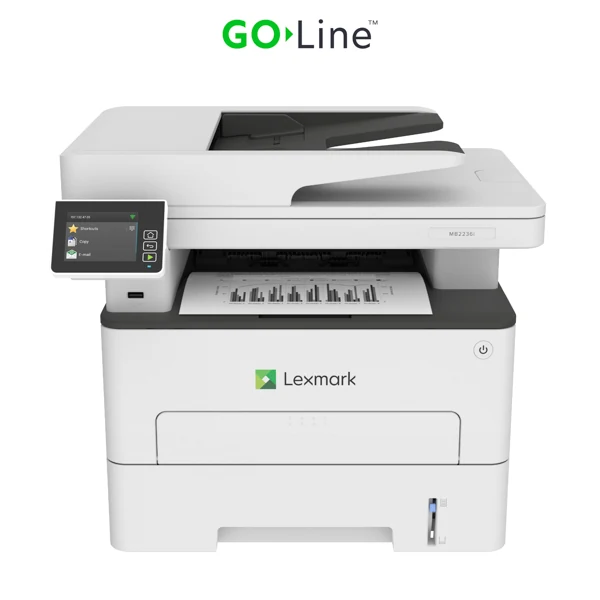
The Lexmark MB2236i provides monochrome printing, copying and color scanning with a 2.8-inch touchscreen and built-in Wi-Fi. US part 18M0751 also includes 10/100 Ethernet, USB Type-B and a front USB host port. It fits a modest office wanting ordinary document functions in a 22-pound body, with a recommended monthly range of 250–2,500 printed pages.
Its fax arrangement needs a separate decision. Lexmark explicitly says analog fax through a phone line is unsupported. The advertised cloud option uses etherFAX and requires a subscription. The limited trial is conditional, with a stated maximum of three months or 300 pages, possible other fees, location limits and withdrawal conditions. Do not treat it as permanent included fax service.
Service possibilities are separate from base hardware
The original guide's exact model matrix confirms that MB2236i lacks analog fax while listing etherFAX, fax server and Fax over IP possibilities. It identifies subscription and license-bundle conditions. Those are real possibilities to investigate with the provider or administrator, but they do not establish a ready, subscribed or licensed fax arrangement for an offered printer.
If telephone-line fax is central to the office, compare a positively documented analog-fax model. If service fax is preferred, confirm activation, region, account terms, connection requirements and ongoing charges for the intended setup. The everyday print, scan and copy functions can be considered independently of that service decision.
A simplex feeder and a smaller glass
The 50-sheet feeder scans one side of an original at a time. Automatic two-sided printing does not make it an automatic duplex scanner. Letter, Legal and A4 originals fit the feeder, while the glass supports Letter and A4 and explicitly excludes full-length Legal in the original size table.
Load suitable feeder sheets faceup and adjust the guides. Put books, photos, small items and fragile paper on the glass. For delicate Legal originals or repeated two-sided batches, choose a configuration with the required glass or feeder hardware. Color originals can be captured in color, but printed documents and copies remain monochrome.
The exact source lists computer scan destinations over USB or the network. The guide covers ScanBack profiles, Windows Fax and Scan, and Mac Image Capture. Verify the required software and destination setup on the intended current system rather than assuming that successful printing completes scanner installation.
Shared networking and protected output
AirPrint is confirmed by the exact US Apple support entry, and the scoped guide supplies Mopria instructions. Suitable shared networking and compatible devices are required. For Wi-Fi setup, the guide calls for the Ethernet cable to be disconnected and the active adapter set to Auto.
Wi-Fi Direct computer attachment is separately documented. That peer print route should not borrow unverified computer-scanning or protected-job functions from the normal network arrangement. The front USB host port is also distinct from the Type-B computer connection, with supported flash-file functions subject to their own restrictions.
Compatible computer software provides actual confidential-print routines: Windows Print and Hold or Mac AirPrint PIN Printing with a four-digit PIN and local release. Confirm those controls, firmware and job settings for the intended users. Cloud connectors and service accounts deserve separate compatibility checks.
Paper and supplies without inflated capacity
The main drawer holds 250 sheets, while the manual feeder takes one sheet. Their declared 251-sheet total at 20 pounds or 75 gsm is not a 251-sheet stack. Letter, Legal and A4 fit the main drawer and automatic duplex. Set the physical duplex unit to A4 for A4, or Letter for Letter and Legal; suitable envelopes use the one-sided manual slot individually.
Printing is declared up to 36 one-sided Letter pages per minute, with duplex separately 18 Letter sides per minute. The 30,000-page maximum duty figure is separate from the 2,500-page recommended monthly ceiling. The original starter declares 700 pages; exact replacements include B221000 at 1,200, B221H00 at 3,000 and B221X00 or B220XA0 at 6,000 under ISO/IEC 19752. The separate 12,000-page imaging unit has a different job and coverage basis.
Lexmark marks this model discontinued. Check condition, regional supplies, Return Program terms, usable software and the electrical label, and allow loading and service access around the body.
Key details at a glance
| Color printing | No |
|---|---|
| Scanner | Yes |
| Copying | Yes |
| Flatbed scanner | Yes |
| Automatic document feeder | Yes |
| Automatic two-sided printing | Yes |
| Automatic two-sided scanning | No |
| Single-pass two-sided scanning | No |
| Color scanning | Yes |
| Instructed envelope handling | Yes |
| Apple AirPrint | Yes |
| Mopria printing | Yes |
| Supported PIN-release printing | Yes |
| Recommended monthly minimum | 250 pages |
| Recommended monthly maximum | 2500 pages |
| Maximum monthly duty | 30000 pages |
| Included ordinary-paper capacity | 251 sheets |
| Document-feeder capacity | 50 sheets |
| Declared one-sided mono Letter rate | 36 pages/min |
| Unit-body width | 16.4 in |
| Unit-body depth | 14.2 in |
| Unit-body height | 13.9 in |
| Unit weight | 22 lb |
| Imaging engine | laser |
Use the exact model’s instructions for operating limits, supplied equipment and version differences.
Paper, software and setup details
Print-rate conditions
Manufacturer maximum 36 one-sided Letter pages/minute; automatic print duplex separately 18 Letter sides/minute. Letter simplex scanning separately 25 black/8 color sides/minute; not measured application results.
Paper handling
250-sheet main drawer plus single-sheet manual feed: maker total/max 251 at 20 lb/75 gsm, not a 251-sheet stack. Per-size ordinary Letter/Legal/A4 main load is 250. All three support automatic print duplex; set duplex unit to A4 for A4, Letter for Letter/Legal. Suitable envelopes use manual feed one at a time, one-sided.
Scanning arrangement
Exact US specification: 50-sheet simplex-only feeder. Letter/Legal/A4 feeder and Letter/A4 glass are positively mapped in original 20–21; Legal glass is unsupported. Generic two-sided-original wording in the common guide does not supply an automatic duplex scanner.
Computer and mobile connections
Included USB Type-B, front Type-A, 10/100 Ethernet and 802.11b/g/n Wi-Fi. USB/network computer scanning is explicit. Wi-Fi uses Ethernet disconnected and Active Adapter Auto. Wi-Fi Direct computer printing is documented; peer scan/PIN/named mobile routes remain unestablished.
Supplies and declared yields
US supplied Return Program toner 700 pages. Replacements B221000 1,200; B221H00 3,000; B221X00/B220XA0 6,000 under ISO/IEC 19752. Separate B220Z00 imaging unit 12,000 has its own job/coverage basis. Match regional cartridge and Return Program terms.
Software and support
Scoped guide 72–73 documents Windows Print and Hold and Mac AirPrint PIN Printing with four-digit PIN/local release. Exact US Apple support confirms AirPrint; unqualified scoped guide 69 supplies Mopria steps. Verify current firmware, print/scan software and any cloud-account integration separately.
Electrical edition and setup
Analog fax through a phone line is explicitly unsupported. Optional etherFAX needs a subscription and applicable service availability; FoIP needs a license bundle and fax-server setup is separate. No fully established subscribed/licensed fax arrangement is modeled. The advertised limited trial is conditional, not permanent included service. Check electrical label and current software.
Sources for this assessment
Find a printer for your routine.
Match color output, scanning, connections and paper handling, then compare the exact models.