
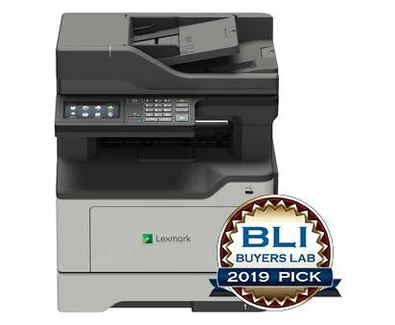
Your needs, this model
Does it fit your priorities?
Can included Wi-Fi combine Legal duplex printing and Legal two-sided feeder scans with fax at 9,000 monthly pages?
Yes with compatible network scan software and a suitable separate fax line. The Legal feeder route and 350-sheet ordinary Legal input are confirmed; the recommended monthly maximum is 10,000.
Explore this need in the finder →Can USB support A4 glass color scans and PIN-held A4 duplex printing?
Yes with compatible scanner and protected-job software. A4 fits the glass, and a four-digit PIN controls local release; printed output remains monochrome.
Explore this need in the finder →Can the glass capture a full-length Legal original without using the feeder?
No. The exact glass area is 8.5 by 11.7 inches; the separately documented 8.5-by-14-inch capacity belongs to the feeder.
Explore this need in the finder →Included Wi-Fi and a useful Legal feeder
The Lexmark MB2442adwe is a monochrome office MFP with color scanning, copying, analog fax and a 4.3-inch touchscreen. US part 36SC720 includes Wi-Fi, gigabit Ethernet and USB computer connectivity. It fits a team that needs automatic two-sided feeder scanning alongside ordinary printing within the maker's recommended 1,000–10,000-page monthly range.
Its deciding scanner distinction is the surface. Legal originals fit the document feeder, while the glass accommodates Letter and A4. A large original that cannot safely go through a feeder therefore needs a different scanner arrangement. The 50-sheet feeder also reverses originals to capture both faces; it is automatic duplex scanning, not single-pass scanning.
Choose the right route for each original
The exact US specification separates an 8.5-by-14-inch feeder area from an 8.5-by-11.7-inch glass area. Use the feeder for suitable loose Letter, Legal or A4 pages. Use the glass for books, photos, small items and fragile documents within its shorter limit. Do not infer Legal glass capacity from Legal printing or from a general family paper table.
For a two-sided bundle, select the appropriate original-side and destination settings before starting. Align pages and adjust feeder guides rather than mixing unsuitable media into a stack. The declared Letter scan rates are up to 45 black or 22 color sides per minute in simplex and 20 black or 10.5 color in duplex. Those mode-specific figures do not describe complete file processing or print throughput.
USB- and network-connected computer scanning are explicitly documented. The guide provides ScanBack, Windows Fax and Scan, and Mac Image Capture routines. Check the current scanner software and destination permissions on the intended computer. Color capture is useful for marked paperwork, but printed copies and other output remain monochrome.
Connect the office and control release
The included radio supports 802.11b/g/n networking. An optional adapter listing on the product page does not remove the separately stated built-in Wi-Fi. Choose a supported Ethernet or wireless network setup and verify the active connection during installation. A normal shared-network workflow is the established mobile arrangement here.
The scoped guide supplies Mopria and AirPrint printing instructions. A compatible phone or tablet needs suitable access to the printer's network; these protocols do not mean that a USB-only computer connection provides mobile printing. The front Type-A port has separate flash-drive functions with documented file and FAT-format restrictions.
Confidential output also has an actual computer routine. Compatible Windows software uses Print and Hold, while Mac software offers PIN Printing. A four-digit PIN controls local release, and expiration or invalid-attempt settings can affect held jobs. Check the complete submission and release process with the intended software.
Analog fax requires suitable telephone connectivity and station information. Wi-Fi or Ethernet alone is not its ordinary transport. Confirm any telephone adapter or service arrangement separately instead of treating network setup as fax activation.
Plan around the supplied 350 sheets
The base printer includes a 250-sheet drawer and 100-sheet multipurpose feeder, totaling 350 sheets at the stated 20-pound or 75-gsm basis. Letter, Legal and A4 fit the ordinary inputs and automatic print duplex. Match guides, size and media settings to each load. Suitable envelopes use a separate one-sided multipurpose-feeder routine.
The 900-sheet maximum requires an optional drawer. Check installed hardware on an offered unit rather than assuming the maximum is supplied. Lexmark declares up to 42 one-sided Letter pages per minute and separately 21 Letter sides per minute in print duplex. Its 100,000-page maximum duty rating is not the recommended monthly workload.
Supplies and the offered unit
The original US starter toner declares 2,500 pages. Listed B231000 replacements declare 3,000, while B241H00 or B240HA0 declare 6,000 under ISO/IEC 19752. The separate 60,000-page imaging unit has a different job and coverage basis. Match the exact supply region and Return Program conditions.
Lexmark marks this model discontinued. Inspect condition, current software compatibility and the electrical label, and allow operating clearance around its 42.8-pound body. If full-length Legal glass capture or faster single-pass batch scanning is essential, choose a model that explicitly supplies that scanner route.
Key details at a glance
| Color printing | No |
|---|---|
| Scanner | Yes |
| Copying | Yes |
| Fax | Yes |
| Flatbed scanner | Yes |
| Automatic document feeder | Yes |
| Automatic two-sided printing | Yes |
| Automatic two-sided scanning | Yes |
| Single-pass two-sided scanning | No |
| Color scanning | Yes |
| Instructed envelope handling | Yes |
| Apple AirPrint | Yes |
| Mopria printing | Yes |
| Supported PIN-release printing | Yes |
| Recommended monthly minimum | 1000 pages |
| Recommended monthly maximum | 10000 pages |
| Maximum monthly duty | 100000 pages |
| Included ordinary-paper capacity | 350 sheets |
| Document-feeder capacity | 50 sheets |
| Declared one-sided mono Letter rate | 42 pages/min |
| Unit-body width | 15.7 in |
| Unit-body depth | 16.9 in |
| Unit-body height | 18.4 in |
| Unit weight | 42.8 lb |
| Imaging engine | laser |
Use the exact model’s instructions for operating limits, supplied equipment and version differences.
Paper, software and setup details
Print-rate conditions
Maker maximum 42 one-sided Letter pages/minute and separately 21 Letter sides/minute in print duplex. Letter scans up to 45 black/22 color sides/minute simplex or 20 black/10.5 color in reversing duplex; these are distinct modes.
Paper handling
Exact US included 250-sheet drawer plus 100-sheet MPF: 350 sheets at 20 lb/75 gsm. Letter/Legal/A4 fit the ordinary inputs and automatic print duplex. Extra drawers are optional; suitable envelopes use MPF simplex. Generic family standard-550 heading does not change this package.
Scanning arrangement
50-sheet reversing duplex ADF supports Letter, Legal and A4. Exact US scanner areas distinguish 8.5 x 14-inch ADF from 8.5 x 11.7-inch glass: Letter/A4 glass, no full-length Legal glass. Color capture does not produce color print output.
Computer and mobile connections
Included USB Type-B, gigabit Ethernet, front USB Type-A and 802.11b/g/n Wi-Fi. Exact Wireless Yes and built-in Wi-Fi statements establish the radio despite an optional N8372 listing. USB/network computer scanning is explicit; no separate peer arrangement is qualified.
Supplies and declared yields
US starter toner 2,500 pages. B231000 replacement 3,000; B241H00/B240HA0 6,000 under ISO/IEC 19752. Separate 56F0Z00/56F0ZA0 imaging unit 60,000 uses a different job/coverage basis. Check region and Return Program terms.
Software and support
Guide 42–43 supplies actual compatible Windows Print and Hold and Mac PIN Printing with four-digit PIN and local release, plus expiration/invalid-attempt settings. Unqualified scoped Mopria and AirPrint instructions require suitable shared networking. Front flash routines have FAT/file restrictions; verify current compatible print/scan software.
Electrical edition and setup
Analog fax needs station information and a suitable separate phone-line/adapter arrangement. Ethernet or Wi-Fi is not the ordinary analog fax transport. Inspect the actual electrical label and allow loading, scanner-cover and service space beyond body dimensions.
Sources for this assessment
Find a printer for your routine.
Match color output, scanning, connections and paper handling, then compare the exact models.