
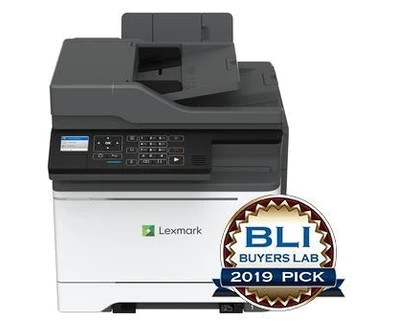
Your needs, this model
Does it fit your priorities?
Can I print color Letter reports on both sides over Ethernet and scan both sides of Letter forms for a 6,000-page monthly routine?
Yes, with earlier models enabled. The exact Ethernet arrangement supports automatic print duplex and reversing duplex scanning; the recommended monthly maximum is 6,500 pages.
Explore this need in the finder →Is the automatic duplex feeder a single-pass scanner?
No. Lexmark explicitly identifies RADF reversing duplex. It can automate both sides but turns each original over.
Explore this need in the finder →Can I require at least 500 included input sheets in the normal Letter configuration?
No. The standard input is 250 sheets plus a one-sheet manual slot. The additional 650-sheet duo tray is optional.
Explore this need in the finder →Automatic document capture with a turning feeder
The Lexmark MC2425adw suits a small workgroup that combines color printing with recurring two-sided paperwork. Its useful features are a 50-sheet reversing duplex feeder, automatic two-sided printing, copying, color scanning and analog fax, plus included Ethernet and Wi-Fi. The deciding scanning tradeoff is the mechanism: the feeder turns an original over to capture the second side rather than reading both sides in one pass.
Lexmark identifies US part 42CC430 as discontinued. This is therefore an earlier-model reference for an installed machine or a specific offer, not a current-stock claim. Check the complete suffix, actual regional unit, supplied inputs, compatible software and seller terms. Closely related color multifunction models have different speed, input-expansion and supply limits.
Separate the print and scan jobs
The manufacturer declares up to 25 one-sided Letter pages per minute in black or color. Automatic duplex printing has a distinct 12.5 Letter sides-per-minute rating under its stated ISO method. These are specifications from Lexmark, not throughput measurements from testing for this article. A long two-sided report should not be planned as though it used the faster simplex figure.
The same care is needed with scanning. For Letter originals, the published simplex rates are up to 50 black or 32 color sides per minute, while reversing duplex is rated at 23 black or 14 color sides per minute. The larger black simplex number is not the rate for a two-sided color archive. Letter and A4 reversing routes are positively documented. The glass maximum is 8.5 by 11.7 inches; Legal print support should not be treated as a Legal flatbed. Use the glass for a delicate single item and the feeder for an appropriate stack.
Choose a connection for the whole office routine
The standard interfaces are USB Type-B for a computer, gigabit Ethernet and 802.11b/g/n Wi-Fi. The front USB Type-A port serves walk-up media instead. Scanning destinations explicitly include either a USB-connected or network-connected computer. For network scanning, the original guide describes ScanBack profiles using the printer's IP address with the computer and printer on the same network.
AirPrint and Mopria are documented network printing routes. They can be useful on an appropriate shared office network, but a direct USB cable does not provide the same mobile arrangement. Analog fax needs its own telephone connection and configuration. The 2.4-inch color LCD and keypad are operator controls rather than a touch-screen promise; compare the actual panel with the tasks staff perform. Historical operating-system and cloud-service names do not guarantee current support on a newly configured computer.
The standard paper supply is smaller than the expansion figure
The included input is a 250-sheet tray plus one-sheet manual feed, stated as 250+1 on the manufacturer's 20-pound or 75-gsm basis. Letter, Legal and A4 are supported in the ordinary tray and print-duplex path. Envelopes require their own instructed one-sided media routine. The manual slot is useful for an occasional alternate sheet, not a second substantial stack.
A 650-sheet duo tray is optional and raises the stated maximum to 900+1. It should not be counted as supplied equipment, nor should the larger expansion limit of MC2535 be borrowed for this model. Lexmark recommends 800–6,500 printed pages monthly. The separate 75,000-page duty ceiling is not a recommendation to sustain that everyday volume. Even within the recommended range, assess whether refilling the included tray is acceptable.
Supplies, space and the useful comparison
The declared supplied toner yields are 1,400 black pages and 750 pages for each color under ISO/IEC 19798. US replacement examples include C241XK0 black at 6,000 pages and C241XC0, C241XM0 and C241XY0 color at 3,500 pages. The higher black yield offered for another family member is not assumed compatible here. Match the geographic region and Return Program conditions without inferring today's cost per page from yield alone.
The body is 17.4 inches wide, 21.9 deep and 18.2 high and weighs 59 pounds, before operating clearance. Leave access for the scanner, paper and service, and confirm the actual unit's electrical label. If the reversing feeder meets the task and the recommended workload fits, this is a coherent shared-office configuration. If fast two-sided capture is essential, compare an explicitly documented single-pass scanner; if manual refilling is the problem, verify the actual included or separately purchased paper arrangement.
Key details at a glance
| Color printing | Yes |
|---|---|
| Scanner | Yes |
| Copying | Yes |
| Fax | Yes |
| Flatbed scanner | Yes |
| Automatic document feeder | Yes |
| Automatic two-sided printing | Yes |
| Automatic two-sided scanning | Yes |
| Single-pass two-sided scanning | No |
| Color scanning | Yes |
| Instructed envelope handling | Yes |
| Apple AirPrint | Yes |
| Mopria printing | Yes |
| Recommended monthly minimum | 800 pages |
| Recommended monthly maximum | 6500 pages |
| Maximum monthly duty | 75000 pages |
| Included ordinary-paper capacity | 251 sheets |
| Document-feeder capacity | 50 sheets |
| Declared one-sided mono Letter rate | 25 pages/min |
| Declared one-sided color Letter rate | 25 pages/min |
| Unit-body width | 17.4 in |
| Unit-body depth | 21.9 in |
| Unit-body height | 18.2 in |
| Unit weight | 59 lb |
| Imaging engine | laser |
Use the exact model’s instructions for operating limits, supplied equipment and version differences.
Paper, software and setup details
Print-rate conditions
Maker maximum 25 one-sided Letter pages/minute in black or color; duplex printing separately 12.5 Letter sides/minute. Reversing duplex scans are 23 black/14 color Letter sides/minute; 50 black/32 color is simplex scanning.
Paper handling
Included 250-sheet input plus one-sheet manual feed at 20 lb/75 gsm. Per-size stack capacity counts 250 sheets. Letter, Legal and A4 support automatic print duplex. The optional 650-sheet duo tray raises the maker maximum to 900+1; it is not included.
Scanning arrangement
50-sheet RADF explicitly reverses originals for automatic duplex scanning, not single-pass. Letter/A4 routes are positively specified; glass maximum 8.5 × 11.7 inches. Legal ADF size is not established by the read scanning sections and is left unassigned.
Computer and mobile connections
Included USB Type-B, gigabit Ethernet and 802.11b/g/n Wi-Fi. USB or network computer scanning is explicitly supported. AirPrint/Mopria belong to the shared network; analog fax requires its own telephone setup.
Supplies and declared yields
Supplied toner: 1,400 black/750 each CMY declared ISO/IEC 19798 pages. US C241XK0 black replacement is rated 6,000 pages, and C241XC0/C241XM0/C241XY0 color replacements 3,500. Geographic and Return Program conditions apply; no 8,000-page MC2535 black option is borrowed.
Software and support
Use a compatible current print/scanning driver or utility. The old OS and cloud-service lists are not a guarantee of present software/service availability.
Electrical edition and setup
Exact US part 42CC430 is established, but nominal input voltage is not directly given in the read sources. Check the actual unit electrical label, regional fuser and correct cord before connecting an imported machine.
Sources for this assessment
Find a printer for your routine.
Match color output, scanning, connections and paper handling, then compare the exact models.