
Your needs, this model
Does it fit your priorities?
Can I print color Letter documents on both sides over Wi-Fi and scan an A4 original on the flatbed?
Yes, with earlier models enabled. This uses its included Wi-Fi, automatic Letter print duplex and documented A4 glass route; copying and color scanning are included.
Explore this need in the finder →Can I feed a stack of originals automatically?
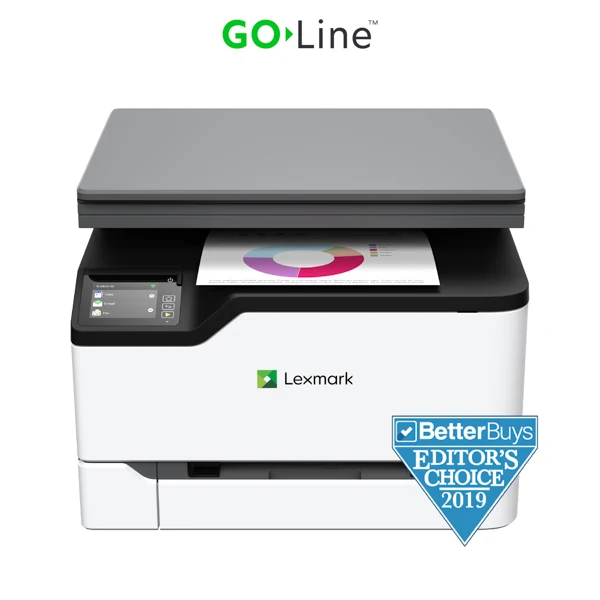
No. The exact MC3224dwe hardware configuration has a flatbed and no ADF. The feeder shown for other family models is not included.
Explore this need in the finder →Can I require a complete Legal original to fit on its scanner glass?
No. The original route table marks Legal unsupported on the glass. The product page’s broader scan-area number does not override that route-specific limit.
Explore this need in the finder →A flatbed for occasional originals
The Lexmark MC3224dwe fits a small office that needs color printing and occasionally scans or copies an individual original. It combines automatic two-sided printing with a flatbed scanner and built-in network connections. The deciding tradeoff is how originals are handled: the exact configuration has no automatic document feeder, so a stack of invoices requires placing pages on the glass individually.
Lexmark identifies US part 40N9040 as discontinued. This assessment therefore helps with an existing machine or a specific earlier-model offer rather than establishing present availability. Confirm the exact dwe suffix. The MC3224adwe is a different configuration with feeder and analog-fax hardware, and a related model's photograph or feature list should not fill those gaps.
Printing duplex does not automate the scanner
The manufacturer declares up to 24 one-sided Letter pages per minute in black or color under its ISO method. Automatic duplex printing has a separate 13 Letter sides-per-minute figure. These are source specifications, not measured results from this article. They describe printing; neither number implies that a two-sided original is captured automatically.
The original user guide's paper table supports Letter and A4 on the scanner glass and explicitly excludes Legal there. The product page also contains a broad 8.5-by-14-inch scan-area value, but that does not resolve a route-specific restriction in the operating table. For a full Legal original, choose a documented Legal-capable capture route on another model. For a fragile page or a small original that should not be fed, manual glass placement can be the useful part of this arrangement.
Connect around printing and flatbed scanning
The included connections are USB Type-B, 10/100 Ethernet and 802.11b/g/n Wi-Fi. The exact scanning destinations include a USB-connected or network-connected computer. The separate “Direct USB” label on the product page should not be read as absence of its specified computer USB port. Select a compatible scanning utility or operating-system workflow and verify that path on the actual computer.
For shared-network use, the guide describes ScanBack profiles using the printer's IP address with both devices on the same network. AirPrint and Mopria Print Service are network printing routes, while a USB-only computer arrangement does not provide that mobile network. Historical cloud references and app names do not guarantee that a particular external service remains available or that every listed function works through every connection.
Fax services need their own conditions
The exact model's analog-fax column is marked unsupported in the original guide. That matters because a generic marketing paragraph also mentions fax. The same guide positively lists other possibilities: etherFAX needs a subscription, registration and updated firmware; Fax over IP needs an installed license bundle; fax-server mode needs an appropriate email-receiving service. Server mode sends outgoing faxes, with reception depending on another configured transport.
Those are meaningful options for an organization that already has the required service and setup. They are not an included analog modem or an established ready-to-use fax arrangement for every buyer. This assessment keeps the ordinary print, scan and copy plans separate from an unverified service configuration. Establish the exact activation, licensing, network and reception requirements before making fax an essential reason to choose this machine.
Paper, consumables and the practical alternative
The included input is a 250-sheet tray plus one-sheet manual feed, stated as 250+1 on the maker's 20-pound or 75-gsm basis. Letter, Legal and A4 are supported for printing and automatic duplex. Envelopes use their own one-sided routine. The recommended monthly range is 250–1,500 pages; the separate 30,000-page duty ceiling does not make a larger everyday workload a recommended fit.
Declared supplied toner yields are 750 black pages and 500 pages for each color under ISO/IEC 19798. US C3210K0, C3210C0, C3210M0 and C3210Y0 replacements are rated at 1,500 pages, with geographic and Return Program conditions. The body is 16.2 inches wide, 15.5 deep and 12.1 high, at 40.2 pounds, before operating clearance. Verify the regional electrical label. Compare a feeder-equipped multifunction model when stacks of originals dominate the work; retain this simpler flatbed arrangement when capture is occasional.
Key details at a glance
| Color printing | Yes |
|---|---|
| Scanner | Yes |
| Copying | Yes |
| Flatbed scanner | Yes |
| Automatic document feeder | No |
| Automatic two-sided printing | Yes |
| Automatic two-sided scanning | No |
| Single-pass two-sided scanning | No |
| Color scanning | Yes |
| Instructed envelope handling | Yes |
| Apple AirPrint | Yes |
| Mopria printing | Yes |
| Recommended monthly minimum | 250 pages |
| Recommended monthly maximum | 1500 pages |
| Maximum monthly duty | 30000 pages |
| Included ordinary-paper capacity | 251 sheets |
| Declared one-sided mono Letter rate | 24 pages/min |
| Declared one-sided color Letter rate | 24 pages/min |
| Unit-body width | 16.2 in |
| Unit-body depth | 15.5 in |
| Unit-body height | 12.1 in |
| Unit weight | 40.2 lb |
| Imaging engine | laser |
Use the exact model’s instructions for operating limits, supplied equipment and version differences.
Paper, software and setup details
Print-rate conditions
Maker maximum 24 one-sided Letter pages/minute in black or color; automatic duplex is separately 13 Letter sides/minute under ISO/IEC 24734.
Paper handling
Included 250-sheet tray plus single-sheet manual feed; maker 250+1 headline at 20 lb/75 gsm. Per-size minimum stack capacity is 250 for Letter, Legal and A4, which also support automatic print duplex. Envelopes use a separate simplex routine.
Scanning arrangement
Exact MC3224dwe is flatbed-only. Original route table permits Letter/A4 glass and marks Legal glass unsupported, despite the broad 8.5 × 14 scan-area field on the product page. No feeder or automatic two-sided scanning is included.
Computer and mobile connections
Included USB Type-B computer printing/scanning, 10/100 Ethernet and 802.11b/g/n Wi-Fi. Product Direct USB: No does not negate its separately specified computer USB port. AirPrint/Mopria printing belong to the shared-network arrangement.
Supplies and declared yields
Supplied 750 black/500 each CMY pages under ISO/IEC 19798. US C3210K0/C3210C0/C3210M0/C3210Y0 replacements are each rated 1,500 pages; regional compatibility and Return Program conditions apply.
Software and support
No supported base analog fax: the original fax table marks MC3224dwe analog X. Positive alternatives remain documented: etherFAX requires subscription, registration and current firmware; FoIP requires an installed license; fax-server mode needs an appropriate email-receiving service and is outgoing-only unless another transport supplies reception. No such service setup is assumed in these base plans.
Electrical edition and setup
US part 40N9040 reviewed with the applicable 110–127 V/60 Hz regional edition. Family guide explicitly says regional versions are not dual-voltage; verify the actual unit label.
Sources for this assessment
Find a printer for your routine.
Match color output, scanning, connections and paper handling, then compare the exact models.