
Your needs, this model
Does it fit your priorities?
Can I print color Letter documents on both sides over Wi-Fi and scan single-sided Legal originals for a 2,000-page monthly routine?
Yes, with earlier models enabled. The included Wi-Fi arrangement supports color printing, automatic Letter duplex, computer scanning through the Legal-capable simplex feeder and 250 sheets in the main tray.
Explore this need in the finder →Can it automatically capture both sides of every original in one pass?
No. The exact MC3326adwe brochure identifies a simplex ADF. Its automatic print duplex unit does not give the scanner a second scanning side.
Explore this need in the finder →Can I scan a Legal original on the flatbed instead of feeding it?
No. The original paper table marks Legal as supported by the ADF and unsupported on the glass; both conditions remain distinct.
Explore this need in the finder →Where the compact package makes sense
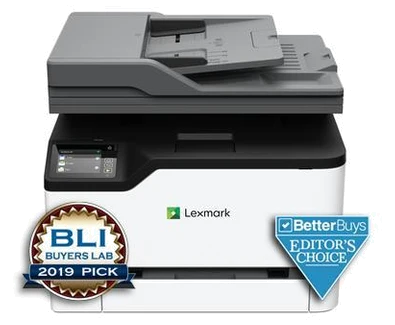
The Lexmark MC3326adwe suits a small office that needs color documents, a shared printer and a feeder for ordinary single-sided paperwork. Its useful combination is built-in Wi-Fi, Ethernet, automatic two-sided printing and scanning, copying and analog fax in one body. The deciding limitation is the scanner: the 50-sheet automatic document feeder scans one side of an original. A duplex print setting will not turn that feeder into an automatic two-sided scanner.
Lexmark identifies US part 40N9060 as discontinued. This assessment is therefore most useful when maintaining an existing machine or checking a specific earlier-model offer. It does not establish current stock. Check the exact regional unit, compatible software, consumables and seller terms before treating an old listing as a complete working package.
Printing and scanning are separate routines
The maker declares up to 26 one-sided Letter pages per minute in either black or color. The separate automatic-duplex figure is 13 Letter sides per minute. Neither is a speed measured for this article. For a report with color charts, select the intended paper size and two-sided printing in a compatible driver; allow for document complexity and the time needed to prepare a job.
The feeder is useful for a stack of invoices or signed forms. It accepts Letter, A4 and Legal originals, while the glass supports Letter and A4 rather than a full Legal page. Use the glass for an individual item that should not pass through the feeder. A two-sided original needs manual intervention; if regularly capturing both sides unattended is the core task, choose a model with an explicitly documented duplex scanner. Single-pass scanning is a further requirement beyond ordinary automatic duplex scanning.
Choose a connection around the whole job
The included computer connections are USB Type-B, gigabit Ethernet and infrastructure Wi-Fi. The front USB Type-A port serves a different walk-up media role. A USB cable connection can support computer printing and scanning with suitable software, but it does not itself provide the network on which AirPrint and Mopria depend. Those mobile protocols belong to the shared-network arrangement.
For a shared scan routine, Lexmark's guide describes installing ScanBack Utility, adding the printer's IP address and running a scan profile with the computer and printer on the same network. Its current product page describes Apple support through AirPrint and AirScan. Verify the actual software path on your operating system before purchase. The brochure's historical Cloud Connector discussion is insufficient to promise continuing access to a particular cloud service. Analog fax also requires its own appropriate telephone connection and setup.
Paper capacity is modest and fixed
The exact model specification lists a 250-sheet tray and a single-sheet manual feeder. Lexmark combines these as 250+1; that extra slot is not another stack-loading tray. Its own maximum is also 250+1, so optional trays shown elsewhere in the shared family guide should not be counted as part of this model. The tray and automatic duplex path support Letter, Legal and A4 ordinary pages. Feed envelopes as instructed in simplex, with the correct media setting.
Use Lexmark's 600–2,500-page recommended monthly range when sizing the routine. The 50,000-page maximum duty cycle describes a different ceiling; it is not a recommendation to print 50,000 pages each month. Similarly, a 250-sheet tray will require attention long before a large monthly total is reached. Capacity and monthly guidance answer different practical questions.
Supplies, placement and the alternative
The declared supplied toner yields are 750 black pages and 500 pages for each color, under ISO/IEC 19798. High-yield replacement cartridges are a separate purchase category: C331HK0 is rated for 3,000 black pages, while C331HC0, C331HM0 and C331HY0 are rated for 2,500 color pages. These declarations do not establish your cost per page. Match the geographic cartridge region and read the conditions attached to Return Program supplies.
The body measures 16.2 inches wide, 15.5 deep and 13.6 high and weighs 42.7 pounds. Allow additional room to load paper, open the scanner and service the printer. The family guide lists regional power versions and explicitly warns that they are not dual-voltage, so confirm the unit's label. If your office rarely scans, compare a print-only color unit; if you process double-sided originals every day, prioritize a documented duplex feeder over this model's compact multifunction convenience.
Key details at a glance
| Color printing | Yes |
|---|---|
| Scanner | Yes |
| Copying | Yes |
| Fax | Yes |
| Flatbed scanner | Yes |
| Automatic document feeder | Yes |
| Automatic two-sided printing | Yes |
| Automatic two-sided scanning | No |
| Single-pass two-sided scanning | No |
| Color scanning | Yes |
| Instructed envelope handling | Yes |
| Apple AirPrint | Yes |
| Mopria printing | Yes |
| Recommended monthly minimum | 600 pages |
| Recommended monthly maximum | 2500 pages |
| Maximum monthly duty | 50000 pages |
| Included ordinary-paper capacity | 251 sheets |
| Document-feeder capacity | 50 sheets |
| Declared one-sided mono Letter rate | 26 pages/min |
| Declared one-sided color Letter rate | 26 pages/min |
| Unit-body width | 16.2 in |
| Unit-body depth | 15.5 in |
| Unit-body height | 13.6 in |
| Unit weight | 42.7 lb |
| Imaging engine | laser |
Use the exact model’s instructions for operating limits, supplied equipment and version differences.
Paper, software and setup details
Print-rate conditions
Maker maximum 26 one-sided Letter pages/minute in black or color under ISO/IEC 24734; separate duplex figure 13 Letter sides/minute. ADF simplex scanning is 21 Letter sides/minute, not print speed.
Paper handling
Included 250-sheet tray plus one-sheet manual feeder, rated at 20 lb/75 gsm. Per-size capacity conservatively counts the 250-sheet tray, not an extra continuously loaded stack in the manual slot. Letter, Legal and A4 automatic duplex; envelopes are simplex.
Scanning arrangement
50-sheet simplex ADF accepts Letter, Legal and A4; glass accepts Letter/A4 but not Legal. Two-sided originals need manual handling.
Computer and mobile connections
USB Type-B computer interface, gigabit Ethernet and 802.11b/g/n Wi-Fi are included. Front Type-A USB is for walk-up media. Network mobile protocols are kept separate from USB computer printing/scanning.
Supplies and declared yields
Supplied toner: 750 black/500 each CMY ISO/IEC 19798 declared pages. Replacement C331HK0 black 3,000 and C331HC0/C331HM0/C331HY0 color 2,500; cartridges must match the geographic region. Return Program terms differ from regular cartridges.
Software and support
Use a compatible current Lexmark scanning utility/driver. The maker page describes Apple support through AirPrint/AirScan and Android through Mopria Print Service/Mopria Scan; cloud features are not an unconditional present-service promise.
Electrical edition and setup
Reviewed US part 40N9060 with the applicable 110–127 V/60 Hz regional edition. The family guide also lists other regional voltages and explicitly says not dual-voltage; confirm the unit label before connecting an imported or used unit.
Sources for this assessment
Find a printer for your routine.
Match color output, scanning, connections and paper handling, then compare the exact models.