
Your needs, this model
Does it fit your priorities?
Can a USB computer print Legal pages automatically on both sides at 2,000 monthly pages with 300 included sheets?
Yes with earlier references enabled and compatible software. Both included ordinary-paper sources and automatic duplex support Legal; the recommendation reaches 2,500 monthly pages.
Explore this need in the finder →Can I connect it directly by standard included Ethernet?
No. The exact d specification says Ethernet Network No and lists external network adapters as optional.
Explore this need in the finder →Does its 50,000-page duty figure qualify an ordinary 3,000-page monthly requirement?
No. Recommended monthly volume tops out at 2,500; duty is a separate maximum robustness measure.
Explore this need in the finder →A straightforward USB printer with automatic duplex
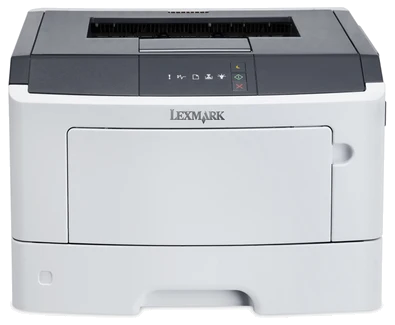
The Lexmark MS310d suits a monochrome printing routine centered on one computer. Exact US part 35S0050 includes automatic two-sided printing, a 250-sheet drawer and a 50-sheet multipurpose feeder. The important limit is its connection package: USB Type-B and a bidirectional parallel interface are standard, while Ethernet is explicitly absent from the included configuration.
That makes the suffix meaningful. An MS310dn has its own network interface; an MS310d does not acquire one because both use a series manual. External print servers appear as options. If direct shared-network printing is essential, choosing a properly documented network model is simpler than planning around an unspecified adapter and its software restrictions.
Understand the workload and the two speed modes
Lexmark declares maximum output of 35 one-sided Letter pages per minute. Automatic duplex has a separate 16 Letter sides-per-minute rating. A document printed on both sides should therefore not be planned as if the simplex figure applied unchanged. These are manufacturer figures rather than measurements of a particular application, file or used printer.
The recommended monthly range is 500–2,500 pages. The separate maximum duty cycle is 50,000 pages and does not extend the ordinary recommendation. A regular 3,000-page monthly queue is already beyond the stated recommended range, even though it is far below maximum duty. Use the recommendation when deciding whether this smaller desktop arrangement matches repeated work.
The included input is split between two sources
The 300-sheet headline combines the 250-sheet drawer and 50-sheet multipurpose feeder on the stated 20-pound or 75-gsm basis. The original paper table supports Letter, Legal and A4 in both sources and in automatic duplex. A suitable 300-sheet ordinary-paper load can use both sources; it is not a single enclosed 300-sheet drawer.
Set the guides and paper settings to the actual size and type. Legal loading extends the length guide beyond the base, so the body's quoted depth is not the full operating footprint for longer paper. When linking sources, matching size and type matter. Otherwise the printer should treat the loads as different media rather than substituting an unwanted sheet.
Suitable envelopes belong in the multipurpose feeder in a separate one-sided routine. Their support does not make them duplex media or main-drawer stock. The manual gives specific loading directions and excludes unsuitable constructions such as windows or clasps. A separately purchased 250- or 550-sheet tray can expand input, with 850 sheets maximum using the larger option; that is not the included package.
Controls and software favor a local setup
The MS310 panel uses indicator lights and buttons, rather than the text display found on some nearby models. Computer-based settings are consequently part of the normal routine. Check that the intended operating system has an appropriate driver and settings utility before relying on an older printer, especially when changing paper defaults or diagnosing a light sequence.
The specification's Direct USB No entry refers to a separate direct-print facility; it does not cancel the positively listed USB Type-B computer connection. Conversely, a mobile-printing chapter in the common documentation does not add an included network radio or Ethernet port. A complete confidential PIN-release routine is not established for this exact configuration, so protected output should be verified separately if it is essential.
Match supplies and inspect the actual unit
The original US package declares 1,500 pages of Return Program toner. Compatible listed replacements include 50F1000 at 1,500 pages and 50F1H00 or 50F0HA0 at 5,000 pages under ISO/IEC 19752. The 60,000-page imaging unit is a separate component with its own job and coverage conditions. Neither declared yield establishes a live cost per page.
Lexmark marks this model discontinued. For an offered unit, verify the actual regional cartridge, accessories, electrical label and condition. The body measures 15.7 inches wide, 15.0 deep and 10.3 high at 30.9 pounds, before working access or extended guides. Choose a scanner-equipped device if paper capture is part of the job; the MS310d remains print-only.
Key details at a glance
| Color printing | No |
|---|---|
| Scanner | No |
| Copying | No |
| Fax | No |
| Flatbed scanner | No |
| Automatic document feeder | No |
| Automatic two-sided printing | Yes |
| Automatic two-sided scanning | No |
| Single-pass two-sided scanning | No |
| Color scanning | No |
| Instructed envelope handling | Yes |
| Recommended monthly minimum | 500 pages |
| Recommended monthly maximum | 2500 pages |
| Maximum monthly duty | 50000 pages |
| Included ordinary-paper capacity | 300 sheets |
| Declared one-sided mono Letter rate | 35 pages/min |
| Unit-body width | 15.7 in |
| Unit-body depth | 15 in |
| Unit-body height | 10.3 in |
| Unit weight | 30.9 lb |
| Imaging engine | laser |
Use the exact model’s instructions for operating limits, supplied equipment and version differences.
Paper, software and setup details
Print-rate conditions
Manufacturer maximum 35 one-sided Letter pages/minute; automatic duplex separately 16 Letter sides/minute. Neither is a measured article result.
Paper handling
Included 250-sheet main tray and 50-sheet multipurpose feeder total 300 at 20 lb/75 gsm. Letter, Legal and A4 fit both inputs and automatic duplex. Set matching size/type and guides; Legal loading extends the main tray beyond the body. Suitable envelopes use a separate one-sided multipurpose routine. One optional 250- or 550-sheet tray is not included; maximum with 550 is 850.
Scanning arrangement
Print-only monochrome laser hardware, without document scanning, copying, fax or an ADF. A color display or mobile software does not add those functions.
Computer and mobile connections
Included USB Type-B computer and bidirectional parallel interfaces. Exact Ethernet Network No; external Ethernet print servers are options. No included Wi-Fi or positive native mobile protocol route is established.
Supplies and declared yields
US supplied Return Program toner: 1,500 pages. Exact replacement 50F1000 1,500 or 50F1H00/50F0HA0 5,000 under ISO/IEC 19752. Separate 50F0Z00/50F0ZA0 imaging unit 60,000 uses its own job/coverage basis. Regional cartridge and Return Program conditions apply.
Software and support
Light/button control panel and computer-based Local Printer Settings Utility. Confirm the selected current driver and operating system. Complete confidential PIN release is not established; a shared-series mobile chapter cannot add network hardware.
Electrical edition and setup
Exact US configuration is separately established. Nominal mains input remains unestablished in the read sources; inspect the actual rating label and correct cord. Body dimensions exclude extended Legal guides, loading and service clearance.
Sources for this assessment
Find a printer for your routine.
Match color output, scanning, connections and paper handling, then compare the exact models.