
Your needs, this model
Does it fit your priorities?
Can I print monochrome Legal pages automatically on both sides over Ethernet, with 650 included sheets and PIN release?
Yes, with earlier models enabled. The included main tray and multipurpose feeder support Legal, the duplex path accepts it, and the driver-based confidential-print routine releases a job with its PIN.
Explore this need in the finder →Does its color touch screen mean that it can scan and copy color originals?
No. This exact package is a monochrome print-only printer. The external scanner shown as an option is not included scanner hardware.
Explore this need in the finder →Can I require built-in Wi-Fi for the standard package?
No. The reviewed package includes Ethernet and USB; the listed MarkNet wireless adapter is optional.
Explore this need in the finder →A touch screen for a print-only office queue
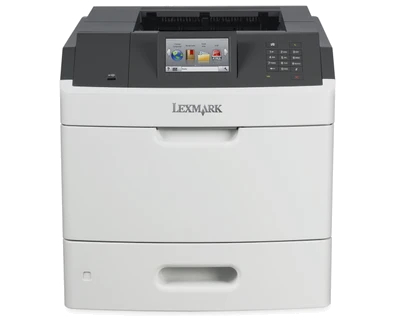
The Lexmark MS810de is useful when a workgroup needs substantial black-and-white printing and a convenient place to release or manage jobs. Its 4.3-inch color touch screen distinguishes it from the smaller-button-control MS810 variants. That screen does not change the output scope: this is a monochrome laser printer without an included scanner, copier or fax. A document-capture requirement points to a different package.
The US manufacturer page identifies part 40G0150 and marks it discontinued. Treat it as an earlier-model reference when supporting an installed printer or evaluating a specific offer. Check the complete configuration, regional electrical label, current driver path and consumables. The manufacturer's old accessories catalog is not evidence that every optional component is still available.
Print speed, duplex and monthly volume
The stated maximum is 55 one-sided Letter pages per minute under the maker's ISO conditions. Automatic two-sided printing has its own 33 Letter sides-per-minute rating. A long report therefore needs planning around the duplex figure rather than assuming the simplex headline describes both jobs. These figures come from Lexmark's specifications; this article does not claim measured throughput or print quality.
The current exact US page recommends 3,000–50,000 pages monthly. An earlier MS810 series brochure gives a lower 20,000-page recommended maximum, so establish which guidance your support arrangement uses if operating near the upper end. The current exact-model page supplies the recommendation used here. The separate 250,000-page maximum duty cycle is not a recommended everyday workload. Paper refill intervals, consumables and the condition of an older printer remain practical constraints even within the stated range.
Two included inputs, with optional expansion kept separate
The standard package has a 550-sheet tray and a 100-sheet multipurpose feeder, totaling 650 sheets on the specified 20-pound or 75-gsm basis. The original paper table supports Letter, Legal and A4 in these inputs and in the automatic duplex path. That permits a normal two-sided Legal job without treating mere Legal simplex support as proof of duplex compatibility.
For envelopes, use the documented feed and media settings and keep the job one-sided. A high-capacity tray, mailbox, stapler and hole-punch finisher are separately listed equipment. The brochure also depicts an external multifunction scanner option. None belongs in the base printer's included capacity or function list. If a seller offers a tall stack of drawers, compare the actual supplied configuration and its operating space with the base specification.
Ethernet and driver-held confidential jobs
USB Type-B connects a computer, while gigabit Ethernet places the printer on the office network. Front and rear Type-A USB ports serve other device roles; they are not additional computer host connections. The optional MarkNet N8350 adapter is the wireless route shown in the specifications. The standard package should not be chosen when built-in Wi-Fi is essential.
The model-specific guide describes AirPrint and Mopria printing on a shared network. A mobile device needs a working route to the printer; an Ethernet-attached printer can be reachable through a suitable office network without possessing its own Wi-Fi radio. USB-only operation does not borrow this mobile arrangement. For confidential desktop jobs, use Print and Hold in a compatible driver, assign a four-digit PIN and release the held job at the control panel. Jobs may be removed if printer memory is needed, so this is not a permanent document archive or an assertion that an optional hard disk is included.
Consumables, placement and a sensible comparison
Lexmark lists a supplied 10,000-page starter toner cartridge under ISO/IEC 19752. US replacement examples include 52D1000 at 6,000 declared pages and 52D1H00 at 25,000; the imaging unit is a separate item with a different yield basis. Match the cartridge region and read Return Program conditions. These declarations alone do not establish current running costs.
The unit body is 16.7 inches wide, 20.1 deep and 16.5 high and weighs 52.3 pounds. Provide extra access for paper, cables, service and any fitted options. If a touch screen and its workflow interface offer little benefit, compare the simpler MS810dn. If copying or scanning is part of the daily routine, choose an actual multifunction printer instead of relying on this model's optional-accessory illustrations.
Key details at a glance
| Color printing | No |
|---|---|
| Scanner | No |
| Copying | No |
| Fax | No |
| Flatbed scanner | No |
| Automatic document feeder | No |
| Automatic two-sided printing | Yes |
| Automatic two-sided scanning | No |
| Single-pass two-sided scanning | No |
| Color scanning | No |
| Instructed envelope handling | Yes |
| Apple AirPrint | Yes |
| Mopria printing | Yes |
| Supported PIN-release printing | Yes |
| Recommended monthly minimum | 3000 pages |
| Recommended monthly maximum | 50000 pages |
| Maximum monthly duty | 250000 pages |
| Included ordinary-paper capacity | 650 sheets |
| Declared one-sided mono Letter rate | 55 pages/min |
| Unit-body width | 16.7 in |
| Unit-body depth | 20.1 in |
| Unit-body height | 16.5 in |
| Unit weight | 52.3 lb |
| Imaging engine | laser |
Use the exact model’s instructions for operating limits, supplied equipment and version differences.
Paper, software and setup details
Print-rate conditions
Maker maximum 55 one-sided Letter pages/minute; automatic duplex is separately rated 33 Letter sides/minute. ISO/IEC 24734 conditions apply.
Paper handling
Included 550-sheet tray plus 100-sheet multipurpose feeder: 650 sheets at 20 lb/75 gsm. Letter, Legal and A4 supported in both included inputs and automatic duplex. Optional extra trays/finishers and scanner are excluded.
Computer and mobile connections
USB Type-B computer printing and gigabit Ethernet are included. Front USB Type-A is for flash media. MarkNet N8350 Wi-Fi, parallel and serial connections are optional; they are not part of the reviewed standard arrangement.
Supplies and declared yields
US supplied starter toner: 10,000 declared one-sided ISO/IEC 19752 pages. Replacement 52D1000 is rated 6,000 pages and 52D1H00 25,000; regular 52D0HA0 is a separate option. Imaging-unit yield is separate from toner and depends on the stated job/coverage conditions. Geographic cartridge restrictions and Return Program conditions apply.
Software and support
Use a compatible current print driver. PIN-held jobs use the driver Print and Hold function and printer control panel; jobs may be deleted if memory is needed. An optional hard disk is not counted as included. Historical cloud-service listings are not current availability promises.
Electrical edition and setup
US SKU and low-voltage regional arrangement only. Original MS810 technical reference gives nominal 100–127 V at 47–63 Hz for low-voltage models and separately lists high-voltage editions. Verify the actual unit label; do not use a voltage converter.
Sources for this assessment
Find a printer for your routine.
Match color output, scanning, connections and paper handling, then compare the exact models.