
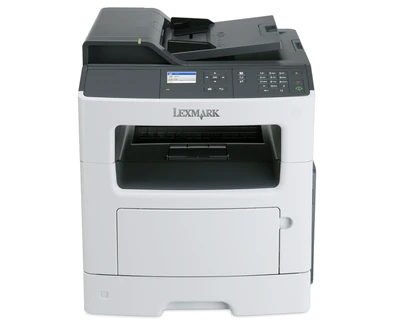
Your needs, this model
Does it fit your priorities?
Can Ethernet combine Legal feeder scanning, copying, fax and Legal print duplex for 5,000 monthly pages?
Yes for one-sided originals, compatible network scanning and a separately connected suitable phone line. The included ordinary-paper input is 300 sheets.
Explore this need in the finder →Will the feeder automatically capture both faces of my contracts?
No. The exact product and original guide explicitly describe a simplex feeder; automatic print duplex is a different function.
Explore this need in the finder →Can I scan a delicate Legal original on the glass without feeding it?
No for the documented full-size route. The original table supports Legal in the ADF but marks it unsupported on the glass.
Explore this need in the finder →A wired office MFP for one-sided originals
The Lexmark MX310dn makes sense when a small office needs black-and-white printing, copying, color scanning and conventional fax in one wired machine. US part 35S5700 includes automatic print duplex and 300 sheets of combined paper input. Its recommended monthly range is 250–6,000 pages, giving a more useful workload guide than the much larger 50,000-page maximum duty figure.
The deciding limitation is its 50-sheet document feeder: it scans only one side of each original. A printer that automatically prints both faces does not necessarily capture both faces. This distinction matters more than the 2.4-inch color LCD when the daily job is a stack of signed two-sided contracts. The display also does not change the monochrome print engine into a color printer.
Legal through the feeder, smaller pages on the glass
The original paper table supports Letter, Legal and A4 originals through the feeder. Load suitable sheets faceup, short edge first, and adjust the guides. Fragile paper, photographs, small items and book pages belong on the glass rather than in the feeder. The glass supports Letter and A4; its Legal row is explicitly unsupported.
For a one-sided Legal document, that feeder route can be useful. For a delicate full-length Legal original that must remain flat, choose a printer with a documented Legal glass. For repeated two-sided batches, compare an automatic duplex scanner and check whether it reverses the sheet or reads both faces in a single pass.
Computer scanning is explicitly listed over USB or the network. The guide describes a network Scan Profile workflow: choose settings and a computer destination, submit a profile, then initiate it at the printer. Confirm that the required software and browser workflow remain usable on the intended system before relying on this earlier model.
Ordinary computer ports and a separate fax line
The included computer connections are USB Type-B and 10/100 Ethernet. Compatibility with a 1000Base-T network does not make that Ethernet interface gigabit. Wireless uses an optional MarkNet N8352 adapter, so the standard package should be planned around a cable.
The exact US specification lists AirPrint. Suitable shared networking can connect an Apple device to the wired printer, subject to discovery and device compatibility; that does not establish a built-in wireless radio. Generic mobile software listings do not establish every other protocol. The separate Direct USB No entry concerns walk-up storage, not the included Type-B computer port.
The analog fax function needs its station details and an appropriate phone-line connection. Ethernet does not carry the ordinary analog fax path. Match any DSL filter or telephone adapter to the actual installation and confirm service compatibility rather than assuming every voice service supports fax.
Paper, protected jobs and realistic throughput
The exact package contains a 250-sheet drawer and 50-sheet multipurpose feeder, totaling 300 sheets on the declared 20-pound or 75-gsm basis. Letter, Legal and A4 fit those sources and automatic duplex. The 850-sheet maximum requires an optional drawer. Set the guides, paper size and type correctly; suitable envelopes use a separate one-sided multipurpose-feeder routine.
Lexmark declares up to 35 one-sided Letter pages per minute and separately 16 Letter sides per minute in duplex. These modes are not measured results for mixed office files. Confidential computer jobs use compatible Print and Hold software and a four-digit PIN entered at the panel. Memory pressure, expiration settings and invalid attempts can remove held jobs.
Supplies and the offered unit
The original US starter declares 2,500 pages. Listed replacements are 60F1000 at 2,500 and 60F1H00 or 60F0HA0 at 10,000 under ISO/IEC 19752. The separate 60,000-page imaging unit has a different job and coverage basis; it is not another toner allowance. Match regional cartridge and Return Program conditions.
Lexmark marks this model discontinued. Check actual condition, usable drivers and compatible supplies. The 15.7-inch-wide, 18.6-inch-deep, 18.4-inch-high body weighs 44 pounds; leave room for loading and service, and inspect its electrical label. A duplex-scanning or wireless MFP is the sensible alternative when either missing standard capability is central to the routine.
Key details at a glance
| Color printing | No |
|---|---|
| Scanner | Yes |
| Copying | Yes |
| Fax | Yes |
| Flatbed scanner | Yes |
| Automatic document feeder | Yes |
| Automatic two-sided printing | Yes |
| Automatic two-sided scanning | No |
| Single-pass two-sided scanning | No |
| Color scanning | Yes |
| Instructed envelope handling | Yes |
| Apple AirPrint | Yes |
| Supported PIN-release printing | Yes |
| Recommended monthly minimum | 250 pages |
| Recommended monthly maximum | 6000 pages |
| Maximum monthly duty | 50000 pages |
| Included ordinary-paper capacity | 300 sheets |
| Document-feeder capacity | 50 sheets |
| Declared one-sided mono Letter rate | 35 pages/min |
| Unit-body width | 15.7 in |
| Unit-body depth | 18.6 in |
| Unit-body height | 18.4 in |
| Unit weight | 44 lb |
| Imaging engine | laser |
Use the exact model’s instructions for operating limits, supplied equipment and version differences.
Paper, software and setup details
Print-rate conditions
Manufacturer maximum 35 one-sided Letter pages/minute; automatic duplex separately 16 Letter sides/minute. Scan rates are separate from print rates.
Paper handling
Included 250-sheet drawer plus 50-sheet MPF: 300 sheets at 20 lb/75 gsm. Letter, Legal and A4 fit both inputs and ordinary-paper duplex. Maximum 850 needs an optional tray; envelopes use the instructed one-sided MPF routine.
Scanning arrangement
50-sheet simplex-only ADF supports Letter/Legal/A4. Glass supports Letter/A4; Legal does not fit its documented table. Color scanning does not provide color output.
Computer and mobile connections
Included USB Type-B and 10/100 Ethernet, not gigabit. USB or network computer scanning is explicitly listed. Optional N8352 wireless is not included. Exact US AirPrint uses suitable shared networking; Mopria remains unestablished for this exact configuration.
Supplies and declared yields
US starter Return Program toner 2,500 pages. Replacements 60F1000 2,500 and 60F1H00/60F0HA0 10,000 under ISO/IEC 19752. Separate 50F0Z00/50F0ZA0 imaging unit 60,000 uses its own job/coverage basis.
Software and support
Original guide 53–54 provides four-digit 0–9 confidential PIN jobs via compatible computer Print and Hold software. Memory pressure, expiration and invalid-PIN settings apply. Verify usable current print/scan software.
Electrical edition and setup
Analog fax needs initial station information and a suitable separately connected phone line/adapter arrangement. Ethernet is not the fax line. Inspect the actual electrical label and allow loading/service clearance.
Sources for this assessment
Find a printer for your routine.
Match color output, scanning, connections and paper handling, then compare the exact models.