
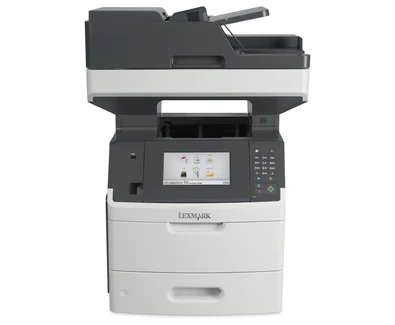
Your needs, this model
Does it fit your priorities?
Can USB combine monochrome Legal duplex printing, single-pass Legal color scans, Legal glass, copy, analog fax and PIN release at 50,000 monthly pages?
Yes with compatible computer software. Both scanner routes accept Legal, and the single-pass ADF holds 150 ordinary originals. The separate analog fax path needs active compatible phone service at LINE and configured fax identity. The recommended range ends at 75,000 monthly pages.
Explore this need in the finder →Can this model produce color printed pages because it scans color?
No. Its print engine is monochrome. Color capture and the 7-inch color touchscreen do not establish color output.
Explore this need in the finder →Does its advertised maximum input qualify a 1,000-sheet included paper requirement?
No. The included ordinary input is 650 sheets. The larger maximum needs optional drawers and the specified stable configuration.
Explore this need in the finder →Black workgroup output with a separate color-capture capability
The Lexmark MX710de suits an earlier commercial office that prints monochrome documents while capturing originals in color. US part 24T7401 includes a 7-inch color touchscreen, analog fax, 650 ordinary input sheets and a 150-sheet single-pass duplex document feeder. USB and gigabit Ethernet are standard.
The recommended monthly range is 5,000–75,000 pages. The deciding tradeoff is the installed package: the generous scanner feeder does not make the printing input larger, and Wi-Fi, additional drawers and a hard disk are optional. A team needing color printed pages should choose a color engine; neither the scanner nor touchscreen changes this machine's monochrome output.
Use Legal-size glass and single-pass capture for different originals
Letter, Legal and A4 are explicitly supported by both scanner routes. The glass accepts documents through 8.5×14 inches and books through one-inch thickness. It is the appropriate place for photos, small items, thin clippings and other originals unsuitable for automatic feeding. Place each original facedown at the marked corner.
For ordinary multipage documents, load the ADF faceup, short edge first, align the stack and adjust the guides. Its 150-sheet capacity and 52–120-gsm range apply to originals. The single-pass mechanism captures both sides without the reversing routine used by some other duplex feeders.
The exact specifications list USB-connected or network-connected computers as destinations. On the network, create the documented scan profile, choose a receiving computer location and start the assigned profile or shortcut at the machine. The guide also describes a same-network Windows Scan to Computer routine. Verify actual software compatibility before relying on either older workflow; flash-drive capture is a separate destination.
Match ordinary paper and duplex settings to the loaded sources
The included 550-sheet drawer and 100-sheet multipurpose feeder provide 650 ordinary sheets on a 75-gsm or 20-pound basis. Letter, Legal and A4 fit both sources and the automatic-duplex path. Match the physical stock to the configured size and type. Identical source settings permit linking for a common stock; distinct types prevent unintended feeding from another source.
Load only one size and type in the multipurpose feeder at a time and stay below the fill mark. Supported envelopes use a separate one-sided load, flap down on the left. They replace the feeder's ordinary stack and do not inherit an automatic-duplex promise. The 550-sheet output bin can need collection before the full ordinary input load is exhausted.
Reaching the 3,300-sheet maximum input needs optional drawers and the correct furniture arrangement. The guide gives specific rules for the 2,100-sheet option and caster base. Inspect the offered machine's actual drawers and support instead of assigning the family maximum to the standard unit.
Keep confidential release and fax on their documented connections
Compatible Windows or Macintosh Print and Hold can send a confidential job for local release with a four-digit PIN using digits 1–9. Configure expiration and invalid-PIN policies, and remember that memory pressure can remove held jobs. Ordinary confidential release is documented in memory; optional disk-dependent PDF or OCR functions need their own hardware and software checks.
AirPrint and Mopria support basic printing from compatible devices on a suitable shared local network while the printer uses Ethernet. An internal wireless adapter is optional. Basic mobile printing does not establish the computer driver's scanner, PIN release or exact media controls.
Analog fax separately needs active compatible telephone service connected to LINE. Configure the fax name and number and the appropriate answer settings. The Ethernet connection does not provide that analog phone service.
Budget attention for supplies and maintenance
Lexmark declares up to 63 one-sided Letter print pages per minute and separately 38 Letter duplex sides per minute. Scanner figures of 70 Letter simplex or 140 Letter duplex sides per minute measure capture, not printing. The 300,000-page maximum monthly duty rating also differs from the recommended 75,000-page ceiling.
The US starter toner declares 10,000 simplex standard pages; replacements declare 6,000 or 25,000 under ISO/IEC 19752. The 45,000-page family cartridge is restricted to the MX711. The separate imaging estimate uses three-page Letter/A4 jobs at approximately 5% coverage. Check regional toner, imaging unit, installed fuser type, rollers and ADF maintenance history. This discontinued 95.4-pound Class A unit needs suitable support, operating access and verified electrical labeling before further office service.
Key details at a glance
| Color printing | No |
|---|---|
| Scanner | Yes |
| Copying | Yes |
| Fax | Yes |
| Flatbed scanner | Yes |
| Automatic document feeder | Yes |
| Automatic two-sided printing | Yes |
| Automatic two-sided scanning | Yes |
| Single-pass two-sided scanning | Yes |
| Color scanning | Yes |
| Instructed envelope handling | Yes |
| Apple AirPrint | Yes |
| Mopria printing | Yes |
| Supported PIN-release printing | Yes |
| Recommended monthly minimum | 5000 pages |
| Recommended monthly maximum | 75000 pages |
| Maximum monthly duty | 300000 pages |
| Included ordinary-paper capacity | 650 sheets |
| Document-feeder capacity | 150 sheets |
| Declared one-sided mono Letter rate | 63 pages/min |
| Unit-body width | 21.6 in |
| Unit-body depth | 22.8 in |
| Unit-body height | 28.6 in |
| Unit weight | 95.4 lb |
| Imaging engine | laser |
Use the exact model’s instructions for operating limits, supplied equipment and version differences.
Paper, software and setup details
Print-rate conditions
Maker maximum 63 one-sided Letter print pages per minute in black; separately 38 Letter duplex sides per minute. The scanner separately declares 66/70 A4/Letter simplex and 132/140 A4/Letter duplex sides per minute in black or color. Color scanning and the color screen do not provide color printing.
Paper handling
Included 550-sheet tray and 100-sheet MP feeder total 650 ordinary sheets at 75 gsm/20 lb. Letter, Legal and A4 explicitly fit both and automatic duplex. Match size/type when linking a common ordinary stock. Envelopes use a separate one-sided MP routine. Output is 550 sheets; optional input can reach 3,300 sheets with the specified configuration and furniture.
Scanning arrangement
The 150-sheet single-pass DADF captures both sides automatically. Letter, Legal and A4 are positive in both the ADF and scanner glass. The guide expressly gives glass through 8.5×14 inches and books through one-inch thickness; ordinary ADF originals use 52–120 gsm. Exact computer destinations include USB or network-connected computers.
Computer and mobile connections
Included USB Type-B and gigabit Ethernet provide compatible computer print/scan paths. Type-A host ports have separate device roles. Wi-Fi, parallel and serial need optional hardware. AirPrint/Mopria basic printing on a suitable shared local network is separate from desktop scanning, PIN and media controls.
Supplies and declared yields
US starter toner declares 10,000 simplex standard pages. Listed replacements declare 6,000 or 25,000 pages under ISO/IEC 19752; the 45,000-page family cartridge is restricted to MX711, not this MX710. The separate 100,000-page imaging estimate uses three average Letter/A4 pages per job at approximately 5% coverage. Regional toner, 520Z/520ZA imaging unit, fuser type, roller and ADF kits are separate maintenance considerations.
Software and support
Network capture uses the documented Embedded Web Server scan profile and receiving computer location, or the documented same-network Windows Scan to Computer routine with compatible software. Windows/Mac Print and Hold supports local confidential release with a four-digit PIN using digits 1–9; memory pressure and expiration may remove held jobs. Disk-dependent compressed PDF/OCR remains conditional on optional hardware/software.
Electrical edition and setup
Analog fax separately needs an active compatible analog telephone line at LINE and configured Fax Name/Number. This earlier Class A commercial machine has a 95.4 lb body and optional-drawer stability requirements. Check the actual voltage label, service condition and compatible software; nominal mains input is unestablished.
Sources for this assessment
Find a printer for your routine.
Match color output, scanning, connections and paper handling, then compare the exact models.