
Your needs, this model
Does it fit your priorities?
Can Ethernet combine PIN-held Legal printing, 350-sheet input and 13,000 monthly pages?
Yes with compatible confidential-print software. Both ordinary sources support Legal, and the recommended monthly maximum is 14,000 pages.
Explore this need in the finder →Can USB handle A4 documents and occasional envelopes?
Yes through ordinary A4 sources and the separate one-sided MPF envelope routine, with matching media settings.
Explore this need in the finder →Does the network-ready n package include automatic duplex?
No. Its exact specification lists a duplex unit as available optional hardware. The dn package includes that unit.
Explore this need in the finder →A wired shared queue with local job release
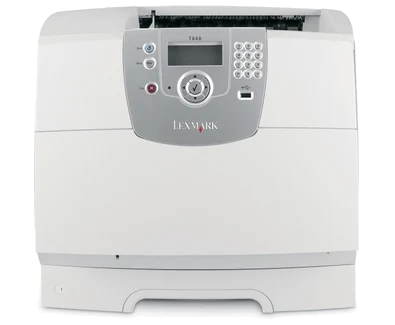
The Lexmark T640n is the network-equipped T640 configuration, combining monochrome laser output with a documented confidential-print routine. Exact US part 20G0150 includes 10/100BaseTX Ethernet and USB computer connectivity. It fits a wired workgroup printing within the maker's recommended 3,000–14,000-page monthly range when users need to release selected jobs at the machine.
The n package does not include automatic duplex. Lexmark lists the matching duplex unit as available separately, while T640dn is the explicitly equipped package. Check the actual suffix and installed hardware on an offered printer rather than assuming network readiness also supplies two-sided output.
Establish the network and the confidential workflow
The original guide describes printing a network setup page, checking its connected status and confirming the IP address before installing the printer on network computers. DHCP and manually assigned addressing have different setup steps. A working Ethernet cable alone does not create the required print queue or select the correct software.
USB Type-B remains a separate direct-computer option. Wireless and gigabit interface options are not the supplied Fast Ethernet configuration. Verify current compatible software on the intended systems; the guide's historical Windows and Mac instructions establish operation, not blanket support for every newer platform.
Compatible Windows software submits confidential jobs through Print and Hold. The Mac procedure uses Job Routing and Confidential Print. Enter a user name and four-digit PIN using digits 0–9, then select the user and confidential job at the panel to release it with the matching PIN. The job stays in printer memory until the documented release or deletion action.
Optional disk encryption is a separate function. Other held-job types, including Verify, Reserve and Repeat, have different behavior and do not all require a PIN. Select the confidential routine when protected local release is essential rather than treating every held job as secure.
The 350-sheet load is two ordinary sources
The supplied drawer holds 250 sheets and the multipurpose feeder 100, totaling 350 on the stated 20-pound or 75-gsm basis. Letter, Legal and A4 fit both. Match guides, panel settings and driver size/type to the actual load. Matching sources can be linked through the documented settings; different stock should retain deliberate source choices.
The optional duplex unit mounts below the printer. The correct 250-sheet version matches the standard tray; the name does not mean it adds another paper drawer. Installing it changes the physical arrangement and may affect support-furniture requirements when combined with extra input hardware.
Suitable envelopes use their separate one-sided MPF routine, with up to ten under the guide's conditions. Select Envelope and the exact size, and avoid stamps, windows, clasps, exposed adhesive and damaged stock. The separately sold 85-envelope feeder is a different device.
Front PDFs and expansion require their own checks
The front USB Direct interface is for supported PDF printing from suitable FAT-formatted storage. NTFS, encrypted files and files without printing permissions are excluded by the guide. Select the document and quantity at the panel and leave the device connected until the job finishes.
The 3,850-sheet maximum input, larger output bins and finishing arrangements require optional equipment. Base output is 250 sheets. Check installed drawers and driver recognition, and follow the specified furniture requirements for larger floor-mounted combinations. These are paper-handling options, not scanning, copying or fax hardware.
Regular volume, supplies and condition
Lexmark declares up to 35 one-sided Letter pages per minute. The 200,000-page maximum duty rating is distinct from the recommended monthly ceiling and does not describe an ordinary workload target. Neither rating is a measured application result.
The original US supplied cartridge declares 6,000 pages, with Americas replacements at 6,000 or 21,000 under ISO/IEC 19752. Do not borrow the T644's 32,000-page option. Inspect maintenance condition and any special label-printing components on this discontinued model. Check the electrical label and operating clearance, or compare an explicitly duplex-equipped or scanner-equipped configuration when those routines matter.
Key details at a glance
| Color printing | No |
|---|---|
| Scanner | No |
| Copying | No |
| Fax | No |
| Flatbed scanner | No |
| Automatic document feeder | No |
| Automatic two-sided printing | No |
| Automatic two-sided scanning | No |
| Single-pass two-sided scanning | No |
| Color scanning | No |
| Instructed envelope handling | Yes |
| Supported PIN-release printing | Yes |
| Recommended monthly minimum | 3000 pages |
| Recommended monthly maximum | 14000 pages |
| Maximum monthly duty | 200000 pages |
| Included ordinary-paper capacity | 350 sheets |
| Declared one-sided mono Letter rate | 35 pages/min |
| Unit-body width | 16.6 in |
| Unit-body depth | 19.6 in |
| Unit-body height | 13.6 in |
| Unit weight | 38 lb |
| Imaging engine | laser |
Use the exact model’s instructions for operating limits, supplied equipment and version differences.
Paper, software and setup details
Print-rate conditions
Maker maximum 35 one-sided Letter pages/minute. The matching 250-sheet duplex unit is optional; no base automatic duplex or duplex speed is borrowed from T640dn.
Paper handling
Included 250-sheet drawer plus 100-sheet MPF totals 350 at 20 lb/75 gsm. Letter/Legal/A4 fit both ordinary sources. Suitable envelopes use MPF simplex, up to 10 under guide conditions. Maximum 3,850 input, an 85-envelope feeder, extra output and finishing need optional hardware; base output is 250.
Scanning arrangement
Print-only monochrome hardware has no glass, document feeder, copying or fax. Optional paper-handling devices do not add scanning.
Computer and mobile connections
Included 10/100BaseTX Ethernet, USB Type-B, front USB Direct, parallel and one internal card slot. N8050 wireless, external wireless servers and gigabit options are separate. No included wireless or Wi-Fi Direct arrangement is qualified; network protocol names alone do not prove AirPrint/Mopria.
Supplies and declared yields
Original US supplied Return Program cartridge 6,000 pages. Americas 64015SA/64035SA replacements 6,000 and 64015HA/64035HA 21,000 under ISO/IEC 19752. T644 32,000-page cartridges are not qualified here. Label applications need the specified label cartridge and fuser-cleaner arrangement; maintenance parts are separate.
Software and support
Original guide 40–41 gives compatible Windows Print and Hold and Mac Job Routing/Confidential Print with a four-digit PIN using 0–9 and local release. Jobs are held in printer memory; optional hard-disk encryption is a separate feature. Front USB PDF printing requires FAT storage and excludes encrypted files or files without printing permission. Verify current software compatibility.
Electrical edition and setup
Inspect actual installed options, maintenance condition, electrical label and correct cord. Allow loading, ventilation, output access and service clearance beyond body dimensions. Larger floor-mounted option stacks need the specified support furniture.
Sources for this assessment
Find a printer for your routine.
Match color output, scanning, connections and paper handling, then compare the exact models.