
Your needs, this model
Does it fit your priorities?
Can Ethernet combine Legal printing, PIN release and 350 included sheets for 15,000 monthly pages?
Yes with compatible confidential-print software. Load 250 ordinary Legal sheets in the drawer and 100 in the multipurpose feeder, match size/type and use Cassette mode for linking. PIN release uses printer memory; the recommended maximum is 20,000 pages/month.
Explore this need in the finder →Does the supplied T650n automatically print both sides of Letter sheets?
No. Its automatic-duplex unit is optional and separate from this supplied n configuration. A general family duplex menu does not make it included.
Explore this need in the finder →Can its 200,000-page maximum establish a 30,000-page recommended monthly workload?
No. The recommended monthly range ends at 20,000 pages. The higher maximum duty figure is a different measure.
Explore this need in the finder →A wired workgroup printer with a clear duplex decision
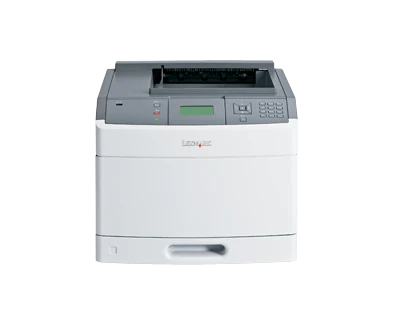
The Lexmark T650n is a monochrome laser printer with included Ethernet and USB, a four-line grayscale panel and a recommended monthly range of 3,000–20,000 pages. US part 30G0100 suits a wired team mainly producing one-sided documents. Its declared one-sided Letter rate reaches up to 45 pages per minute.
The important purchasing distinction is the duplex unit. This n configuration lists automatic duplex as separate optional hardware. The shared T650/T652/T654 manual describes duplex routines, but that does not make the unit standard on the T650n. Choose an explicitly equipped configuration if two-sided reports must finish unattended.
Use both included inputs deliberately
The 350-sheet standard input consists of a 250-sheet drawer and a 100-sheet multipurpose feeder at the 20-pound or 75-gsm ordinary-paper basis. Letter, Legal and A4 fit both paths. For a larger ordinary-paper run, load matching stock and paper settings in both sources; the guide requires Cassette mode to include the multipurpose feeder in tray linking.
That combined capacity is not a single large enclosed drawer. Opening the multipurpose feeder, extending its support and setting its paper size and type are part of the routine. Follow the guides and maximum fill lines, and leave room for trays, covers and access beyond the closed-body dimensions.
Suitable envelopes use the multipurpose feeder with the specified flap orientation, size and Envelope type. They replace its ordinary-paper load for that separate job. An optional envelope feeder is different hardware, and the 4,000-sheet input maximum requires additional equipment. Do not count either as part of the supplied arrangement.
Connect the computer through the correct port
The included computer interfaces are USB Type-B and 10/100 Ethernet. The front Type-A port is for supported flash-drive files, not a substitute computer socket. Parallel, serial, wireless and gigabit options are separately listed, so choose cables and queues for the actual installed interfaces.
For wired sharing, print the network setup page and confirm Connected status and the IP address before installing the appropriate queue. The embedded web server provides device status, settings and reports. Historical driver and protocol lists do not establish present operating-system compatibility; verify the software and representative files used by the team. AirPrint and Mopria are unestablished here.
Confidential printing uses memory and a four-digit PIN
The original guide documents confidential jobs through compatible Windows Print and Hold or Macintosh Job Routing software. Assign a user name and four-digit PIN at the computer, then select the held job and enter the PIN on the printer keypad to release it. This is a specific workflow rather than a generic claim that network security protects every output page.
These jobs occupy printer memory and may be deleted if more memory is needed. The optional hard disk supports separate features such as disk encryption and Job Waiting; it is not a prerequisite stated for the documented memory-based PIN routine. Confirm that the intended driver exposes confidential printing and that the actual configuration behaves as required.
Use the recommended range and exact supplies
The 200,000-page maximum monthly duty figure is separate from the 20,000-page recommended ceiling. It should not replace the recommended range when planning recurring work. The T650n has no scanner, copier or fax; its paper feeder handles output stock, not originals.
The original US supplied Return Program cartridge declares 7,000 pages. Standard T650A11A or T650A21A replacements declare 7,000, while T650H11A or T650H21A high yields declare 25,000 under ISO/IEC 19752. The family's 36,000-page cartridges are restricted to T654 models. Match the supply region and program conditions.
Check the maintenance status, fuser type and voltage as well as toner. Lexmark marks this 40.6-pound model discontinued. Inspect its electrical label, correct cord, physical condition and installed options before reuse. A documented duplex configuration or a multifunction model is the better comparison when unattended back sides or paper capture would remove significant daily work.
Key details at a glance
| Color printing | No |
|---|---|
| Scanner | No |
| Copying | No |
| Fax | No |
| Flatbed scanner | No |
| Automatic document feeder | No |
| Automatic two-sided printing | No |
| Automatic two-sided scanning | No |
| Single-pass two-sided scanning | No |
| Color scanning | No |
| Instructed envelope handling | Yes |
| Supported PIN-release printing | Yes |
| Recommended monthly minimum | 3000 pages |
| Recommended monthly maximum | 20000 pages |
| Maximum monthly duty | 200000 pages |
| Included ordinary-paper capacity | 350 sheets |
| Declared one-sided mono Letter rate | 45 pages/min |
| Unit-body width | 16.7 in |
| Unit-body depth | 19.4 in |
| Unit-body height | 13.7 in |
| Unit weight | 40.6 lb |
| Imaging engine | laser |
Use the exact model’s instructions for operating limits, supplied equipment and version differences.
Paper, software and setup details
Print-rate conditions
Maker maximum 45 one-sided Letter pages per minute. Automatic duplex requires optional hardware on this n configuration; no included duplex throughput is claimed.
Paper handling
Included 250-sheet drawer plus 100-sheet multipurpose feeder total 350 ordinary sheets at 20 lb/75 gsm. Letter, Legal and A4 fit both sources. For a linked ordinary-paper run, match size/type and set the multipurpose feeder to Cassette; envelopes replace its ordinary-paper load for a separate one-sided routine. Maximum 4,000 requires optional hardware.
Scanning arrangement
Monochrome print-only laser hardware has no scanner glass, document-capture feeder, copying or fax. Multipurpose paper feeding and a front flash-drive port do not capture originals.
Computer and mobile connections
Included USB Type-B computer interface and 10/100 Ethernet; the front Type-A port accepts supported flash-drive files. Wireless, gigabit, parallel and serial options are separate equipment. The front host port is not the computer connection.
Supplies and declared yields
US supplied Return Program cartridge declares 7,000 pages. US/Canada T650A11A/A21A standard replacements declare 7,000; T650H11A/H21A high yields declare 25,000 under ISO/IEC 19752. The T654-only 36,000-page cartridge is not assigned to T650n. Check maintenance-kit/fuser type and voltage separately.
Software and support
Compatible Windows Print and Hold or Mac Job Routing software can submit a confidential job with a four-digit PIN, then release it from Held Jobs using the panel keypad. Jobs occupy printer memory and may be deleted under memory pressure. Disk encryption and Job Waiting need the separately optional hard disk. Current OS, AirPrint and Mopria compatibility are unestablished.
Electrical edition and setup
US exact part is established, but nominal mains input is not; inspect the actual electrical label and correct cord. Body is 40.6 lb and needs operating clearance for covers, trays and airflow. Optional input/output hardware can require a suitable stand or base; verify installed options through the menu settings page.
Sources for this assessment
Find a printer for your routine.
Match color output, scanning, connections and paper handling, then compare the exact models.