
Your needs, this model
Does it fit your priorities?
Can an office use included Wi-Fi for monochrome A4 duplex printing and color two-sided Legal scans, with copying and separate analog fax?
Yes through the configured shared wireless network and documented scan profile, with compatible Java/software. Legal originals use the reversing ADF; fax still needs active compatible analog telephone service at LINE.
Explore this need in the finder →Can its wireless network route scan Legal originals on the glass?
No. Wireless networking does not change the glass’s 8.5×11.7-inch physical limit. Legal fits the ADF but does not meet a Legal flatbed requirement.
Explore this need in the finder →Does the included wireless radio establish a Wi-Fi Direct scanning arrangement?
That arrangement is unestablished. The reviewed wireless instructions join a configured network; they do not establish Wi-Fi Direct and its computer-scanning route.
Explore this need in the finder →Shared-network placement for black office documents
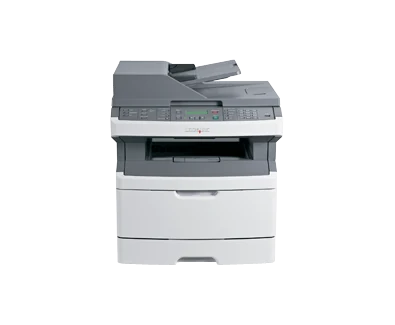
The Lexmark X364dw adds included 802.11b/g/n wireless networking to an earlier monochrome multifunction configuration. US part 13B0503 prints and copies in black, scans in color and provides analog fax. A two-line grayscale LCD and physical buttons control its routines; color capture does not make it a color printer.
Its practical fit is a small office producing approximately 750–5,000 pages per month and placing the machine on a suitable shared network. The main setup consideration is its older computer-scanning software: the documented network Scan Profile requires Java and a compatible computer environment. Check that workflow before relying on wireless document capture.
Join the intended network before configuring jobs
The original wireless instructions identify the network name and security settings and describe infrastructure mode when using a wireless router. The Windows routine temporarily connects USB when prompted, configures wireless access and then removes that temporary cable. Macintosh instructions use their own network and printer-setup steps. Verify that the actual computer and network support the applicable software.
Included Ethernet offers a wired alternative, and USB Type-B provides direct computer printing. These are distinct from the front Type-A flash-drive socket. The radio and network instructions do not establish Wi-Fi Direct, AirPrint or Mopria. A wireless-network connection should not be treated as proof of every mobile protocol.
For computer capture, open the printer's reachable network address, create a Scan Profile, choose the receiving location and settings and start the profile at the machine. Select color, original size and duplex as required. Front flash-drive scanning follows a separate routine, and direct computer scanning over USB remains unestablished here.
Use the reversing feeder for Legal originals
The 50-sheet ADF supports ordinary originals through 8.5×14 inches, including Letter, Legal and A4, within its 52–120-gsm range. Load pages faceup, short edge first, remove staples and adjust the guides. The exact model specifies reversing duplex scanning, so both sides are automatic but the sheet is turned rather than captured in one pass.
The glass separately handles originals through 8.5×11.7 inches. It suits individual Letter or A4 sheets, photos, small items and thin clippings; books must stay within the documented one-inch thickness. A Legal original that must lie flat needs a longer glass on another documented model. Local copying also lets you choose the original sides and output sides independently.
Keep paper capacity, duplex and envelopes together
The included 250-sheet tray and 50-sheet multipurpose feeder total 300 ordinary sheets on the maker's 75-gsm or 20-pound basis. Letter, Legal and A4 fit both sources and the automatic-duplex path. Use appropriate ordinary 60–90-gsm duplex stock, set the actual size/type and use matching loads with MP Cassette mode for combined feeding.
Up to seven suitable envelopes instead use a separate one-sided multipurpose load. Follow the guide's flap orientation and envelope restrictions; those envelopes replace the ordinary paper in that feeder. The 150-sheet output bin needs collecting before a full ordinary input stack finishes.
The optional 250- and 550-sheet drawers are alternatives, with only one permitted at a time. The 850-sheet maximum needs the larger option and should not be assigned to the supplied machine. Analog fax likewise needs its own active compatible telephone service connected to LINE, with station details configured; wireless networking does not replace that connection.
Check declared speed, supplies and continued suitability
The exact Printing specification declares up to 35 one-sided Letter pages per minute and separately 18 Letter duplex sides per minute. Black scan speed is separately 21 A4 or 22 Letter sides per minute. The 80,000-page maximum monthly duty figure does not replace the recommended 5,000-page ceiling for recurring work.
Original US supplied toner declares 3,000 pages, while replacement X264-series cartridges declare 3,500 or 9,000 standard pages under ISO/IEC 19752. Inspect the separate E260X22G photoconductor kit and ADF feed/separator parts as well as toner. This discontinued 44-pound model needs electrical-label, software and operating-clearance checks. A documented newer wireless multifunction machine is useful when maintaining its older profile setup would complicate the office routine.
Key details at a glance
| Color printing | No |
|---|---|
| Scanner | Yes |
| Copying | Yes |
| Fax | Yes |
| Flatbed scanner | Yes |
| Automatic document feeder | Yes |
| Automatic two-sided printing | Yes |
| Automatic two-sided scanning | Yes |
| Single-pass two-sided scanning | No |
| Color scanning | Yes |
| Instructed envelope handling | Yes |
| Recommended monthly minimum | 750 pages |
| Recommended monthly maximum | 5000 pages |
| Maximum monthly duty | 80000 pages |
| Included ordinary-paper capacity | 300 sheets |
| Document-feeder capacity | 50 sheets |
| Declared one-sided mono Letter rate | 35 pages/min |
| Unit-body width | 16.8 in |
| Unit-body depth | 16 in |
| Unit-body height | 18.5 in |
| Unit weight | 44 lb |
| Imaging engine | laser |
Use the exact model’s instructions for operating limits, supplied equipment and version differences.
Paper, software and setup details
Print-rate conditions
Maker maximum 35 one-sided Letter pages per minute in black, separately 18 black Letter duplex sides per minute. Black A4/Letter simplex scan rates are separately 21/22 sides per minute. Color scan and duplex scan rates are unestablished; scanning in color does not provide color printing.
Paper handling
Included 250-sheet tray and 50-sheet MP feeder total 300 ordinary sheets at 75 gsm/20 lb. Letter, Legal and A4 explicitly fit both and automatic duplex; ordinary duplex uses 60–90 gsm stock. Match size/type and MP Cassette mode for combined feeding. Seven envelopes use a separate one-sided MP load. Output is 150 sheets; optional 250/550 drawers are alternatives and only one may be fitted.
Scanning arrangement
The 50-sheet reversing duplex ADF handles Letter, Legal and A4 originals within its 52–120 gsm range. The scanner glass is separately limited to 8.5×11.7 inches, including Letter/A4 but not Legal. Photos, small items and thin clippings belong on the glass. This feeder is not single-pass.
Computer and mobile connections
Included 802.11b/g/n Wi-Fi, USB Type-B computer printing, 10/100 Ethernet and a front Type-A flash-drive host port. Wireless setup joins the configured shared network; infrastructure networking is separate from Wi-Fi Direct or mobile protocols. The network computer-scan profile is used over the reachable network address; USB computer scanning is unestablished.
Supplies and declared yields
US supplied toner declares 3,000 standard pages; X264A11G/A21G replacements declare 3,500 and X264H11G/H21G declare 9,000 under ISO/IEC 19752. The separate E260X22G photoconductor kit and ADF feed/separator parts need condition checks. Their life is not the toner cartridge’s ISO yield.
Software and support
The reviewed network Scan Profile setup explicitly requires Java on the computer and a compatible browser/software environment. Select the destination, original size, color and duplex options, then start its profile at the printer. USB computer scanning, confidential PIN release and current mobile protocols remain unestablished.
Electrical edition and setup
Analog fax uses an active compatible analog telephone line at LINE, with station name and number configured. Network printing or scanning does not replace that phone connection. Check actual-unit electrical labeling, proper cord, software, component condition and room for trays, covers and airflow; nominal mains input is unestablished.
Sources for this assessment
Find a printer for your routine.
Match color output, scanning, connections and paper handling, then compare the exact models.