
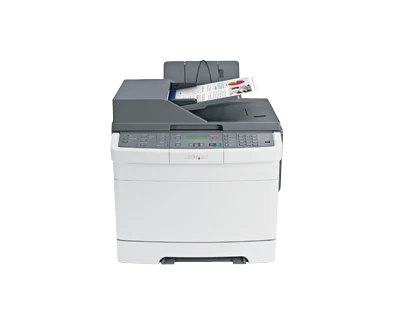
Your needs, this model
Does it fit your priorities?
Can Ethernet combine automatic print duplex and Legal reversing scans with fax at 2,000 monthly pages?
Yes with the printing size left flexible, compatible network scan software and a suitable separate fax line. Legal automatic reversing capture is established; an exact print-duplex size subset is not.
Explore this need in the finder →Can USB support Legal color glass scans, ordinary A4 printing and occasional envelopes?
Yes with compatible computer scanner software. Legal glass and A4 printing are documented, while envelopes use a separate one-sided manual-feed routine.
Explore this need in the finder →Does automatic two-sided scanning satisfy a single-pass requirement?
No. The specified RADF reverses sheets to read the other face. It is automatic duplex capture, but it is not a single-pass scanner.
Explore this need in the finder →Two-sided output and incoming paperwork
The Lexmark X544dn brings automatic print duplex and reversing duplex scanning together in a wired color MFP. US part 3001389 also includes copying, analog fax, a Legal-size glass surface and a 50-sheet document feeder. It is suited to a small office that produces color documents and regularly receives loose originals with information on both faces.
The practical tradeoff is the scanner's method and the age of the platform. Its feeder turns each original to capture the second side; it is not single-pass hardware. Lexmark also marks this model discontinued, so compatible current software, physical condition and the precise installed configuration deserve attention before an offered unit becomes a working office solution.
Separate original settings from output settings
The original guide distinguishes the sides of the original from the sides of a printed copy. Set the feeder's original-side choice to match the source bundle, then choose the desired output arrangement separately. Automatic print duplex does not itself tell the scanner to capture the back of every page.
Letter, Legal and A4 fit the established feeder range. Load suitable pages faceup, short edge first, and align the guides. The 50-sheet capacity uses the stated ordinary-paper basis. Fragile pages, photos and small items belong on the glass, whose explicit 8.5-by-14-inch limit also accommodates a full-length Legal original. A suitably thin book is another glass task rather than a feeder job.
The scanner captures color, while the print engine can also produce color pages. Lexmark's declared Letter simplex scan rate reaches 20 sides per minute in either black or color; the corresponding A4 figure is 18. Those are not reversing-duplex rates or promises about the time to deliver a completed file to a computer.
Share destinations over Ethernet
The supplied computer connections are USB Type-B and 10/100 Ethernet. The guide documents computer-scanning software and network Scan Profile or ScanBack workflows. Set the destination, document settings and output format on the computer, then recall the profile at the printer. Test a small representative bundle and confirm page order and file location.
A front Type-A port provides a different walk-up routine: supported flash-drive printing or scanning. FAT formatting and supported file types matter. The guide distinguishes an encrypted PDF's password from general access to a file; that does not establish protected-job PIN release. AirPrint and Mopria are likewise unqualified here, so verify a required modern mobile workflow independently.
The fax modem needs a suitable analog telephone path and station setup. A wired network connection does not replace that telephone arrangement. Digital services need the documented equipment and compatibility checks. The optional external wireless print server also should not be mistaken for included Wi-Fi or a confirmed wireless scanner setup; the X544dw is the family variant with an included radio.
Capacity and duplex media
The included drawer holds 250 ordinary sheets, with a separate one-sheet manual feed. Letter, Legal and A4 each fit that stack. A specification of 250+1 does not mean two bulk trays. For longer sheets, extend the drawer and adjust its guides, then match the panel and computer paper settings.
Automatic print duplex is confirmed for the X544dn. The reviewed paper table does not separately establish the exact duplex-size subset, so check the precise size and compatible driver before committing to a size-specific two-sided workflow. The guide limits duplex media to suitable 60–105-gsm grain-long paper and excludes envelopes, labels, transparencies and card stock from that path.
Suitable envelopes use the separate one-sided manual-feed instructions. The optional Duo Drawer adds a 550-sheet drawer and 100-sheet feeder; the 900+1 maximum requires that extra hardware. Lexmark's recommended monthly range is 800–3,000 pages. Its separate 55,000-page duty figure is not the recommended workload, and the up-to-25-ppm Letter rate is one-sided output.
Make supplies part of the inspection
The original US package declares 2,500-page black and 2,000-page color Return Program cartridges. Listed replacement choices include extra-high yields of 6,000 black and 4,000 color pages under ISO/IEC 19798. Check cartridge region, Return Program conditions and the separate imaging and waste components rather than using yield alone to infer current running cost.
Allow room around the 60-pound body for the scanner lid, extended paper and service access, and check the actual electrical label. If frequent two-sided digitizing dominates the workload, compare a documented single-pass model. If wired sharing and moderate mixed paperwork are enough, the X544dn's two separate duplex functions form a coherent reference configuration.
Key details at a glance
| Color printing | Yes |
|---|---|
| Scanner | Yes |
| Copying | Yes |
| Fax | Yes |
| Flatbed scanner | Yes |
| Automatic document feeder | Yes |
| Automatic two-sided printing | Yes |
| Automatic two-sided scanning | Yes |
| Single-pass two-sided scanning | No |
| Color scanning | Yes |
| Instructed envelope handling | Yes |
| Recommended monthly minimum | 800 pages |
| Recommended monthly maximum | 3000 pages |
| Maximum monthly duty | 55000 pages |
| Included ordinary-paper capacity | 251 sheets |
| Document-feeder capacity | 50 sheets |
| Declared one-sided mono Letter rate | 25 pages/min |
| Declared one-sided color Letter rate | 25 pages/min |
| Unit-body width | 17.32 in |
| Unit-body depth | 21.14 in |
| Unit-body height | 18.23 in |
| Unit weight | 60 lb |
| Imaging engine | laser |
Use the exact model’s instructions for operating limits, supplied equipment and version differences.
Paper, software and setup details
Print-rate conditions
Maker maximum 25 one-sided Letter pages/minute in black or color. A4/Letter simplex scanner rates are separately 18/20 sides/minute in black or color; neither print-duplex throughput nor reversing scan speed is inferred.
Paper handling
Included 250-sheet drawer plus single-sheet manual feed, declared 250+1 at 20 lb/75 gsm. Each Letter/Legal/A4 stack holds 250; the manual slot is separate. Optional Duo Drawer adds 550+100; maximum 900+1 is not supplied. Envelopes use the one-sided manual-feed routine.
Scanning arrangement
50-sheet reversing duplex ADF and explicitly documented 8.5 x 14-inch glass accept Letter, Legal and A4. Reversing scans automatically turn originals; single-pass scanning is not supplied. Print duplex is a separate included function with exact size subset unestablished.
Computer and mobile connections
Included USB Type-B, 10/100 Ethernet and separate front USB Type-A/PictBridge. USB/network computer scan routines are documented. Suitable telephone service is separate for analog fax. Optional external wireless print server is print-only, not included Wi-Fi scanning.
Supplies and declared yields
US supplied 2,500-page black and 2,000-page CMY Return Program cartridges. Replacements: 1,000 standard, 2,500 black/2,000 CMY high yield, 6,000 black/4,000 CMY extra-high yield, ISO/IEC 19798. Imaging and waste components are separate supplies.
Software and support
Compatible computer printer/scanner software is required. The guide documents network Scan Profile/ScanBack, Scan Center and USB/network scanner connection troubleshooting. Modern OS compatibility, AirPrint/Mopria and protected-job PIN release remain unestablished.
Electrical edition and setup
Inspect the actual electrical label and correct cord; nominal mains input is unestablished. Body dimensions exclude extended trays, scanner lid and service/ventilation access. Historical warranty, toner-price guarantee and Rewards terms are not present purchase promises.
Sources for this assessment
Find a printer for your routine.
Match color output, scanning, connections and paper handling, then compare the exact models.