
Your needs, this model
Does it fit your priorities?
Can the Wi-Fi arrangement print color Letter documents from a compatible computer with 130 included ordinary sheets?
Yes after the actual access point, wireless security and compatible model driver are configured. The exact W model includes wireless networking, and the original plain-paper table gives 130 sheets at 80 gsm. It still does not establish a native mobile protocol or automatic duplex.
Explore this need in the finder →Can an Ethernet computer print Legal pages and suitable envelopes without adding another paper tray?
Yes with the compatible driver and correct media settings. Legal belongs to the original ordinary-paper table; suitable envelopes use the same tray’s manual-feed procedure. The envelope routine requires its own stock, guide adjustment and loading conditions rather than a second simultaneous input.
Explore this need in the finder →Does the manual two-sided option meet an essential automatic-duplex requirement over USB?
No. The exact sheet calls duplex manual, and the original guide describes printing alternate pages before the operator completes the prompted second-side routine. A driver option for two sides does not make this automatic duplex hardware.
Explore this need in the finder →CLP-325W puts color output on a small wired or wireless printer
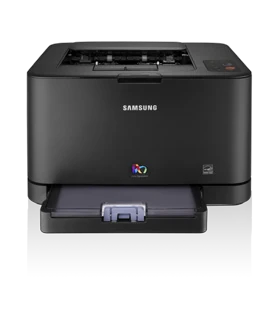
The Samsung CLP-325W is an earlier color laser printer for a compatible computer workflow. It provides USB, Ethernet and infrastructure Wi-Fi, with a 130-sheet ordinary-paper tray. Its most important limitation is paper handling: two-sided output is manual, and there is no document scanner or copier.
That combination suits someone who needs occasional color pages and can confirm the actual printer software, regional supplies and wireless environment. A requirement for automatic duplex, scanning or a verified modern mobile protocol points toward a different model with those exact functions documented.
Choose a connection and finish its setup
USB provides a direct computer connection. Ethernet connects the printer to a wired network, while the W version also includes wireless networking. Each route still needs a compatible installed printer driver and a correctly selected printer.
For infrastructure Wi-Fi, the original guide uses an access point with the appropriate network name and security settings. The WPS button simplifies enrollment when the router supports WPS; it does not remove the need for a compatible network. The guide also describes computer-assisted configuration and removing the network cable before ordinary infrastructure wireless operation.
An old ad-hoc option should not be renamed Wi-Fi Direct. Similarly, the PIN used in a WPS enrollment procedure is different from a PIN that holds a submitted document until its owner releases it. Native AirPrint, Mopria and held-job release are not established for this reviewed arrangement.
The same tray handles ordinary paper and special media
The original media table places Letter, Legal and A4 in the plain-paper group, with a 130-sheet capacity at 80 gsm. Heavier or different media have separate limits. Adjust the tray length, width guides and driver settings rather than assuming one setting works for every size.
Manual Feeder is a way of using this tray, not an extra input that can be added to its capacity. The guide calls for one media type, size and weight at a time and an operator response when the software requests each manually fed page.
Suitable envelopes have their own loading routine: flap down, stamp area toward the top left, appropriate guides and margins, and stock within the documented limits. The guide discourages using its two-sided routine on envelopes, labels or thick media. A small envelope job can fit the printer's role, but it requires attention at the tray.
Two sides require an operator
The exact US specification calls duplex manual. In the original Windows procedure, the Advanced tab offers long- or short-edge binding, then the printer produces alternate pages before a computer prompt guides completion of the job.
Someone therefore needs to handle the paper for the second side. The presence of a two-sided checkbox does not mean the machine automatically reverses sheets. This difference matters when the printer sits across the room or when nobody will be present to finish a batch.
Read speed, supplies and body size on their stated basis
Samsung declares up to 17 one-sided Letter pages per minute in black and four in color. Those figures describe different output modes; neither is a measured result from this site or a promised rate for a complex document. The 20,000-page duty ceiling is separate from a recommended recurring monthly workload.
There are four toner cartridges as well as an imaging unit and waste container. The original replacement declarations give 1,500 black pages and 1,000 per color under the stated standard. Verify the cartridge region and actual installed supply condition, and keep replacement yields separate from starter contents and current ownership cost.
For placement, use the guide's named width, depth and height: approximately 15.28 by 12.32 by 9.57 inches. The promotional sheet prints an inconsistent axis label beside rounded figures. Allow further room for the tray, covers, cables and ventilation, and verify the actual power label before putting an earlier unit into service.
Key details at a glance
| Color printing | Yes |
|---|---|
| Scanner | No |
| Copying | No |
| Fax | No |
| Flatbed scanner | No |
| Automatic document feeder | No |
| Automatic two-sided printing | No |
| Automatic two-sided scanning | No |
| Single-pass two-sided scanning | No |
| Color scanning | No |
| Instructed envelope handling | Yes |
| Maximum monthly duty | 20000 pages |
| Included ordinary-paper capacity | 130 sheets |
| Declared one-sided mono Letter rate | 17 pages/min |
| Declared one-sided color Letter rate | 4 pages/min |
| Unit-body width | 15.28 in |
| Unit-body depth | 12.32 in |
| Unit-body height | 9.57 in |
| Unit weight | 24.25 lb |
| Imaging engine | laser |
Use the exact model’s instructions for operating limits, supplied equipment and version differences.
Paper, software and setup details
Print-rate conditions
The exact US sheet declares up to 17 one-sided Letter pages/min in black and 4 in color. These are distinct manufacturer rates, not measured results or automatic-duplex throughput. The 20,000-page duty-cycle ceiling does not establish a recommended sustained monthly volume.
Paper handling
The included tray holds up to 130 sheets of 80 gsm ordinary paper. The original media table lists Letter, Legal and A4 in that plain-paper group; capacity varies with stock and conditions. Adjust the tray extension, guides and driver size/type/source. Manual Feeder uses this same tray, rather than a second independent input: load one media type at a time and press Cancel for each prompted page. Suitable 75–90 gsm envelopes use the documented manual feed, flap down with the stamp area at top left and at least 15 mm image margins. Follow the exact loading diagram. Automatic two-sided printing is absent; the compatible driver offers a manual reinsertion routine for ordinary supported sizes and warns against duplexing envelopes, labels or thick media.
Scanning arrangement
The exact specification is a color laser printer for printed output, with no document scanner, glass, original feeder, copying or fax hardware. A generic family glossary or Linux troubleshooting reference to shared scanner ports does not add those functions. Color output is genuine; it is separate from scanning capability.
Computer and mobile connections
CLP-325W includes USB 2.0 computer printing, 10/100 Ethernet and 802.11b/g/n wireless networking. Install the compatible model printer driver for the chosen route. Infrastructure Wi-Fi needs the actual access point, network name and security settings; WPS is a setup method when the access point supports it. The original procedure disconnects the network cable before infrastructure wireless operation. These are separate wired and wireless arrangements. Old ad-hoc networking is not established Wi-Fi Direct, and general HP AirPrint/mobile support links are not exact model protocol evidence.
Supplies and declared yields
The US sheet identifies CLT-K407S black and CLT-C407S/M407S/Y407S color replacements, CLT-R407 imaging unit and CLT-W409 waste container. The original guide gives replacement yields of 1,500 black and 1,000 per color under ISO/IEC 19798, corroborated by the US government list. The guide distinguishes regional cartridge configurations, so match the actual unit’s supply region. Replacement declarations are not verified starter contents, remaining life, current stock or running cost. The imaging unit and waste container are separate maintenance items.
Software and support
The original guide requires compatible installed printer software and describes Windows manual two-sided printing in the Advanced tab, with long- or short-edge binding and a computer prompt after alternate pages print. This still needs an operator to complete the second side. The exact W panel has WPS, Cancel and status/toner indicators rather than the neighboring USB-only model’s Print Screen button. WPS PIN enrollment and a CONFIDENTIAL watermark do not establish passcode-held print release. Native AirPrint, Mopria and secure job release remain unconfirmed; the dated operating-system list is not a current software-support promise.
Electrical edition and setup
The original guide’s named axis table gives a body 388 mm wide, 313 mm deep and 243 mm high, or 15.28 x 12.32 x 9.57 inches, with consumables weight 11 kg/24.25 lb. Its separate paper/plastic packaging weights are excluded. The US promotional sheet prints the same rounded dimensions beside an inconsistent H/W/D label and a questionable footprint claim; the guide’s explicit axes govern. Allow additional tray, cover, cable and ventilation access. US Electronics America model context and the guide’s 110–127 VAC edition support the US electrical arrangement, distinct from 220–240 VAC units. Check the actual rating label. This is an earlier reference without a current availability or driver guarantee.
Sources for this assessment
Find a printer for your routine.
Match color output, scanning, connections and paper handling, then compare the exact models.