
Your needs, this model
Does it fit your priorities?
Can a USB computer print color Legal pages with 150 included ordinary sheets?
Yes with the compatible model driver and permitted paper. The original plain-paper table lists Legal with a 150-sheet capacity at 75 gsm; the printer’s real color output is separate from scanning hardware. The tray and driver settings must match the loaded stock.
Explore this need in the finder →Can a compatible mobile printing app use a genuine Wi-Fi Direct peer arrangement if paper size is flexible?
Yes after Wi-Fi Direct is enabled and the device connects with the required printer key or WPS acceptance. The guide requires a compatible printing app, limits peers to three and says the printer does not provide internet access to the phone. This does not establish native AirPrint or Mopria.
Explore this need in the finder →Can Ethernet printing satisfy essential automatic two-sided Letter output?
No. The exact specification calls duplex manual with guidance, and the Windows procedure requires the operator to finish after alternate pages print. Neither the network connection nor the Eco button adds automatic paper reversal.
Explore this need in the finder →CLP-365W supports color documents and a distinct peer connection
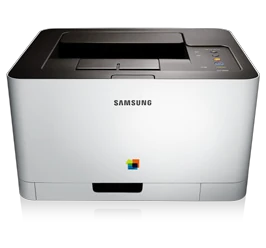
The Samsung CLP-365W is an earlier color laser printer with USB, Ethernet, infrastructure Wi-Fi and genuine Wi-Fi Direct. Its 150-sheet ordinary-paper tray and compact body suit a compatible computer printing routine where color is useful and unattended two-sided output is not essential.
It is a print-only machine. There is no document scanner, copier or fax. The advertised mobile application can scan when used with a suitable multifunction printer, but that generic application capability does not give this model scanning hardware.
Separate desktop networking from Wi-Fi Direct
For a computer, install the compatible printer driver and choose the actual USB or configured network printer. An infrastructure wireless setup needs the correct access point, network name and security settings. The WPS button offers an enrollment method when the router supports it.
The original guide treats ordinary wired and infrastructure wireless setups as alternatives, including removing the network cable before the wireless arrangement starts operating. A network discovery problem can therefore require checking both the printer address and the intended active route.
Wi-Fi Direct is separately documented. Enable the printer's peer network, connect the compatible device using the network key or WPS acceptance, then use a compatible mobile printing application. The guide limits this arrangement to three devices and states that it does not give a phone internet access through the printer.
That is useful evidence for an actual peer-printing routine, but it does not establish native AirPrint or Mopria. Confirm that the required application still works on the actual device. Historical app-store and operating-system instructions are not a promise of present availability.
Paper capacity depends on the media
The original plain-paper table includes Letter, Legal and A4, with 150 sheets at 75 gsm. Extend and adjust the tray for the chosen size, close its paper cover, and match the paper type and size in the compatible software.
Special media have different capacities, and the operating section recommends feeding one sheet at a time. This uses the same tray rather than a second input that adds to the standard capacity. Labels, card stock and photo stock must meet their own limits.
An exact envelope routine has not been established here. A general glossary mentioning envelopes, or a warning against printing their second side, is insufficient to promise reliable envelope feeding. Choose a model with a documented envelope path if that task is essential.
Guided duplex still needs paper handling
The exact specification describes duplex as manual with guidance. The original Windows instructions offer binding choices, print alternate pages and then prompt the operator to complete the job. They do not describe automatic sheet reversal for this model.
This matters when a batch must finish while nobody is near the printer. The Eco button and driver paper-saving settings are useful controls, but they cannot add an automatic duplex unit. Nor should a desktop manual-duplex option be promised in the separate mobile-app workflow.
Keep declared rates and supply contents distinct
Samsung declares up to 19 one-sided Letter pages per minute in black, compared with 18 A4, and four color pages per minute in either size. These are manufacturer declarations. Actual document processing and manual second-side work can change completion time.
The original US package sheet distinguishes 700-page black and 500-page color starters from replacements declared at 1,500 black and 1,000 per color. The imaging unit and waste bottle are separate maintenance items. Check the actual regional cartridge markings and installed condition; these figures do not establish remaining life or current running cost.
The closed-body dimensions do not establish operating clearance, and the boxed weight is different from the printer's weight with consumables. Allow operating access beyond the closed body, check the actual voltage label, and confirm the compatible software before making an earlier unit part of a daily workflow.
Key details at a glance
| Color printing | Yes |
|---|---|
| Scanner | No |
| Copying | No |
| Fax | No |
| Flatbed scanner | No |
| Automatic document feeder | No |
| Automatic two-sided printing | No |
| Automatic two-sided scanning | No |
| Single-pass two-sided scanning | No |
| Color scanning | No |
| Maximum monthly duty | 20000 pages |
| Included ordinary-paper capacity | 150 sheets |
| Declared one-sided mono Letter rate | 19 pages/min |
| Declared one-sided color Letter rate | 4 pages/min |
| Unit-body width | 15 in |
| Unit-body depth | 12.2 in |
| Unit-body height | 8.3 in |
| Unit weight | 21.69 lb |
| Imaging engine | laser |
Use the exact model’s instructions for operating limits, supplied equipment and version differences.
Paper, software and setup details
Print-rate conditions
The exact US sheet and original guide distinguish up to 19 one-sided Letter black pages/min from 18 A4, with up to 4 color pages/min in Letter or A4. These manufacturer declarations are not measured output or two-sided throughput. The 20,000-page monthly duty ceiling is separate from a recommended ongoing volume, which remains unconfirmed.
Paper handling
The original plain-paper table lists Letter, Legal and A4 in the included tray, up to 150 sheets at 75 gsm and permitted 60–85 gsm stock. Match the tray length/width guides, paper cover and the driver’s paper size/type. Special media have their own lower capacities and the operating section recommends feeding one sheet at a time. There is no separate included multipurpose input to add to 150. Automatic duplex is absent: the exact sheet says manual with guidance, and the original Windows driver routine prints alternate pages before operator completion. Letter/Legal/A4 are eligible ordinary sizes for that manual routine, not automatic-duplex sizes. Envelope support is unconfirmed because no exact supported-envelope feed procedure was established; generic media definitions or a warning against duplexing envelopes do not prove such a route.
Scanning arrangement
The exact manufacturer function table says color laser printer: this unit prints but has no document scanner, glass, original feeder, copier or fax hardware. The MobilePrint description explicitly makes document scanning conditional on having a multifunction printer. Generic printer-app screens showing scanned images do not add a scanner to CLP-365W.
Computer and mobile connections
The exact US CLP-365W includes USB 2.0, 10/100 Ethernet, 802.11b/g/n infrastructure Wi-Fi and Wi-Fi Direct. Computer routes need the compatible model driver, selected printer and appropriate network address/security. Ordinary wired and infrastructure wireless setups are alternatives, with the network cable removed for the wireless procedure. Wi-Fi Direct has its own enabled peer network, device name and password or WPS acceptance; the guide allows up to three peers and says it does not provide mobile-device internet access. Direct can coexist with a suitable infrastructure or wired connection, but no desktop driver features are borrowed into the separate app-based mobile arrangement.
Supplies and declared yields
The exact US sheet distinguishes supplied starter yields of 700 black and 500 per cyan/magenta/yellow from standard replacement yields of 1,500 black (CLT-K406S) and 1,000 per color (CLT-C406S/M406S/Y406S), with its stated ISO/IEC 19798 metric. CLT-R406 imaging unit and CLT-W406 waste bottle are separate items. Match the actual unit’s regional supply configuration; these are original maker yields and package declarations, not remaining life, current stock or cost per page.
Software and support
The original feature table limits its guided manual-duplex function to Windows users; it remains an operator task. For Wi-Fi Direct the actual guide requires enabling the feature, connecting the compatible device using the printer’s key or WPS acceptance, and installing a compatible mobile printing application such as Samsung MobilePrint. The historical app/OS list is not a promise of current app-store availability. Native AirPrint and Mopria are not established merely by iPhone support in an app, copyright trademarks or generic HP support links. Google Cloud Print is not assigned as a current operating route. A CONFIDENTIAL watermark and WPS network PIN do not establish secure held-job release.
Electrical edition and setup
The original guide names width 382/depth 309/height 211 mm, or 15.0 x 12.2 x 8.3 inches. It gives 9.84 kg/21.69 lb with consumables; the US sheet rounds unit weight to 21.7 lb and separately gives 25.8 lb boxed. Unit dimensions exclude the additional working space needed for tray, covers, cabling and ventilation. The guide separates 110–127 VAC and 220–240 VAC editions and directs checking the rating label. The US-authored exact sheet establishes the US model context rather than the Korean catalog alone. This is an earlier reference, without an assertion of present stock, compatible modern driver or app availability.
Sources for this assessment
Find a printer for your routine.
Match color output, scanning, connections and paper handling, then compare the exact models.