
Your needs, this model
Does it fit your priorities?
Can a compatible USB computer print Letter automatically on both sides from 250 included sheets?
Yes. The standard configuration includes automatic duplex, and the loading section expressly confirms 250 Letter/A4 sheets at its stated paper basis. Earlier models must be enabled.
Explore this need in the finder →Does Legal support also establish a 250-sheet Legal load?
No. Legal printing and automatic duplex are documented, but the loading instructions say 250 applies only to Letter/A4 and fewer sheets fit other sizes. The exact Legal quantity remains unknown.
Explore this need in the finder →Can a supported phone use Mopria when the printer is wired to the same network?
Yes. The manual expressly allows the printer’s wired interface with a supported mobile device on that shared network and subnet. This basic route does not promise every desktop-driver setting.
Explore this need in the finder →An earlier printer for black-and-white documents
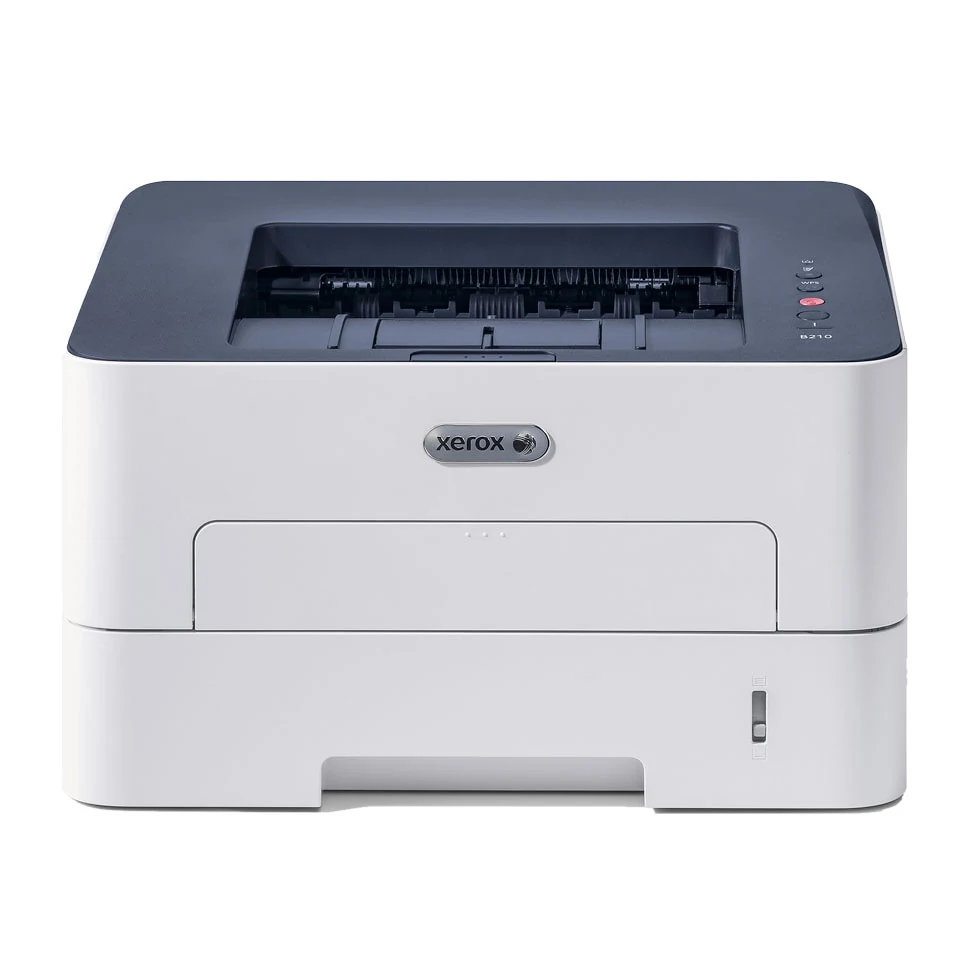
The Xerox B210 is a monochrome laser printer with standard automatic two-sided printing, USB, Ethernet and Wi-Fi. It fits a straightforward document routine when a scanner is unnecessary and compatible computer software is available. Xerox's US page says the model is no longer sold as new, so this is an earlier-model reference rather than a current-stock promise.
The B210 is physically different from the B205 and B215 multifunction models in the same brochure. It does not include their glass, document feeder or copying, and the B215's analog fax does not transfer to it. Its LED user-interface description refers to status indicators, while the actual imaging technology is laser.
Letter capacity is explicit; Legal capacity is a separate question
The ordinary tray holds up to 250 sheets of 20-pound, 80 gsm paper for Letter or A4. The loading instructions expressly say other sizes hold fewer sheets. Legal is supported, but that statement does not establish a 250-sheet Legal load. This is a meaningful distinction when unattended capacity matters.
Load the main tray print side down, extend it appropriately for longer stock and adjust the guides without forcing the stack. Confirm the size and type in the driver after changing paper. The automatic duplex unit accepts ordinary Letter, Legal and A4 within its own media restrictions, rather than every special material the printer can feed.
A separate manual slot accepts one sheet. It is useful for an envelope or a stock change that should not disturb the main tray, but is not an extra automatically linked sheet. Select that source explicitly in the driver. The normal output tray holds 150 ordinary sheets; the rear face-up path handles one sheet and needs accessible space behind the printer.
Choose the network arrangement before using mobile printing
USB is a direct computer route. The guide states that network features are unavailable when using the USB-only arrangement. Ethernet and infrastructure Wi-Fi instead allow the printer to participate in a suitable shared network. Configure the chosen route and verify it with the configuration report before adding computers.
AirPrint and Mopria require compatible devices and appropriate network discovery. The manual specifically allows a printer on Ethernet while a mobile device joins the same network wirelessly. Keep both on the same subnet, or have the network administrator configure the required discovery traffic.
Wi-Fi Direct is another arrangement: a peer network that is disabled by default and must be enabled and configured. Do not confuse its network key with an office-router password. Basic mobile printing does not guarantee that an application exposes all desktop media, duplex or job-security controls.
Keep one-sided speed and monthly volume distinct
The declared one-sided rate is up to 31 Letter pages per minute or 30 A4 pages per minute. The configuration table separately lists up to 15 images per minute for two-sided Letter/A4. Those are source specifications, not our measured timing, and the faster one-sided rate should not be advertised as duplex throughput.
The US model page lists up to 4,000 pages per month in its monthly-volume summary. The brochure's 30,000-page duty figure is a different maximum-volume ceiling. A monthly document plan should preserve that distinction rather than treating the larger number as a normal sustained workload recommendation.
Software also needs an exact check. The original Easy Printer Manager instructions cover a limited range of older Mac versions and point later configurations toward the web interface. They do not establish current driver support or a complete included PIN-release workflow.
Check supplies, voltage and operating access
The US brochure lists a 1,000-page starter toner, while the guide distinguishes that 110 V starter from a 1,500-page starter in 220 V devices. Standard US replacement toner declares 1,500 pages and high-capacity toner 3,000 under ISO/IEC 19752. The separate drum has an approximate 10,000-page service figure with its own job and media conditions.
The body is 14.5 inches wide, 13.2 deep and 8.4 high, at 16.67 pounds. Allow extra room for the extended tray and rear path. Check the actual electrical label: the guide describes separate voltage classes, not universal input. A supported newer print-only model is a clearer alternative when current software support or an assured regional package is essential.
Key details at a glance
| Color printing | No |
|---|---|
| Scanner | No |
| Copying | No |
| Fax | No |
| Flatbed scanner | No |
| Automatic document feeder | No |
| Automatic two-sided printing | Yes |
| Automatic two-sided scanning | No |
| Single-pass two-sided scanning | No |
| Color scanning | No |
| Instructed envelope handling | Yes |
| Apple AirPrint | Yes |
| Mopria printing | Yes |
| Recommended monthly maximum | 4000 pages |
| Maximum monthly duty | 30000 pages |
| Included ordinary-paper capacity | 250 sheets |
| Declared one-sided mono Letter rate | 31 pages/min |
| Unit-body width | 14.5 in |
| Unit-body depth | 13.2 in |
| Unit-body height | 8.4 in |
| Unit weight | 16.67 lb |
| Imaging engine | laser |
Use the exact model’s instructions for operating limits, supplied equipment and version differences.
Paper, software and setup details
Print-rate conditions
Maker-declared one-sided rates are up to 31 Letter or 30 A4 pages/min. The standard-configuration table separately gives up to 15 images/min for two-sided Letter/A4; another feature table labels that duplex figure ppm, so it is not used as the one-sided rate. The US page’s up-to-4,000 monthly-volume reference is separate from the brochure’s 30,000-page maximum duty ceiling.
Paper handling
Tray 1 holds up to 250 ordinary Letter/A4 sheets on the guide’s 20 lb/80 gsm basis. It explicitly holds fewer sheets of other sizes, so the exact Legal stack capacity is unknown. Legal is supported in the tray and automatic duplex unit. The one-sheet manual slot is separate and accepts instructed envelopes; it is not another linked automatic sheet. Output holds 150 ordinary sheets, while the rear path handles one sheet face up.
Scanning arrangement
The B210 is a monochrome print-only model. The B205/B215 scanners, feeders, copying and B215 fax are different hardware. The brochure’s LED UI means status indicators, not LED imaging; the exact guide identifies a laser engine.
Computer and mobile connections
Standard USB computer, 10/100 Ethernet and infrastructure Wi-Fi routes are documented. Network features are unavailable in the USB-only arrangement. Wi-Fi Direct is disabled by default and needs separate configuration. AirPrint and Mopria require supported devices on the same network/subnet; the printer may use Ethernet while the mobile device uses that network’s Wi-Fi.
Supplies and declared yields
The US brochure includes a 1,000-page black starter. The guide distinguishes a 1,500-page starter for 220 V devices from 1,000 for 110 V devices, so editions must not be mixed. US standard 106R04346 declares 1,500 pages and high-capacity 106R04347 3,000, to ISO/IEC 19752 average standard pages. Drum 101R00664 has a separate approximate 10,000-page figure depending on job and media conditions. Toner and drum are separate items.
Software and support
Compatible desktop drivers provide the documented ordinary-paper and automatic-duplex settings. The original guide limits Easy Printer Manager support to Mac OS X 10.9–macOS 10.14 and points later configurations toward the web interface. Check current drivers separately. No complete included job-hold/PIN-release workflow is established. Basic mobile printing does not establish every desktop setting. Historical cloud-service names are not treated as current routes.
Electrical edition and setup
Documented earlier US B210 hardware configuration; Xerox says it is no longer sold as new. Body measures 14.5 in wide, 13.2 in deep and 8.4 in high at 16.67 lb. Allow rear-output, tray and ventilation access. The guide lists separate 110–127 V and 220–240 V classes; the exact surviving unit’s edition must be checked rather than assuming universal input.
Sources for this assessment
Find a printer for your routine.
Match color output, scanning, connections and paper handling, then compare the exact models.