
Your needs, this model
Does it fit your priorities?
Can USB support color scanning from a Legal feeder, monochrome Legal print duplex and a 250-sheet paper stack?
Yes, with compatible computer software. The US brochure explicitly supports USB-connected computer scanning; the 50-sheet ADF accepts Legal, the main tray holds 250 ordinary Legal sheets and automatic Legal print duplex is documented. This does not establish automatic scanning of both original sides.
Explore this need in the finder →Can a Wi-Fi computer scan a delicate Legal original on the glass?
No. The glass is limited to 11.7 inches in length and supports Letter/A4; Legal is supported through the feeder. Choose a model with a documented Legal glass when the original cannot be fed.
Explore this need in the finder →Does this B225 include fax alongside printing, copying and scanning on Ethernet?
No. The exact US brochure marks B225 fax N/A. B235 is the family model with native fax and still needs its separate configured telephone connection.
Explore this need in the finder →Color capture beside monochrome document output
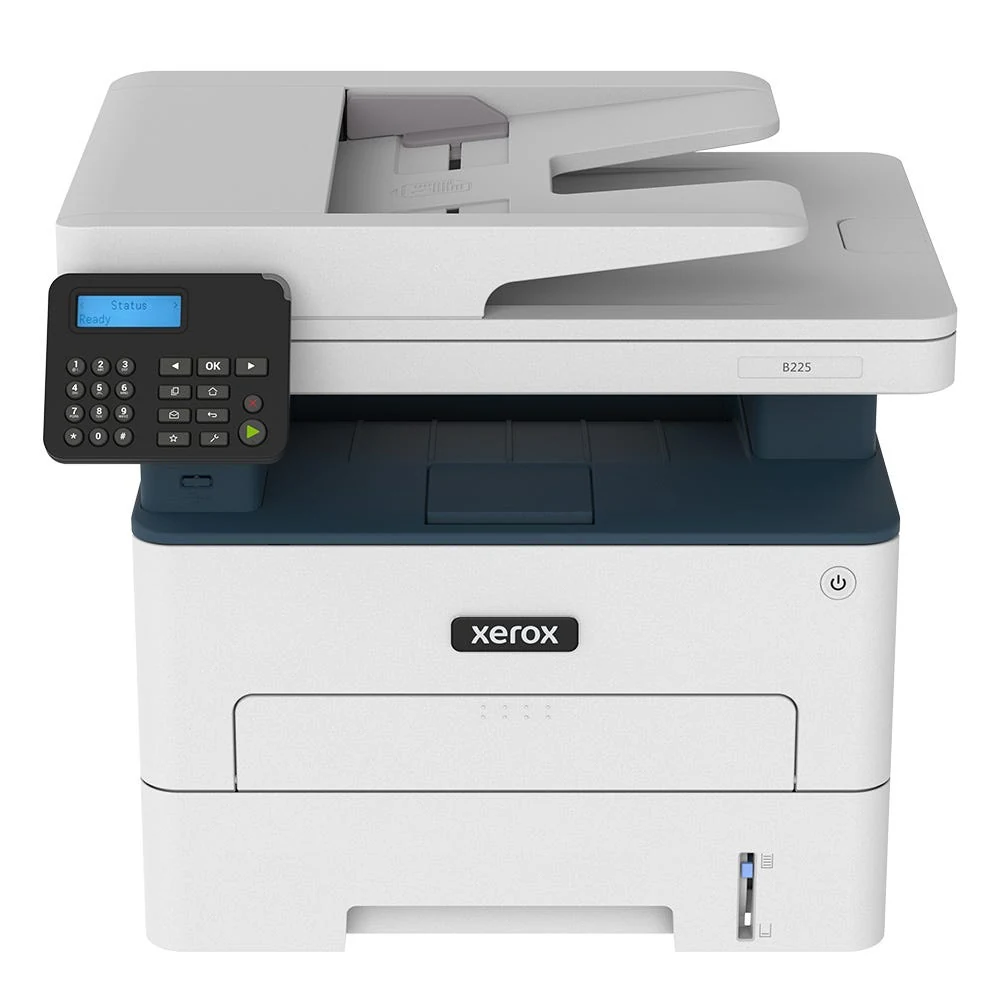
The Xerox B225/DNI combines black-and-white laser printing with copying and color scanning. Its 50-sheet feeder makes loose multipage originals more convenient than a glass-only scanner, while included USB, Ethernet and Wi-Fi give a small workspace several ways to connect a computer.
Choose it when fax is unnecessary and the ordinary workload is monochrome documents. The exact family table marks B225 fax as unavailable; B235 adds that function. Color scanning also does not mean color printing. A captured color illustration can become a color file, while a printed copy remains black and white.
Match the original to the correct scanner surface
The feeder accepts Letter, A4 and Legal originals, with a 50-sheet capacity based on 75 gsm paper and a stated 60–105 gsm media range. Load suitable loose originals face up, align their leading edges and adjust the guides to the sheet width.
The glass is the better route for a suitable book page, small item or fragile original that should not travel through the feeder. Place it face down at the marked corner. Letter and A4 fit the glass; the manual limits its length to 297 mm, or 11.7 inches. A full Legal page therefore needs the feeder or a different scanner.
Automatic print duplex is documented, but that does not establish automatic capture of both sides of an original. The read material does not establish an automatic duplex feeder mechanism for this model. For a routine centered on two-sided originals, choose a model that explicitly documents the required automatic scanning method.
Install computer scanning for the chosen connection
The US brochure explicitly supports scanning to a network- or USB-connected computer. A USB Type B cable provides the direct computer connection; install suitable current software and select the intended scanner source and output settings. This is separate from saving files to a thumbdrive, which is a B235 family addition.
The current guide's network recipe requires updated firmware, an installed printer and the computer on the same network. Windows uses Windows Fax and Scan with source selection. Mac users can use Image Capture or the scanner controls under Printers & Scanners, including the Document Feeder option.
For infrastructure Wi-Fi setup, disconnect Ethernet and set Active Adapter to Auto as instructed. A configured network-folder destination is another route and needs its own valid shortcut and access settings. Wi-Fi Direct provides separate peer printing; verify a capture arrangement independently before relying on it.
Keep a paper stack and feed special pages individually
The included main tray holds 250 ordinary sheets and the manual slot one at 20 lb/75 gsm. Both accept Letter, A4 and Legal. Those sizes also have automatic print duplex support, with the duplex unit set to Letter for Letter/Legal or to A4 for A4.
Ordinary tray and duplex stock has a 60–105 gsm range. The manual slot's 60–200 gsm range is a separate limit. Envelopes, labels and card stock use that slot one-sided, with the correct size and type selected before printing. Do not treat the one-sheet slot as another stack or assume a heavy sheet can automatically duplex.
Use a protected job type when privacy matters
A compatible Windows driver offers Print and Hold with a username and Confidential PIN. At the panel, select Held jobs, the user, Confidential and the PIN, then choose the document and Print. The March 2026 guide explicitly includes non-touch models and explains using OK to navigate.
Mac AirPrint has a separately documented four-digit PIN Printing routine. Confirm support in the actual driver or application. Basic AirPrint or Mopria from a phone is a useful shared-network printing arrangement, but does not guarantee every desktop capture or protected-job control.
Plan workload, supplies and operating room
The US brochure declares up to 36 one-sided Letter or 34 A4 pages per minute under ISO/IEC 24734. Scanner rates are separate, and color capture is slower than the stated monochrome capture figure. The maker recommends up to 2,500 printed pages monthly; 30,000 is the separate maximum duty ceiling.
Starter toner is declared at 700 pages. Replacement declarations are 1,200, 3,000 or 6,000 pages under ISO/IEC 19752, while the imaging kit is separate. Actual yield depends on the job and coverage. The body is approximately 16.4 inches wide, 14.2 deep and 13.9 high at 22 pounds. Allow additional access for the feeder, glass and paper sources, and verify the actual electrical label and current driver before installation.
Key details at a glance
| Color printing | No |
|---|---|
| Scanner | Yes |
| Copying | Yes |
| Fax | No |
| Flatbed scanner | Yes |
| Automatic document feeder | Yes |
| Automatic two-sided printing | Yes |
| Color scanning | Yes |
| Instructed envelope handling | Yes |
| Apple AirPrint | Yes |
| Mopria printing | Yes |
| Supported PIN-release printing | Yes |
| Recommended monthly maximum | 2500 pages |
| Maximum monthly duty | 30000 pages |
| Included ordinary-paper capacity | 251 sheets |
| Document-feeder capacity | 50 sheets |
| Declared one-sided mono Letter rate | 36 pages/min |
| Unit-body width | 16.4 in |
| Unit-body depth | 14.2 in |
| Unit-body height | 13.9 in |
| Unit weight | 22 lb |
| Imaging engine | laser |
Use the exact model’s instructions for operating limits, supplied equipment and version differences.
Paper, software and setup details
Print-rate conditions
US brochure print speed is up to 36 one-sided monochrome Letter or 34 A4 pages/min under ISO/IEC 24734. Scanner image rates are separate: Letter 25 monochrome/8 color ipm and A4 23/7. The B225 model page recommends up to 2,500 pages/month without a lower bound; maximum duty 30,000 is not a sustained recommendation.
Paper handling
Included ordinary input is 250 sheets in the main tray plus one in the manual slot at 20 lb / 75 gsm. Both sources support Letter, Legal and A4, also supported by automatic print duplex. Tray/duplex stock is 60–105 gsm, while manual stock has a separate 60–200 gsm range. Set the duplex unit to Letter for Letter/Legal or A4 for A4. Envelopes, labels and card stock use the manual slot one-sided; no second stack or automatic envelope duplex is established.
Scanning arrangement
The 50-sheet ADF capacity is based on 75 gsm, with a 60–105 gsm original range and Letter/Legal/A4 support. Scanner glass supports Letter/A4 and is limited to 297 mm / 11.7 in. length; Legal feeder support does not enlarge it. Both monochrome and color capture are documented, with brochure maximum 1200x1200 dpi monochrome and 600x600 color stated without assigning one resolution to every route. Automatic feeder duplex and a single-pass mechanism remain unestablished. USB and network computer scanning are explicitly supported in the US brochure.
Computer and mobile connections
Exact US DNI connections are USB Type B, 10/100 Ethernet and 802.11 b/g/n Wi-Fi. USB computer capture needs suitable installed software; it is distinct from B235’s thumbdrive port. Network computer scanning uses the same network, current firmware and an installed device; the guide describes Windows Fax and Scan or Mac Image Capture with source selection. To configure infrastructure Wi-Fi, disconnect Ethernet and use Active Adapter Auto. Wi-Fi Direct is separate peer printing, with advanced capture unestablished.
Supplies and declared yields
Supplied starter toner is declared at 700 pages. Replacement declarations are 1,200 pages for 006R04399, 3,000 for 006R04400 and 6,000 for 006R04401 under ISO/IEC 19752, subject to image coverage and mode. Imaging kit 013R00691 is a separate approximate 12,000-page item with job/media conditions. No current price or cost per page is asserted.
Software and support
Confidential Print is documented from a compatible Windows driver with username and PIN, then Held jobs > user > Confidential > PIN > job > Print at the panel. The current guide explicitly includes non-touch models using OK. Mac AirPrint PIN Printing separately specifies a four-digit code. Basic shared-network AirPrint/Mopria printing does not establish every desktop scan, duplex or PIN setting in a phone app. Workflow Central is an optional service with separate conditions.
Electrical edition and setup
The exact US B225/DNI is a print/copy/scan model; the brochure explicitly marks Fax N/A. A generic family fax chapter or optional workflow-service name does not add native fax. Actual body is 16.4 in wide, 14.2 deep and 13.9 high at 22 lb, distinct from 29 lb shipping weight. Leave room for feeder, glass, tray and cartridge access, and verify the actual electrical label and current driver.
Sources for this assessment
Find a printer for your routine.
Match color output, scanning, connections and paper handling, then compare the exact models.