
Your needs, this model
Does it fit your priorities?
Can Ethernet print color Legal documents automatically on both sides and protect them with a four-digit PIN?
Yes, with compatible current software and ordinary supported paper. The C310 guide confirms Legal print duplex and Confidential job submission/release with a four-digit PIN. Its main tray holds 250 ordinary Legal sheets, plus a one-sheet manual source.
Explore this need in the finder →Can the USB-connected C310 scan both sides of a document?
No. C310 is print-only and has no scanner. The C315’s reversing feeder is a separate model capability, not an option created by installing family software.
Explore this need in the finder →Is 901-sheet Letter input included with the Wi-Fi printer?
No. Standard input is 251 sheets at 75 gsm. The 901-sheet maximum assumes the optional 550 + 100-sheet duo tray is installed.
Explore this need in the finder →Color printing without a multifunction scanner
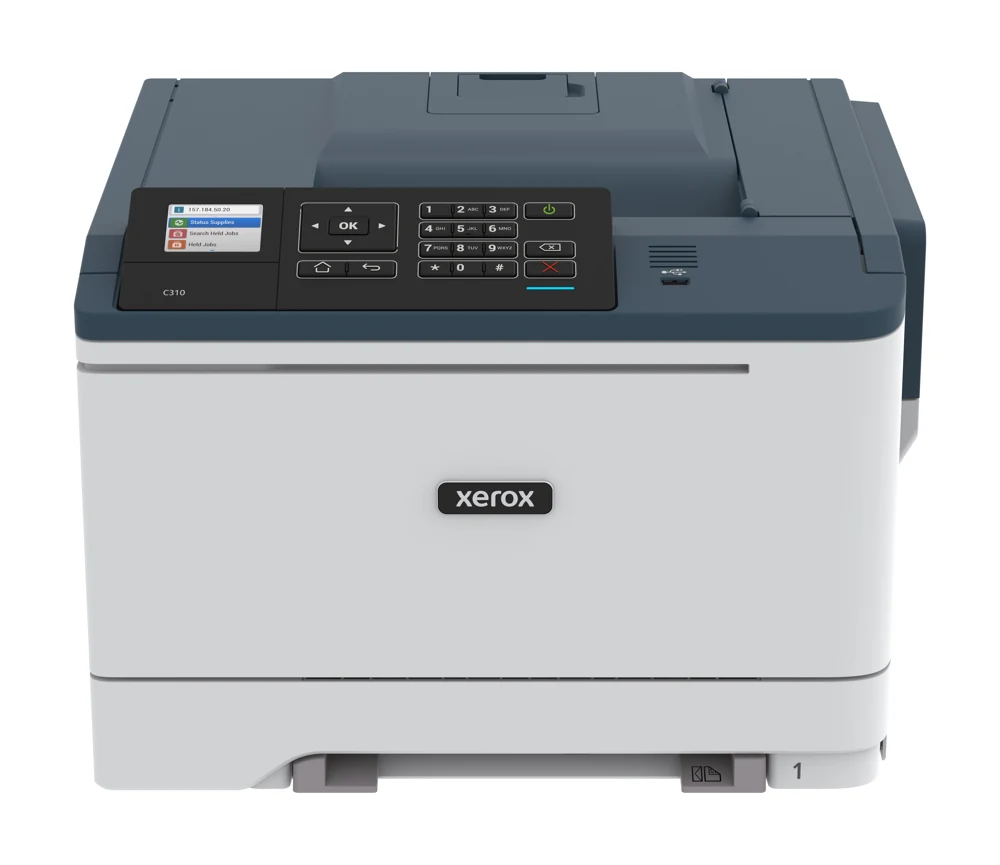
The Xerox C310 is a color laser for a document workspace that wants automatic print duplex, several connection choices and protected computer jobs. Its standard paper supply is modest: one 250-sheet tray and a single-sheet manual feeder. It makes sense when those sources suit the routine and an attached scanner is unnecessary.
Xerox's US legacy page explicitly identifies C310 as discontinued. Treat it as an earlier model to assess for a suitable existing installation or reuse, with current driver and actual unit checks. C315 is the multifunction relative; its feeder, copying and fax hardware are separate capabilities.
Count standard input before planning a larger installation
The included tray and manual feed total 251 ordinary sheet positions at 20 lb/75 gsm. Only the main tray holds a full stack. The single-sheet feeder is useful for an occasional different page, but is not another stack source.
Letter, A4 and Legal fit both included sources and the automatic duplex path. Ordinary plain paper has a documented 75–90.3 gsm range. Set the size and media type correctly at the printer and in the driver. A wider one-sided media range does not make every heavy sheet or special format suitable for duplex.
The optional duo tray combines a 550-sheet drawer and 100-sheet multipurpose feeder. Its installed total raises maximum ordinary input to 901. Confirm the hardware is actually present before planning that capacity, and allow the additional height and loading access.
Follow the route for envelopes and special pages
The exact guide permits supported envelopes in the main tray or manual feeder one-sided. Format, size and orientation still matter. For the manual feeder, the instructions place the envelope flap up against the right side of the guide, and warn against forcing a sheet into the feed opening.
Do not assume a front USB port provides direct document printing simply because it appears in a family illustration. The detailed C310 column marks Print from USB as unavailable, while the manual's flash-drive chapter is conditional on the model. USB computer printing is a different, documented arrangement.
Choose computer and mobile connections deliberately
USB Type B provides a direct computer route with suitable software. Gigabit Ethernet connects the printer to a wired network, and included 802.11 b/g/n Wi-Fi provides an infrastructure wireless option. Confirm the current driver and firmware needed for the intended features.
AirPrint and Mopria offer basic printing from compatible mobile devices on a suitable shared network. The printer can use Ethernet while a phone uses that network's wireless access. Wi-Fi Direct is a separate peer connection with its own configuration and joining procedure.
Basic mobile printing should not be treated as a promise that every app exposes all desktop paper, job-retention and passcode settings. Compare the actual application controls when a particular printing routine is essential.
Submit a Confidential job for PIN release
The C310 guide documents Windows Print and Hold and Mac Job Routing. Select Confidential, assign the username and enter a four-digit PIN before submitting the document. At the panel, navigate through Held jobs, the user, Confidential and the PIN, then select the job and Print.
The panel includes numeric and navigation buttons. Other held-job choices, including Repeat, Reserve and Verify, serve different purposes and do not automatically protect a document with a code. Use the actual Confidential routine and confirm suitable software support.
Size the workload, supplies and operating area
The US declared rate is up to 35 one-sided Letter or 33 A4 pages per minute in color or monochrome under ISO/IEC 24734. Separate duplex figures are lower. Recommended monthly print volume is up to 6,000 pages, while the 80,000-page duty ceiling is a different peak reference.
Included toner declarations are 1,500 black pages and 1,000 per color under ISO/IEC 19798. Replacement capacities differ, and imaging kits and the waste bottle are separate service items. Confirm regional cartridge compatibility and the terms of the exact supply.
The standard body is approximately 17.4 inches wide, 16.6 deep and 12.1 high at 46 pounds. Leave extra access for covers and paper loading; the manual specifies substantial front clearance. Verify the actual electrical label and installed options. Choose a multifunction model or a printer with larger included input when either requirement decides the installation.
Key details at a glance
| Color printing | Yes |
|---|---|
| Scanner | No |
| Copying | No |
| Fax | No |
| Flatbed scanner | No |
| Automatic document feeder | No |
| Automatic two-sided printing | Yes |
| Automatic two-sided scanning | No |
| Single-pass two-sided scanning | No |
| Color scanning | No |
| Instructed envelope handling | Yes |
| Apple AirPrint | Yes |
| Mopria printing | Yes |
| Supported PIN-release printing | Yes |
| Recommended monthly maximum | 6000 pages |
| Maximum monthly duty | 80000 pages |
| Included ordinary-paper capacity | 251 sheets |
| Declared one-sided mono Letter rate | 35 pages/min |
| Declared one-sided color Letter rate | 35 pages/min |
| Unit-body width | 17.4 in |
| Unit-body depth | 16.6 in |
| Unit-body height | 12.1 in |
| Unit weight | 46 lb |
| Imaging engine | laser |
Use the exact model’s instructions for operating limits, supplied equipment and version differences.
Paper, software and setup details
Print-rate conditions
US declarations are up to 35 one-sided Letter or 33 A4 pages/min in color or monochrome under ISO/IEC 24734. Separate duplex rates are 17 Letter or 16 A4 ppm. Recommended monthly print volume is up to 6,000 with no stated minimum; 80,000 maximum duty is not a sustained recommendation.
Paper handling
Standard ordinary input is a 250-sheet tray plus one-sheet manual feed at 20 lb / 75 gsm, totaling 251. Letter, Legal and A4 fit both and automatic print duplex. Ordinary plain paper is 75–90.3 gsm; heavier stock has separate media and duplex restrictions, with different general upper figures across documents. Envelopes fit the main tray or manual feeder one-sided, with exact size/type and orientation. The optional 550 + 100-sheet duo tray is excluded; 901 maximum input requires that installed expansion.
Scanning arrangement
C310 is print-only. It has no scanner, standalone copying or native fax. The C315 family column’s reversing feeder, scan destinations and fax are separate hardware, even where a software/mobile section spans both models.
Computer and mobile connections
The US C310 reference includes USB Type B, gigabit Ethernet and 802.11 b/g/n Wi-Fi. Basic AirPrint and Mopria printing can use a suitable shared network, including Ethernet at the printer. Wi-Fi Direct is a separately configured peer route. A physical Type A port or a generic manual flash-drive chapter does not establish C310 thumbdrive printing: the exact detailed table marks that function N/A.
Supplies and declared yields
Box declarations are black 1,500 and each CMY 1,000 average standard pages under ISO/IEC 19798. North American standard replacement declarations are black 3,000 / CMY 2,000; high black 8,000 / CMY 5,500. Confirm the exact regional cartridge and its Use & Return or Return Optional terms. The imaging kits and waste bottle are separate service items with condition-dependent approximate life; current and older waste-bottle references differ. No tested yield, subscription requirement or current cost per page is asserted.
Software and support
The exact C310 guide documents Windows Print and Hold or Mac Job Routing with Confidential selected, a username and four-digit PIN, followed by Held jobs > user > Confidential > PIN > job > Print at the panel. The panel has numeric and navigation buttons. Repeat, Reserve and Verify job types are different and do not necessarily use a PIN. Some print features require suitable firmware/software; confirm the current driver and intended application. Basic phone printing does not establish the whole desktop protected-job and media arrangement.
Electrical edition and setup
Earlier US base C310 reference; Xerox’s US legacy page explicitly says discontinued. Regional C310V/DNI units need their own electrical and package checks. Standard body is 17.4 in wide, 16.6 deep and 12.1 high at 46 lb. Allow substantial additional tray/cover access; the manual asks for 20 in at the front, beyond the body. Verify the actual mains label and installed options.
Sources for this assessment
Find a printer for your routine.
Match color output, scanning, connections and paper handling, then compare the exact models.