
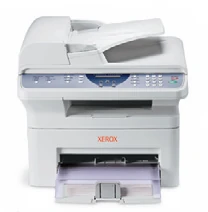
Your needs, this model
Does it fit your priorities?
Can a compatible USB computer scan color Legal originals through the feeder, copy them and use conventional fax?
Yes with the documented USB scan software and a separately configured supported analog telephone line. The 30-sheet ADF accepts Legal originals; copying and print output are monochrome. The fax line must meet the guide’s PSTN/PABX conditions, which exclude its listed DSL, VoIP and converter arrangements.
Explore this need in the finder →Can the same USB setup accept a whole Legal original on the glass when a delicate sheet cannot use the feeder?
No. The glass instructions explicitly name Letter and A4, while Legal belongs to the longer ADF route. A Legal print-paper setting or a 14-inch feeder specification cannot extend the glass. Compare a model with a separately confirmed Legal flatbed for that need.
Explore this need in the finder →Does the B model meet an essential automatic two-sided Letter printing requirement while retaining USB scanning and copy?
No. The original service specification describes manual print duplex. Page-layout tools, ID Card Copy and a document feeder do not establish an automatic output-duplex unit. Use a separately confirmed automatic-duplex model when reinserting pages is unsuitable.
Explore this need in the finder →A USB multifunction arrangement with a specific network boundary
The Xerox Phaser 3200MFP/B is an earlier monochrome laser multifunction model for a compatible USB computer setup. It combines printing, color document scanning, standalone copying and analog fax. Its scanner can preserve color information even though its paper output remains black and white.
The B suffix matters. Xerox's exact table gives B a USB interface and desktop scan destination. N adds Ethernet and network scanning, with other software differences. Do not plan a direct office-network installation around the B model simply because the family brochure discusses network functions.
Give Legal originals the correct path
The standard 30-sheet feeder supports Letter, Legal and A4 originals within its stated size and stock limits. It is useful for a set of suitable loose forms that would otherwise need separate placement on the glass.
The glass has a different limit. Its operating instructions explicitly name Letter and A4, while Legal requires the longer feeder path. A delicate Legal original that cannot use the feeder therefore needs another capture arrangement; Legal output-paper support does not solve that scanner limitation.
Use the glass for supported books, individual items and originals unsuitable for feeding. Remove other originals from the ADF because the guide gives the feeder priority. ID Card Copy asks the user to turn the card on the glass, rather than providing automatic two-sided scanning.
The original optical scan declaration is 600 by 600 dpi in color or monochrome. The 4800 enhanced figure is a different specification. Neither establishes measured quality or capture to every edge of an original.
Install the actual USB scan workflow
The guide describes TWAIN applications and a Windows Image Acquisition routine. WIA is explicitly documented for Windows XP over USB. Install compatible software and confirm the available capture source and file destination on the computer that will actually be used.
These historical instructions do not promise a current driver for every operating system. Macintosh support is marked for N in the original specifications, so it should not be borrowed for the B arrangement. A scan saved on the USB-connected computer can subsequently be handled there; that is different from N's network scan or device email functions.
Keep fax and special-media jobs coordinated
Embedded fax uses its separate telephone connection. The guide describes PSTN or a compatible PABX arrangement and explicitly excludes DSL, VoIP and Digitac converters from supported applications. Configure and verify that path before making fax an essential daily function.
The paper input is a 250-sheet main tray plus a single-sheet manual path, totaling 251 ordinary sheets at 75 gsm. The 30-sheet feeder holds originals and should not be added to the paper-input count.
An envelope routine requires suitable construction, a single item, correct driver size and type, and the manual-feed controls. In Manual Feed mode, incoming faxes are stored in memory rather than printing immediately. That is a useful operational detail for an office where special-media printing and fax reception share the same machine.
Print duplex is manual in the original service specification. A feeder, a two-sided ID-card layout or a page watermark does not establish automatic two-sided output. Fax Secure Receive also concerns received faxes and should not be mistaken for passcode-held computer printing.
Use the dated specifications for a realistic comparison
The guide declares up to 24 one-sided Letter or A4 pages per minute. The 10,000-page monthly figure is maximum duty, with no established recommended monthly ceiling in the reviewed material. Use it as a different declaration from a routine workload target.
The original guide distinguishes a 1,500-page supplied starter from sold cartridge yields, and the US brochure identifies the 3,000-page high-capacity replacement. Coverage and print mode affect those manufacturer declarations; remaining toner and current supply cost require their own checks.
For a USB computer and a supported telephone line, B offers documented capture and fax routines. If shared Ethernet scanning, automatic duplex or a Legal-size glass is essential, compare a configuration that explicitly supplies that exact function.
Key details at a glance
| Color printing | No |
|---|---|
| Scanner | Yes |
| Copying | Yes |
| Fax | Yes |
| Flatbed scanner | Yes |
| Automatic document feeder | Yes |
| Automatic two-sided printing | No |
| Color scanning | Yes |
| Instructed envelope handling | Yes |
| Maximum monthly duty | 10000 pages |
| Included ordinary-paper capacity | 251 sheets |
| Document-feeder capacity | 30 sheets |
| Declared one-sided mono Letter rate | 24 pages/min |
| Unit-body width | 17.2 in |
| Unit-body depth | 14.7 in |
| Unit-body height | 15.2 in |
| Unit weight | 24.7 lb |
| Imaging engine | laser |
Use the exact model’s instructions for operating limits, supplied equipment and version differences.
Paper, software and setup details
Print-rate conditions
The original guide explicitly declares up to 24 one-sided Letter or A4 print pages/min, with actual speed affected by the computer, software, connection, media and complexity. Color scanning does not mean color printing. The 10,000-page monthly figure is a maximum duty; no recommended monthly maximum is established. Copy speed and enhanced scan resolution are separate declarations, not measured printing quality or automatic-duplex speed.
Paper handling
The included main drawer holds 250 ordinary sheets at 20 lb, 75 gsm and the manual path takes one, totaling 251. The exact B/N table supports Letter, Legal and A4 in the main tray and within the manual path. The 30-sheet ADF holds originals and is excluded from print-paper capacity. The indexed original service table identifies print duplex as manual, so no automatic-duplex sizes are recorded. For an envelope select Manual Feeder, its exact size and type in the compatible PC print settings, load one suitable item print-face up and press Start when prompted. Follow the actual loading diagram. The envelope section gives a 75 gsm maximum and excludes unsuitable clasped, windowed, stamped, coated or self-adhesive stock. Manual Feed mode is not continuous and temporarily stores incoming faxes in memory rather than printing them immediately. Switch the normal routine appropriately instead of promising simultaneous immediate fax output during manual feeding.
Scanning arrangement
The standard 30-sheet feeder accepts original documents 142–216 mm wide and 148–356 mm long, including Letter, Legal and A4. The glass is explicitly limited to Letter/A4 in the operating instructions; its 297 mm length does not support a whole Legal original. Color optical scanning is 600 x 600 dpi; 4800 x 4800 is enhanced, not optical. The 208 mm effective image width is not a borderless or full-edge capture guarantee. USB TWAIN software and the original Windows XP WIA routine explicitly offer the glass or feeder. Network scanning, scan to email and Macintosh support are identified with N, not assumed for B. Automatic two-sided feeder capture and single-pass scanning remain unestablished; only the confirmed ordinary feeder route is recorded.
Computer and mobile connections
B includes USB 2 computer printing and scanning. N adds 10/100Base-TX Ethernet, network scanning, PostScript and the specifically marked Macintosh arrangement. The reviewed B plan uses a compatible Windows USB print/scan installation; the original WIA instructions specifically name Windows XP and do not promise compatibility with a present operating system. Standalone copying and analog fax can accompany that USB setup, but fax uses its own LINE telephone connection and configuration. Native AirPrint, Mopria, Wi-Fi, Wi-Fi Direct and computer PIN-release arrangements are not established for B.
Supplies and declared yields
The US brochure identifies high-capacity replacement 113R00730 at 3,000 standard pages under ISO/IEC 19752, subject to coverage and print mode. The original guide separately describes 2,000/3,000-page sold cartridges and a 1,500-page supplied starter on its stated ISO/5% basis. An earlier machine need not contain fresh supplied toner. The cartridge is a one-piece print system; no live price, remaining-life estimate or ownership-cost calculation is made.
Software and support
A compatible TWAIN application or the described USB WIA driver can save scans to a computer. Choose the feeder or glass according to the original document, and set the file destination in the application. ID Card Copy uses the glass and asks the user to turn the card; it is not evidence of automatic duplex scanning. Fax Secure Receive concerns received faxes, rather than a passcode-held desktop print job. Watermarks, overlays and generic security-service listings also do not establish included PIN printing.
Electrical edition and setup
This earlier US reference preserves the exact B suffix and the separately documented 110–127 VAC edition. The 220–240 VAC edition is different; check the actual rating label. The brochure and guide give a 17.2 x 14.7 x 15.2-inch body and 24.7 lb including consumables, distinct from packaging and required access space. Leave room above for originals, the ADF and cover, and for manual feed, output and service. Analog fax uses the documented PSTN or compatible PABX path. The guide explicitly excludes DSL, VoIP and Digitac converters from supported applications; USB does not replace the telephone line.
Sources for this assessment
Find a printer for your routine.
Match color output, scanning, connections and paper handling, then compare the exact models.