
Your needs, this model
Does it fit your priorities?
Can a compatible USB computer print monochrome Legal documents on both sides automatically with 251 included input sheets?
Yes. The exact model includes automatic duplex, and the guide specifically lists Legal for two-sided output on 75–90 gsm paper. Its base input is a 250-sheet drawer plus a single-sheet manual feed; an extra 250-sheet drawer is optional. Legal paper requires the tray to be extended correctly.
Explore this need in the finder →Can the DN serve Ethernet computer printing for a 3,000-page month, with Letter duplex and occasional instructed envelope jobs?
Yes in the documented compatible desktop driver arrangement. DN includes Ethernet, the indexed US evaluator recommends up to 4,000 monthly pages, and the guide confirms the separate duplex and one-envelope manual-feed routines. The 30-ppm declaration is for one-sided Letter output, not duplex timing.
Explore this need in the finder →Can a mobile-first office assume native AirPrint and PIN-held release because the 3250/DN has Ethernet and watermark settings?
No qualifying arrangement is established for those requirements. The reviewed sources support desktop computer printing, while native AirPrint and PIN-held release remain unknown. A CONFIDENTIAL watermark changes the page and does not prove a job is held for a passcode.
Explore this need in the finder →A straightforward printer for compatible computer workflows
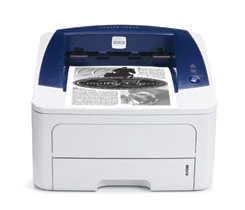
The Xerox Phaser 3250/DN fits a small wired setup producing black-and-white documents from compatible computers. Automatic two-sided printing is standard, and the DN configuration includes Ethernet as well as USB. The related D configuration has USB without the DN network interface.
The deciding limitation is the age and scope of the documented workflow. These original materials describe desktop drivers and wired printing. A network socket does not by itself establish native mobile printing, PIN-held release or a scanner.
This is an earlier US model reference, based on the dated configuration table and original operating instructions. Check the actual electrical label, software compatibility and unit condition before planning an installation.
Count the main drawer and manual feed separately
The included drawer holds 250 ordinary sheets at 75 gsm. A separate manual feed takes one sheet, giving 251 included input sheets. The optional 250-sheet second drawer is additional equipment.
This distinction matters for a workgroup expecting to leave several stocks loaded. A single-sheet path can accommodate an occasional special item, but it does not act like another full drawer. The optional tray also needs to be physically present before its capacity becomes part of a normal routine.
Letter, Legal and A4 are supported ordinary sizes. Legal paper requires extending the drawer guides correctly. Plan working space around that extended arrangement, rather than judging the machine solely from its compact closed-body measurements.
Set the duplex job and envelope job differently
The guide specifically confirms automatic duplex for Letter, Legal and A4 within its 75–90 gsm paper range. Select the correct media and choose long-edge or short-edge binding in the compatible driver according to how the finished pages will be read.
The same permission does not extend to labels, envelopes, transparencies or thick paper. A recurring ordinary-paper duplex preset can be useful, but a special-media job needs its own source, size and type settings.
For envelopes, use the manual feeder one suitable item at a time and follow the guide's loading diagram. The instructed routine uses the appropriate driver selection and manual-feed controls. Envelope construction and condition matter; the one-sheet path does not make windowed, clasped or incompatible adhesive stock suitable.
Make the network configuration deliberate
The DN's 10/100Base-TX Ethernet interface supports computer sharing through the documented network setup. The original guide explains network addressing, a configuration page and the relevant management tools. A compatible USB computer provides a separate direct printing arrangement.
The original Windows, Macintosh and Linux instructions belong to their period. Verify the driver that will actually be used on a present computer. A utility mentioning Bonjour should not be treated as native AirPrint certification, and the model is not given an assumed Wi-Fi or Wi-Fi Direct arrangement here.
Watermarks, overlays and booklet layouts can help prepare documents. They do not establish passcode release. An office needing confidential held jobs should compare a configuration with an explicitly documented release mechanism.
Use monthly and cartridge figures on their stated basis
The US material declares up to 30 one-sided Letter pages per minute, with 28 for A4. The guide gives separate automatic-duplex image rates. The indexed US evaluator recommends average monthly output up to 4,000 pages, distinct from the 30,000-page duty maximum; regional material has a different recommendation.
Those figures are manufacturer declarations, not measured throughput or a reason to plan sustained work at the duty maximum. Include refilling and the manual nature of special-media jobs when assessing a daily workload.
The US replacement cartridges have declared yields of 3,500 and 5,000 pages under ISO/IEC 19752. The guide says the supplied starter has a lower yield, so the sold cartridge rating should not become an assumed fresh starting amount. Coverage and print mode also affect the declaration.
If original-document capture or a native mobile workflow is essential, compare a separately confirmed multifunction or mobile-printing model. For an established wired computer environment, the 3250/DN's useful combination is monochrome output, standard duplex and clearly defined paper paths.
Key details at a glance
| Color printing | No |
|---|---|
| Scanner | No |
| Copying | No |
| Fax | No |
| Flatbed scanner | No |
| Automatic document feeder | No |
| Automatic two-sided printing | Yes |
| Automatic two-sided scanning | No |
| Single-pass two-sided scanning | No |
| Color scanning | No |
| Instructed envelope handling | Yes |
| Recommended monthly maximum | 4000 pages |
| Maximum monthly duty | 30000 pages |
| Included ordinary-paper capacity | 251 sheets |
| Declared one-sided mono Letter rate | 30 pages/min |
| Unit-body width | 14.3 in |
| Unit-body depth | 14.5 in |
| Unit-body height | 9.4 in |
| Imaging engine | laser |
Use the exact model’s instructions for operating limits, supplied equipment and version differences.
Paper, software and setup details
Print-rate conditions
Original US material declares up to 30 one-sided Letter pages/min and 28 A4. The user guide separately gives automatic-duplex rates of 14.5 images/min for Letter and 14 A4. The indexed US evaluator recommends average monthly output up to 4,000 pages, distinct from the 30,000 maximum duty. A regional evaluator lists 2,000; this assessment uses the US edition. No inferred recommendation from duty, enhanced-resolution number or measured performance claim.
Paper handling
The included main drawer holds 250 ordinary sheets at 75 gsm and the separate manual feed takes one sheet, totaling 251. Letter, Legal and A4 are explicitly supported in both ordinary paths. Legal requires extending the tray guides. The exact guide confirms Letter, Legal and A4 automatic duplex on 75–90 gsm stock; labels, envelopes, transparencies and thick paper are not given that permission. The optional 098N02194 drawer adds 250 sheets and is excluded from the base count. A conflicting generic guide claim of three additional drawers is not adopted over the exact US one-tray configuration. For envelopes use Manual Feeder, one suitable envelope at a time, select the size and type in the compatible driver, load the print face up and follow the actual feed diagram. The guide calls for well-creased flat envelopes of compatible construction and 75–90 gsm, without clasps, windows, self-adhesive seals or synthetic lining. Manual feeding uses the Start/Stop routine described in the guide; no envelope duplex.
Scanning arrangement
The exact US document describes a black-and-white laser printer, without an original-document scanner, copier, feeder, glass or fax. Linux software called MFP Driver does not add those physical functions. Manual feed and the duplex unit handle output paper, not original-document capture.
Computer and mobile connections
The exact DN adds included 10/100Base-TX Ethernet to USB 2 computer printing. D has USB only. Configure a suitable network address and compatible driver for Ethernet, or the supported direct computer driver for USB. The guide explains Windows, Macintosh and Linux routines from its period; verify software for the operating system actually used. No included Wi-Fi or Wi-Fi Direct route is established. Native AirPrint, Mopria and PIN-held release are unestablished and remain unknown, rather than being inferred from a network port, Bonjour utility, watermark or generic software name.
Supplies and declared yields
Original US replacement print cartridge 106R01373 declares 3,500 standard pages and 106R01374 5,000 under ISO/IEC 19752, with coverage and print-mode conditions. The guide explicitly says the supplied starter has a lower yield, without establishing its exact capacity here. A sold cartridge yield is not the supplied amount or remaining toner in an earlier machine. No current price, cost per page, cartridge condition or customer-experience claim.
Software and support
For supported computer printing select the actual source, paper size and media type together in the driver. Automatic duplex offers long-edge or short-edge binding; choose the orientation needed by the finished document. Saved driver Favorites can retain a recurring arrangement. Poster printing, overlays and a CONFIDENTIAL watermark are page-layout features, not evidence of PIN-held release. The original network guide describes SetIP and the embedded CentreWare management interface; it does not turn Ethernet into a native mobile-print protocol.
Electrical edition and setup
This earlier reference uses the dated US 3250/DN part-number table with the guide’s separately documented 110–127 VAC electrical edition. The alternative 220–240 VAC edition is not universal-voltage proof; check the rating label. The indexed US evaluator gives the base body as 14.3 x 14.5 x 9.4 inches, with 364 x 369.4 x 239.2 mm. The user-guide dimensional row has mismatched millimeters and inches, so that row is not used. Weight remains unknown here. Allow additional room for Legal tray extension, manual feeding, output, cables and maintenance. The historical 2008/2012 evidence establishes an earlier reference; a URL failure alone is not a discontinued or nonexistent finding.
Sources for this assessment
Find a printer for your routine.
Match color output, scanning, connections and paper handling, then compare the exact models.