
Your needs, this model
Does it fit your priorities?
Can a compatible USB computer automatically print both sides of Legal documents and use the instructed one-at-a-time envelope feed?
Yes. The 3260DI duplex-unit table explicitly includes Legal, and the manual feed slot provides the separate one-sided envelope routine with the specified loading and driver settings. No Legal sheet-capacity threshold is assumed; the 250-sheet main-tray rating is specifically confirmed for Letter/A4.
Explore this need in the finder →Can a compatible Apple device use native AirPrint over the configured Wi-Fi network?
Yes with IPP and Bonjour/mDNS enabled and the required network discovery and subnet arrangement. Native AirPrint is documented for 3260DI. This answer does not promise every desktop-driver duplex, envelope or PIN control in the mobile print dialog.
Explore this need in the finder →Can the 3260DI connect directly to the office network through an Ethernet cable?
No. The exact DI interface list contains Wi-Fi and USB, while DNI adds Ethernet. A shared family rear-view drawing or a network-security feature does not give the DI a wired network port. Choose the exact Ethernet-equipped model if that connection is essential.
Explore this need in the finder →Automatic duplex without a wired network port
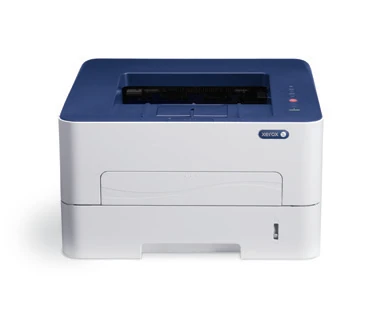
The Xerox Phaser 3260DI suits an individual or small team whose main job is monochrome printing. It includes automatic two-sided printing, USB and Wi-Fi, plus a distinct Wi-Fi Direct peer connection. It has no scanner, copier or fax hardware.
The important suffix distinction is Ethernet. DNI adds the wired network interface; DI does not. That makes the DI a reasonable historical reference for a USB desk or supported wireless setup, while an office requiring a direct Ethernet cable needs a different confirmed model.
The US Xerox legacy shop marks Phaser 3260 discontinued. Check the exact North American edition, condition and compatible computer software of an individual unit. The original documentation is useful for understanding its routines, without establishing present availability.
Separate the paper drawer from the manual slot
The main drawer is rated for 250 sheets, with a separate one-sheet manual feed slot. That slot is useful when an occasional envelope or different stock should not replace the contents of the main drawer. It is not a second unattended paper tray.
The guide specifically limits the main drawer's 250-sheet statement to Letter and A4 at its stated paper weight, and says other media sizes hold fewer sheets. Legal paper fits, but its exact capacity remains unestablished here. A buyer needing both Legal and a particular minimum capacity should resolve that condition directly.
Automatic duplex independently supports Letter, Legal and A4 on the listed media. Heavier specialty stock and envelopes have separate restrictions. Selecting a legal-size page in an application is also different from loading matching paper and choosing the correct source in the driver.
Choose the connection for the actual client
USB provides a direct computer-printing route. Wi-Fi lets the DI join a supported wireless network, with the network name and credentials configured. Wi-Fi Direct is a separate peer arrangement for a compatible device when a router is not part of the connection.
Native AirPrint is documented for a suitable shared wireless-network setup. Discovery depends on the relevant protocols and network arrangement. It should be assessed separately from desktop-driver controls, rather than assuming every paper, duplex or confidential-release option appears in a mobile application's print dialog.
The historical brochure also names other mobile services. Those names are not a promise that an old cloud service remains available. Decide which supported local route will actually be used before making mobile printing an essential requirement.
A print-only device beside multifunction relatives
The shared brochure places Phaser 3260 beside WorkCentre 3215 and 3225. Those WorkCentre models add scanning, copying and fax. Their feeder, glass, scan resolution and fax-receive functions do not belong to the shorter Phaser body.
This matters because a shared software bundle may contain scanning tools. Software names do not provide a physical scanner. If paper originals regularly need to become computer files, compare a confirmed multifunction model or budget for a separate scanner.
Similarly, network security and a Confidential watermark should not be treated as proof that a print job can be held for PIN release. That specific release routine is not established here. Choose a separately documented secure-print arrangement when unattended output is a concern.
Read speed and supplies as separate declarations
Xerox declares up to 29 one-sided Letter pages per minute and 28 A4. Automatic-duplex output has separate lower figures in the guide. The brochure's enhanced image-quality number is different from physical resolution, and these declarations are not measured print-quality or timing results.
The 30,000-page monthly duty figure is a maximum, explicitly distinguished from regular sustained output. It does not supply a recommended monthly workload. An office planning longer recurring runs should establish that recommendation and the refill routine separately.
The original US starter toner is declared at 1,500 pages. Standard replacement toner and the 3,000-page high-capacity cartridge have distinct US part numbers and stated ISO yield conditions. The imaging drum is a separate approximately 10,000-page component; changing toner does not replace it.
Allow room for more than the closed body
The listed body is 14.5 by 13.2 by 8.4 inches and 16.8 lb. Leave additional room for extended paper, the manual slot, rear output, cables and ventilation. For mainly Letter paperwork, the DI's useful combination is automatic duplex and wireless access in a print-only body. For Ethernet, original-document capture or confirmed PIN release, use an alternative whose exact configuration establishes those needs.
Key details at a glance
| Color printing | No |
|---|---|
| Scanner | No |
| Copying | No |
| Fax | No |
| Flatbed scanner | No |
| Automatic document feeder | No |
| Automatic two-sided printing | Yes |
| Automatic two-sided scanning | No |
| Single-pass two-sided scanning | No |
| Color scanning | No |
| Instructed envelope handling | Yes |
| Apple AirPrint | Yes |
| Maximum monthly duty | 30000 pages |
| Included ordinary-paper capacity | 251 sheets |
| Declared one-sided mono Letter rate | 29 pages/min |
| Unit-body width | 14.5 in |
| Unit-body depth | 13.2 in |
| Unit-body height | 8.4 in |
| Unit weight | 16.8 lb |
| Imaging engine | laser |
Use the exact model’s instructions for operating limits, supplied equipment and version differences.
Paper, software and setup details
Print-rate conditions
Declared one-sided monochrome speed is up to 29 Letter or 28 A4 pages/min. The guide separately declares automatic-duplex output up to 13 Letter or 12 A4 pages/min. No exact Legal rate or measured result is supplied here. Maximum monthly duty is 30,000, explicitly not expected as a sustained regular workload; a recommended monthly volume remains unestablished. Physical 600 x 600 dpi and enhanced image-quality figures are different claims.
Paper handling
Included input consists of one 250-sheet main tray plus a one-sheet manual feed slot, totaling 251 ordinary sheets only on the confirmed Letter/A4 capacity basis. The guide specifies the main 250 at 80 gsm for Letter and A4 and says other media sizes hold fewer sheets. Legal fits the stated main and manual size ranges, but its exact capacity is unestablished. Do not use the generic tray-capacity headline to satisfy a Legal minimum-capacity requirement. Automatic duplex independently supports Letter, Legal and A4 on the listed plain, thin, thick or recycled stock with their separate limits; the duplex unit states a 60–120 gsm range. The manual slot is one sheet, not a second unattended paper drawer. For an envelope, remove curl, feed short edge with flap facing down, adjust guides and set driver size/type and Manual Feeder source; close the slot afterward. Use the rear output if instructed for curl or special media, and do not run duplex with the rear door open. Avoid clasped, windowed, coated, self-adhesive or damaged envelopes.
Scanning arrangement
Phaser 3260 is a print-only monochrome laser printer. The family brochure explicitly assigns copying, color scanning, the 40-sheet feeder and fax to WorkCentre 3215/3225, with scan/fax not applicable in the Phaser columns. A shared software bundle named Scan to PC Desktop does not add a physical scanner, glass or feeder to 3260DI.
Computer and mobile connections
The exact DI includes USB2 and Wi-Fi b/g/n; Ethernet belongs to DNI and is not a DI route. Install a compatible computer print driver for normal desktop jobs. The documented Wi-Fi setup uses a reachable supported wireless network and its credentials. Wi-Fi Direct is a distinct standard peer arrangement: in CentreWare Internet Services configure Wi-Fi Direct, device name, IP address, group-owner setting and network key, then apply it. A router is not required for that peer link. Driver and paper controls in the peer client remain separately unestablished here; only basic peer printing is modeled. For native AirPrint use the supported same-network/subnet arrangement with IPP and Bonjour/mDNS enabled and compatible application discovery. That route is separate from USB or desktop-driver duplex settings. Native Mopria and advanced AirPrint paper, envelope and passcode controls are unestablished.
Supplies and declared yields
The original US package includes toner declared at 1,500 pages. Sold US standard toner 106R02775 is declared at 1,500 and high-capacity 106R02777 at 3,000 under ISO/IEC 19752, with yield dependent on image, coverage and print mode. Drum 101R00474 is a separate approximately 10,000-page consumable under the maker's Letter/A4 media and usage conditions. A shared-guide generic replacement yield does not erase these regional cartridge choices. A two-cartridge 6,000-page bundle is not one 6,000-page cartridge. No current prices, cost per page or remaining-life claim.
Software and support
The US sheet lists PCL5e/PCL6 and PostScript3 emulation, printer status and stored driver settings. In the supported Windows driver, Basic contains long-edge and short-edge two-sided layout; Paper sets the actual output size, stock type and feed source. A Confidential watermark or network access/security setting does not establish PIN-held printing, which remains unconfirmed. AirPrint is native software functionality; historical PrintBack and Google Cloud Print listings are not promises of presently available services. Historical OS lists do not establish present driver support.
Electrical edition and setup
The original North American reference positively lists 3260/DI under 110 V parts; the US brochure separately describes 110–127 V and 220–240 V electrical editions. Check the actual unit rating and exact DI suffix. The current US Xerox legacy shop marks Phaser 3260 discontinued. Listed printer body is 14.5 x 13.2 x 8.4 inches and 16.8 lb, separate from the taller and heavier WorkCentre scanner models. Allow room for extended Legal paper, open manual slot and rear output, cable access and ventilation. The stated body footprint is not the full operating envelope. The older guide separately gives 14.4 x 13.17 x 8.4 inches and 16.31 lb net with consumables. The later US brochure basis is retained here; these figures are not carton measurements.
Sources for this assessment
Find a printer for your routine.
Match color output, scanning, connections and paper handling, then compare the exact models.