
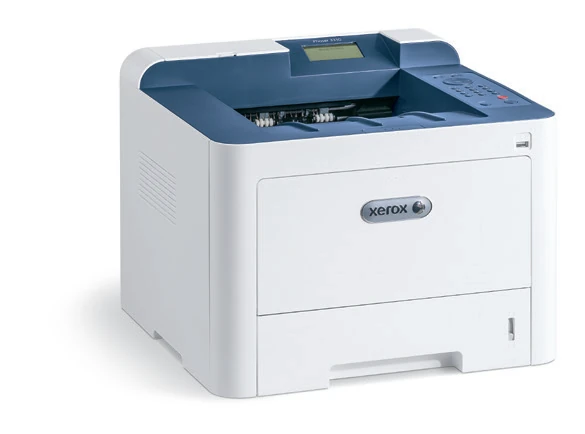
Your needs, this model
Does it fit your priorities?
Can an office Wi-Fi computer print monochrome Legal on both sides with 300 included sheets for 5,000-page months?
Yes, using the configured office Wi-Fi connection and a compatible computer driver. Both included input paths accept Legal, and the guide separately confirms Legal automatic duplex. The 300-sheet ordinary-paper capacity uses 75 gsm stock. Recommended regular output reaches 6,000 monthly pages; the 80,000 duty declaration is separate.
Explore this need in the finder →Can a supported Android device use Mopria while the printer is on the wired office network?
Yes. The exact administrator guide explicitly allows an Ethernet-connected printer, with a compatible Mopria Print Service on the shared network and suitable subnet discovery. This native mobile workflow does not establish every full computer-driver paper or passcode option.
Explore this need in the finder →Can this Phaser 3330/DNI scan and copy originals through its Wi-Fi connection?
No. The exact Phaser 3330 brochure column marks scanning and copying as not applicable. Wi-Fi is included for this printer, but it does not add the scanner or feeder hardware found on the separate WorkCentre 3335 and 3345 models.
Explore this need in the finder →An included wireless connection for a print-only office
The Xerox Phaser 3330/DNI suits a small workgroup that needs monochrome documents and wants a choice of office Wi-Fi, wired Ethernet or a direct USB computer connection. Automatic two-sided printing is included, and the standard main tray plus bypass provide 300 ordinary input sheets.
The deciding tradeoff is that it has no scanner or copier. The WorkCentre 3335 and 3345 share the brochure but contain different hardware. For a desk that must capture originals as well as print them, choose a documented multifunction model with the required scanner connection and feeder routine.
This is an earlier reference. Xerox's exact family page says the Phaser 3330 is no longer sold as new. The original US configuration list confirms the DNI designation, separately from the Turkish page's 3330V/DNI regional code. Check the physical rating label when evaluating an individual unit.
Set up ordinary Wi-Fi and peer printing separately
The included Wi-Fi connection joins an existing wireless network. Before starting the printer's wireless wizard, obtain its exact network name, security type and passphrase. The original instructions distinguish letter case in the name and password. A matching network name alone does not establish a successful authenticated connection.
Ethernet provides another office-network route, using a suitable cable and network port. CentreWare Internet Services then exposes printer settings through its network address. A direct USB connection serves an individual computer through a compatible driver, while the front flash-drive socket supports a separate walk-up printing routine.
Wi-Fi Direct is available for supported peer devices, but the administrator guide says it is disabled by default. Its configuration has a device name, address and network key, with a separate group-owner setting. Enabling that peer connection is different from joining the office Wi-Fi network.
Letter and Legal duplex are explicitly documented
The included main tray holds 250 sheets and the bypass 50 at the specified 20 lb, 75 gsm basis. Both accept Letter, Legal and A4. The original guide separately lists all three for automatic two-sided printing, so ordinary Legal duplex is supported rather than inferred merely from a Legal input claim.
Select the actual loaded size, paper type and source in the driver, then choose the required two-sided page-turning layout. Follow the duplex paper-type and weight table. The bypass's wider one-sided media range does not make every heavy sheet suitable for the duplex path.
An additional 550-sheet drawer raises a separately equipped machine to 850 sheets. It is an option, not part of the 300-sheet base. A photograph showing the extra drawer therefore needs to be read alongside the actual installed configuration.
Use the bypass for envelopes
The original envelope instructions restrict this job to the bypass. Use flat paper envelopes and select Envelope in the driver. Avoid windows, metal clasps, padded construction and the prohibited adhesive types listed in the guide.
Load with the print side facing up, flaps closed and down, and the flap to the left. Adjust the guides to the edges, then verify the actual size and type at the panel. This orientation is model-specific; a loading diagram from a different Xerox printer may put the flap on the other side.
Keep envelopes to a one-sided routine. Their construction and feed instructions are separate from the 50-sheet ordinary-paper bypass rating.
Check passcode policy and mobile discovery
Secure Print is listed among the included security functions. The administrator guide provides its minimum-passcode-length setting under CentreWare's printing services. Use a compatible driver and the office's configured job permissions for supported held jobs.
The separate held-job timeout policy can delete uncollected jobs. Confirm that policy when a document must wait for its recipient. Optional card readers and NFC enablement kits are different additions; the presence of a card-reader bay does not establish that the reader is installed.
AirPrint and Mopria require their appropriate protocols, compatible devices and shared-network discovery. The exact guide explicitly allows the printer to use Ethernet while a mobile device uses the office network. AirPrint depends on HTTP, IPP and Bonjour; Mopria requires its compatible Print Service. Check application controls before relying on a particular paper or held-job option.
Separate routine workload, toner and drum life
The US table declares up to 42 one-sided Letter pages per minute, with separate A4 and Legal rates of 40 and 34. Duplex figures are 21 Letter, 20 A4 and 17 Legal pages per minute. These are manufacturer declarations. The recommended regular monthly maximum is 6,000 pages; 80,000 is a separate duty figure.
The supplied US toner is declared at 2,600 pages. Replacement capacities and the approximately 30,000-page drum have distinct identities and yield conditions. Finally, allow working clearance around the 14.4 by 14.4 by 11.4 inch body for loading, the open bypass, rear access and ventilation.
Key details at a glance
| Color printing | No |
|---|---|
| Scanner | No |
| Copying | No |
| Fax | No |
| Flatbed scanner | No |
| Automatic document feeder | No |
| Automatic two-sided printing | Yes |
| Automatic two-sided scanning | No |
| Single-pass two-sided scanning | No |
| Color scanning | No |
| Instructed envelope handling | Yes |
| Apple AirPrint | Yes |
| Mopria printing | Yes |
| Supported PIN-release printing | Yes |
| Recommended monthly maximum | 6000 pages |
| Maximum monthly duty | 80000 pages |
| Included ordinary-paper capacity | 300 sheets |
| Declared one-sided mono Letter rate | 42 pages/min |
| Unit-body width | 14.4 in |
| Unit-body depth | 14.4 in |
| Unit-body height | 11.4 in |
| Unit weight | 23.37 lb |
| Imaging engine | laser |
Use the exact model’s instructions for operating limits, supplied equipment and version differences.
Paper, software and setup details
Print-rate conditions
US one-sided monochrome figures are up to 42 Letter, 40 A4 and 34 Legal pages/min. The separate automatic-duplex table gives 21 Letter, 20 A4 and 17 Legal. Recommended regular monthly throughput reaches 6,000; 80,000 duty is a separate maximum not expected to be sustained. First-page timing has its own ready-state/USB condition and is not the continuous print rate. No hands-on speed claim.
Paper handling
Included main tray 250 and bypass 50 total 300 ordinary sheets at 20 lb, 75 gsm. Both support Letter, Legal and A4 in the original guide, which separately lists those automatic-duplex sizes. Optional 550-sheet drawer raises a separately equipped total to 850 and is excluded from the base. Main-tray one-sided stock is 60–163 gsm; bypass supports listed types up to 220 gsm. Follow the narrower duplex paper-type and weight table rather than carrying every one-sided stock into automatic duplex. Envelopes use the bypass only and print one side. Use paper envelopes without windows, metal clasps, padding, heat-activated glue or press-and-seal flaps. Load print side up with flaps closed/down and the flap to the left, set guides, and match size/type in panel and driver. Exact envelope stack count unestablished.
Scanning arrangement
The exact Phaser 3330 brochure table marks scanning, copying and fax not applicable. There is no glass, feeder, color scanner or automatic capture of two-sided originals. The WorkCentre 3335 feeder and WorkCentre 3345 reversing feeder belong to separate machines in the family brochure. A generic Print and Scan software listing does not add scanner hardware.
Computer and mobile connections
Included USB2 Type B computer connection, Gigabit Ethernet and Wi-Fi. The original guide says the configured Wi-Fi network offers the same network access and services as wired networking. For the wizard, obtain the exact case-sensitive SSID, security type and passphrase. A direct USB connection needs a compatible computer driver and does not provide CentreWare Internet Services. Front flash-drive printing is a different routine and can be disabled by the administrator. Wi-Fi Direct is a distinct supported peer-print route, disabled by default. It needs its separately enabled name, network key and group configuration; do not treat it as automatic membership in the office LAN.
Supplies and declared yields
The original supplied US standard toner is declared at 2,600 pages. US replacement 106R03620 is 2,600, 106R03622 is 8,500 and 106R03624 is 15,000 standard pages under ISO/IEC 19752, depending on image, coverage and print mode. Drum 101R00555 is approximately 30,000 Letter/A4 pages at 75 gsm, with media, orientation and usage conditions. Toner and drum are separate items. Regional page codes 03621/23/3773 are not substituted for the US list. No current price, remaining-life or cost-per-page promise.
Software and support
Included Secure Print is positively listed in the exact specification. The administrator guide configures its minimum passcode length at CentreWare Properties, Services, Printing, Secure Print. Supported jobs use the compatible driver and configured job permissions. The separate Held Job Timeout policy can delete uncollected jobs; verify this policy before relying on retained output. The reviewed material does not establish an exact ordinary-user panel release sequence, digit limit, or direct-USB PIN workflow, so none is invented. Optional NFC enablement and USB card-reader systems are separate. AirPrint requires HTTP, IPP and Bonjour/mDNS, suitable subnet discovery and compatible applications. Mopria requires its enabled service, compatible Print Service and shared network. Both explicitly permit a printer connected through Ethernet. Native mobile and Wi-Fi Direct plans do not borrow full-driver paper, PIN or envelope controls. Historical cloud services and OS lists do not guarantee present compatibility.
Electrical edition and setup
The inherited row left the configuration code unverified. The original US Customer Rebates model table independently lists Phaser 3330 DNI. US detailed specifications identify North America 110–127 V versus Europe 220–240 V. The inherited Turkish maker page identifies the different regional 3330V/DNI and does not establish a US electrical edition. Check the actual suffix and rating label. The manufacturer now says the exact family is no longer sold as new. The unpackaged body is 14.4 x 14.4 x 11.4 inches and 23.37 lb; packaged 28.31 lb is distinct. Leave room for loading, the open bypass, rear duplex access, cables and ventilation.
Sources for this assessment
- Original Xerox US Phaser 3330 and WorkCentre 3335/3345 brochure, March 2018
- Xerox Turkish exact Phaser 3330 configuration reference
- Original Xerox US customer configuration list, April–June 2019
- Original Xerox US Phaser 3330 detailed specifications, March 2018
- Original Xerox Phaser 3330 System Administrator Guide, version 3.0, October 2019
- Original Xerox Phaser 3330 User Guide, September 2016, reproduced actual pages
- Current exact Xerox Phaser 3330 family reference
Find a printer for your routine.
Match color output, scanning, connections and paper handling, then compare the exact models.