
Your needs, this model
Does it fit your priorities?
Can the base USB D scan ordinary Legal feeder originals and automatically print two-sided Legal with 200 included sheets?
Yes with the compatible TWAIN application, installed scan driver and D duplex unit enabled in the print driver. The feeder explicitly accepts Legal, and the paper table confirms Legal print duplex from the included 200-sheet input. Fax, if used, needs its own configured telephone connection.
Explore this need in the finder →Can the Ethernet email arrangement scan color Legal originals through the feeder?
No. The original network ADF instructions explicitly allow gray or black-and-white only because of memory limits. The color network route uses the glass, whose route-specific Legal size is not established here. Color capability from another scan route cannot satisfy this exact combination.
Explore this need in the finder →Can the Ethernet arrangement still capture ordinary monochrome Legal feeder pages for saving on a computer?
Yes through the documented scan-to-email arrangement, with a compatible configured SMTP server, recipient mailbox and attachment retrieval on the computer. The ADF accepts Legal and supports gray/black-and-white email. Email authentication is unsupported, so the actual mail path must be checked rather than assumed.
Explore this need in the finder →D adds two-sided output, with a separate scan decision
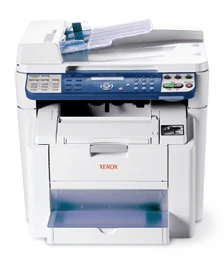
The Xerox Phaser 6115MFP/D is an earlier color laser multifunction printer with included automatic two-sided output. It also provides a 50-sheet original feeder, USB computer access, Ethernet and embedded fax. The D suffix adds the print duplex unit that is optional on N.
Its most important qualification concerns scanning. Network feeder email is limited to gray or black-and-white, while color network capture uses the glass. A general color-scanner headline therefore does not describe every original path and connection arrangement.
Choose USB application capture or configured email
The original guide shows glass and feeder loading for direct USB scanning through a compatible TWAIN application. Install the actual scanner driver, choose the source and settings in the application, and save the resulting image to its intended destination. This differs from simply pressing the network scan button.
The feeder explicitly accepts originals through Legal within its supported size and weight range. It helps with loose multipage documents, while the glass provides a physical route for unsuitable originals. Legal support in the feeder should not be used to guarantee the same full-size glass area.
Network scanning uses an SMTP mail server. Configure the sender, server, port and recipient, then retrieve and save the attachment on the intended computer. The evaluator says email authentication is unsupported, so a present office mail service should not be assumed compatible without checking its actual requirements.
For the network feeder route, the guide explicitly restricts the color choice to gray or black-and-white because of memory limits. Its glass procedure offers Color. Those two arrangements remain distinct: the glass's color choice cannot be combined with the feeder's Legal handling to invent color Legal feeder email.
Count the included tray before considering expansion
The base machine includes a 200-sheet multipurpose input. The ordinary-paper guide makes capacity dependent on paper weight and its fill line. Letter, Legal and A4 are explicitly supported for automatic print duplex with the installed D unit and permitted stock.
Enable that unit in the compatible print driver and choose the correct media and binding option. Two-sided copy output is also documented, but it does not establish an automatically two-sided original feeder. Printing both sides and capturing both original sides are different tasks.
The optional 500-sheet feeder comes in Letter- or A4-size versions. The advertised 700-sheet total includes that extra hardware, and its capacity should not be counted as a Legal expansion. The feeder's 50 originals and output bin's 100 sheets are also separate counts.
Envelope work includes a fuser adjustment
Suitable envelopes use Tray 1 only, up to ten depending on thickness, with one-sided output and the printable face up. Long-edge and short-edge flaps have different loading directions in the guide. Select the actual envelope type, size and source.
This model also requires its specific fuser-separator adjustment for envelopes. Follow the guide's access sequence, raise both green levers and restore them down after the envelope job before returning to ordinary paper. Treating envelopes as an unchanged plain-paper load misses a necessary operating step.
Use the actual software, speeds and supply basis
Printing is host-based and needs compatible model-specific software. MFP ControlCentre is a Windows/USB management tool, while CentreWare IS serves network management. Neither name by itself establishes a network TWAIN scan route or native mobile printing.
The guide rates Letter/A4 printing up to 20 monochrome or 5 color pages per minute. Monochrome copying is separately up to 12 copies per minute. These declarations are not measured performance, and the 35,000-page duty is a maximum rather than a recommended recurring volume.
Toner and imaging-unit declarations have different conditions; do not turn the longer monochrome imaging life into the same expected color life. The exact D configuration is also heavier than the N figure often used in family summaries. For compatible computer capture and included print duplex, D has a clear role. Color feeder email or essential automatic two-sided scanning needs another confirmed arrangement.
Key details at a glance
| Color printing | Yes |
|---|---|
| Scanner | Yes |
| Copying | Yes |
| Fax | Yes |
| Flatbed scanner | Yes |
| Automatic document feeder | Yes |
| Automatic two-sided printing | Yes |
| Color scanning | Yes |
| Instructed envelope handling | Yes |
| Maximum monthly duty | 35000 pages |
| Included ordinary-paper capacity | 200 sheets |
| Document-feeder capacity | 50 sheets |
| Declared one-sided mono Letter rate | 20 pages/min |
| Declared one-sided color Letter rate | 5 pages/min |
| Unit-body width | 20.8 in |
| Unit-body height | 20.9 in |
| Unit weight | 78 lb |
| Imaging engine | laser |
Use the exact model’s instructions for operating limits, supplied equipment and version differences.
Paper, software and setup details
Print-rate conditions
The original guide explicitly rates Letter/A4 printing up to 20 monochrome or 5 color pages/min. Monochrome copying is separately up to 12 copies/min, with color copying up to 5. Automatic two-sided output and the 2400 x 600 dpi maximum print declaration are separate features, not a promise of 20-page color or duplex throughput. The 35,000-page monthly duty is a maximum; no recommended recurring monthly range is established. All figures are manufacturer declarations, not measured results.
Paper handling
D includes a 200-sheet multipurpose Tray 1. The guide describes ordinary 60–90 gsm paper and states capacity depends on paper weight and the fill line. Letter, Legal and A4 are explicitly supported for ordinary printing and automatic print duplex with the included D unit enabled in the compatible driver. The optional 500-sheet feeder has Letter- or A4-specific versions; it is neither included nor a 500-sheet Legal expansion. The 50-original feeder and 100-sheet output are separate capacities. Envelopes use Tray 1 only, up to 10 suitable items depending on thickness, one-sided and print face up. Follow the different long- and short-flap loading diagrams, select Envelope in the driver, raise both green fuser separator levers using the exact guide procedure, and restore them down afterward before normal paper printing.
Scanning arrangement
The included 50-sheet automatic feeder accepts originals from 140 x 148 mm through 216 x 356 mm, including Letter, Legal and A4, on supported 60–90 gsm stock. Glass and feeder are each positively shown in the USB TWAIN computer-scanning procedure. The reviewed sections do not establish a route-specific glass maximum, so its supported physical route is retained with an empty size list rather than borrowing Legal from the feeder. Automatic two-sided original scanning and single-pass capture remain unverified; D describes two-sided output. Network scan-to-email has a specific restriction: the ADF can select gray or black-and-white only because of memory limits. Color network capture uses the glass. The separate USB TWAIN application route is not assigned that network-email limitation.
Computer and mobile connections
Both N and D have USB 2 computer and 10/100Base-TX Ethernet connections. USB scanning uses a compatible TWAIN application and installed scanner driver; the supplied TWAIN/WIA color capture capability is described separately from the network-email procedure. Network capture is SMTP email, followed by retrieving and saving the attachment on the intended computer. Configure the sender, server, port, recipient and working mail path; the evaluator explicitly says email authentication is unsupported. An ordinary present mail service is not automatically compatible. Separate Ethernet feeder/gray and glass/color plans prevent a false color-feeder combination. Native AirPrint, Mopria, included wireless and PIN-release printing are unverified.
Supplies and declared yields
The original brochure lists standard cyan 113R00689, magenta 113R00691 and yellow 113R00690 at 1,500 pages, with black 113R00692 and high cyan 113R00693, magenta 113R00695 and yellow 113R00694 at 4,500. Its 2007 footnote uses 5% coverage of Letter/A4, while the 2008 evaluator identifies ISO/IEC 19798 for those toner declarations; both source descriptions are retained rather than silently treating the bases as identical. These are replacement declarations, with no verified included-toner yield here. Separate imaging unit 108R00691 is approximately 20,000 monochrome or 10,000 color pages on average three-page Letter/A4 jobs. Actual coverage and job patterns matter; no current price or ownership-cost estimate is asserted.
Software and support
Printing is host-based, with model-specific Windows/Mac software. Enable the actual D duplex unit in the compatible driver and select its media and binding options. MFP ControlCentre is a Windows/USB configuration and fax-address-book tool; its presence does not establish network TWAIN scanning. CentreWare IS manages the network arrangement. The bundled Scan to PC Desktop Personal Edition is one seat, not unlimited software licensing. Verify the actual application and driver needed for a present installation. Embedded fax needs its functioning telephone connection, country/date/time and fax-number setup; it is a separate routine from Ethernet email.
Electrical edition and setup
The exact D evaluator row weighs 78 lb, distinct from the N row and generic brochure’s 73 lb. Both give 20.8-inch width and 20.9-inch height. The original depth pair is internally inconsistent: 22.7 inches beside 583 mm, so the filtering depth remains unknown pending an exact unit measurement; allow additional tray and service access regardless. The optional feeder adds its own height and 11 lb. North American 110–127 VAC and 220–240 VAC electrical editions are separately listed; inspect the actual label. The 2007/2008 material is an earlier-model reference, not a current-stock, warranty or current-software promise.
Sources for this assessment
Find a printer for your routine.
Match color output, scanning, connections and paper handling, then compare the exact models.