
Your needs, this model
Does it fit your priorities?
Can a compatible USB setup print Legal color documents with at least 250 included sheets and a 1,000-page monthly need?
Yes. Legal fits the documented main tray and manual slot, giving 251 nominal input positions on standard paper. The US page gives guidance up to 1,500 pages/month. Use the appropriate host-based driver and matching paper settings; scanning and automatic duplex are not part of this routine.
Explore this need in the finder →Can Ethernet provide printer-held PIN release on a standard 6125/N?
No. The fixed 64 MB 6125 configuration does not provide the 6130-only Secure Print arrangement. Network management access controls and a password on a computer are different from holding the job at the printer for numeric-password release.
Explore this need in the finder →Does the driver's two-sided option mean this USB model automatically turns Letter sheets?
No. The documented two-sided method is manual. A driver layout option does not provide the automatic paper-handling hardware required by this choice; select a model with explicitly supported automatic duplex.
Explore this need in the finder →A modest wired color routine depends on the right driver
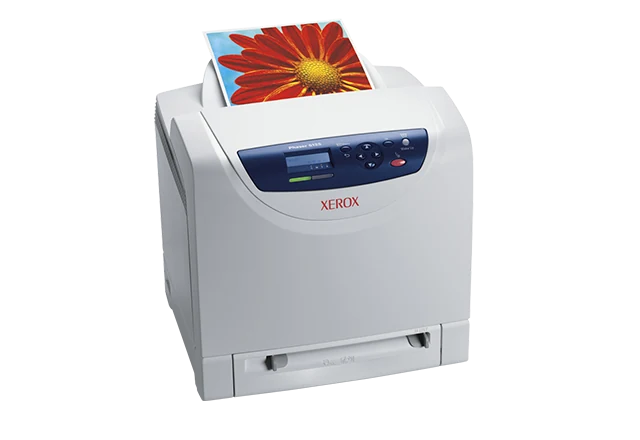
The Xerox Phaser 6125/N is an earlier US color laser for compatible computer printing, with a 250-sheet main tray and a separate one-sheet manual feed slot. It can suit an established Windows setup making ordinary color documents while another device handles scanning. Its smaller feature set matters more than its resemblance to the Phaser 6130.
The 6125 uses host-based printing and fixed 64 MB memory. The US configuration guide reserves PostScript, PCL, broader historical operating-system support and expandable memory for the 6130. Confirm the actual driver works with the intended computer before planning to reuse a 6125/N; the network port alone does not resolve software compatibility.
Use USB directly or configure the Ethernet route
The standard USB 2.0 Type B connection serves a computer directly. Alternatively, the 10/100Base-TX Ethernet interface connects it to an appropriate wired network. The original guide describes TCP/IP addressing and printing a settings page to verify the network configuration.
CentreWare Internet Services provides browser management for the network arrangement. It does not add a wireless radio. The US evaluator's wireless and multi-protocol accessories are expressly listed for the 6130, so those options should not be treated as included 6125 features.
Native AirPrint and Mopria workflows are not established by the material read here. If a phone or tablet is the primary document source, choose a printer with a supported mobile arrangement rather than assuming Ethernet makes this older host-based model a suitable match.
The manual slot is useful, but it holds one sheet
Ordinary Letter, Legal and A4 fit both documented input routes. The nominal 251-sheet total combines the main tray with a single sheet in the slot; it is not a second stack tray. The capacity declaration does not establish an exact paper-weight basis, so observe the physical fill limits as stock thickness changes.
The manual separates plain paper at 65–120 gsm from its card and glossy categories. The broad 65–220 gsm media range should not be interpreted as permission to select any type indiscriminately. Match the loaded material and format in the printer settings and driver, especially after switching between ordinary paper and a special sheet.
Use the single-sheet slot when feeding an occasional supported item without replacing the main stack. For larger specialty jobs, follow the main-tray instructions and its applicable loading limits. Do not mix stock types within the same stack.
Two-sided and envelope jobs need deliberate handling
The regional original brochure describes manual two-sided output. The driver's two-sided menu does not establish an automatic paper-turning unit. If unattended two-sided reports are an everyday requirement, a printer with explicitly supported automatic duplex is the more appropriate configuration.
The original manual provides envelope routines for the main tray and manual slot. Loading orientation differs: its main-tray instruction places the printable side up with the top entering first, while the specified manual-slot Monarch routine faces the printable side down. Follow the instructions for the actual format instead of carrying one orientation between sources.
Select the matching envelope type, size and paper source. Use laser-suitable envelopes without windows or metal clasps. The documented maximum width is 8.5 inches, so custom-size capability does not make the 6125 a full A3 or Tabloid printer.
Keep workload and replacement supplies specific to 6125
The original manual declares up to 16 monochrome or 12 color one-sided sheets per minute for documents entirely in Letter or A4. These are maker figures, affected by paper and operating conditions, rather than measured results or automatic-duplex rates.
The US historical page gives guidance up to 1,500 pages per month. That is distinct from the much higher 40,000-page duty declaration, which assumes volume distributed over 30 days. Plan ordinary work around the recommendation and the condition of the actual device.
US replacement black toner 106R01334 is declared at 2,000 pages; the three color replacements 106R01331, 106R01332 and 106R01333 are declared at 1,000 each under the guide's ISO/IEC 19798 statement. They are not the 6130's cartridge identities. US supplied-cartridge yield is unestablished, and the regional box statement should remain separate.
Confirm the electrical edition and working access
The North American parts table explicitly identifies 6125/N as a 110 V part. Its body is listed as 15.75 inches wide, 17.5 deep and 15.3 high at 38 pounds, including consumables in the manual. Leave additional room for paper, output, side access and ventilation.
Xerox says the model is no longer sold as new. Check its actual mains label, software and maintenance condition; a surviving specification sheet cannot establish those details for a particular machine.
Key details at a glance
| Color printing | Yes |
|---|---|
| Scanner | No |
| Copying | No |
| Fax | No |
| Flatbed scanner | No |
| Automatic document feeder | No |
| Automatic two-sided printing | No |
| Automatic two-sided scanning | No |
| Single-pass two-sided scanning | No |
| Color scanning | No |
| Instructed envelope handling | Yes |
| Supported PIN-release printing | No |
| Recommended monthly maximum | 1500 pages |
| Maximum monthly duty | 40000 pages |
| Included ordinary-paper capacity | 251 sheets |
| Declared one-sided mono Letter rate | 16 pages/min |
| Declared one-sided color Letter rate | 12 pages/min |
| Unit-body width | 15.75 in |
| Unit-body depth | 17.5 in |
| Unit-body height | 15.3 in |
| Unit weight | 38 lb |
| Imaging engine | laser |
Use the exact model’s instructions for operating limits, supplied equipment and version differences.
Paper, software and setup details
Print-rate conditions
The original manual declares up to 16 monochrome or 12 color one-sided sheets/min for all-Letter or all-A4 documents; media and adjustment conditions can reduce the rate. No ISO/IEC 24734 basis or measured result is asserted. US monthly guidance is up to 1,500 pages without a minimum. The separate 40,000-page duty declaration assumes volume uniformly distributed over 30 days and is not the ordinary workload recommendation.
Paper handling
Included input is a 250-sheet main tray plus a one-sheet manual feed slot, nominally 251 on standard paper. A precise gsm basis for the full nominal count is unestablished. Ordinary Letter, Legal and A4 are explicitly listed for both routes. The original user manual gives plain paper at 65–120 gsm and separate card/glossy categories within the broader 65–220 gsm range. The earlier regional brochure explicitly describes manual two-sided printing; it does not provide automatic duplex hardware. The manual slot handles one sheet, not a second stack. Supported envelopes have instructed main-tray and manual-slot routines with different loading orientation; use matching settings and laser-suitable stock without windows or metal clasps. Maximum width is 8.5 in., not A3/Tabloid.
Scanning arrangement
This is a print-only color laser without scanner hardware, an original feeder, copying or fax. Document-feed language in its paper instructions concerns blank print media, not scanned originals.
Computer and mobile connections
6125/N includes USB 2.0 Type B and 10/100Base-TX Ethernet for compatible computer printing. Its language is host-based and the original US driver scope is Windows; do not borrow 6130 PostScript, PCL, Mac or Linux support. Ethernet requires appropriate TCP/IP configuration and supports documented CentreWare IS administration; it does not imply a wireless radio, AirPrint or Mopria. The US optional wireless and protocol-card list is expressly for 6130, not an included 6125 capability. Check actual current driver compatibility.
Supplies and declared yields
Exact US 6125 replacements are black 106R01334 at 2,000 declared pages and cyan/magenta/yellow 106R01331/332/333 at 1,000 each. The guide uses an ISO/IEC 19798 yield statement; coverage and mode affect output. These are replacement capacities, not established US supplied-cartridge yields. The regional 220–240V brochure states a different box scope and is not borrowed. Do not substitute 6130 cartridge identities or assume toner is the only possible maintenance need. No current costs, stock or coverage are promised.
Software and support
The 6125/N has 64 MB fixed, non-upgradeable memory. The US table assigns Secure Print, Proof Print and RAM collation only to the 6130 with additional memory; 6125 does not provide that protected-job arrangement. A panel administrator password or ordinary computer spooler is not printer-held numeric-password release. The driver two-sided menu does not establish automatic duplex hardware; the documented two-sided output method is manual.
Electrical edition and setup
Exact earlier US 6125/N 110V part established by the North American parts table; verify the particular unit label before installation. US body dimensions are 15.75 in. wide, 17.5 deep and 15.3 high at 38 lb; the original manual identifies the weight as including consumables. The regional brochure prints a different depth, so use the US/manual 445 mm basis. Leave space for output, tray movement, side consumable access, open covers and ventilation.
Sources for this assessment
- Xerox North American Phaser 6125/6130 Evaluator Guide, March 2009
- Xerox North American Phaser 6125/6130 exact 110V parts list, effective January 1, 2009
- Original Xerox Phaser 6125 Color Laser Printer User Guide, reproduced original PDF
- Original Xerox regional Phaser 6125/6130 brochure, February 2008, 613BR-01EB
- Xerox US Phaser 6125 historical product page
Find a printer for your routine.
Match color output, scanning, connections and paper handling, then compare the exact models.