
Your needs, this model
Does it fit your priorities?
Can Ethernet print Legal color pages with at least 250 included sheets and a 2,000-page monthly need?
Yes. The two documented sources accept ordinary Legal, providing 251 nominal positions together on standard paper, and the US page gives guidance up to 3,000 pages/month. Use compatible computer software, correct network addressing and matching media settings.
Explore this need in the finder →Is printer-held PIN release included with a standard USB-connected 6130/N?
No. The base model has 128 MB memory, below the Secure Print requirement. Its optional numeric-password workflow requires the applicable memory upgrade and enabled RAM-disk settings at the printer and compatible driver.
Explore this need in the finder →Does a normal USB connection provide printing and scanning to my computer?
No. USB supports compatible computer printing, but this is a print-only laser without scanner hardware. Its paper manual-feed slot accepts print media and does not scan originals.
Explore this need in the finder →The 6130/N offers a different software route from 6125
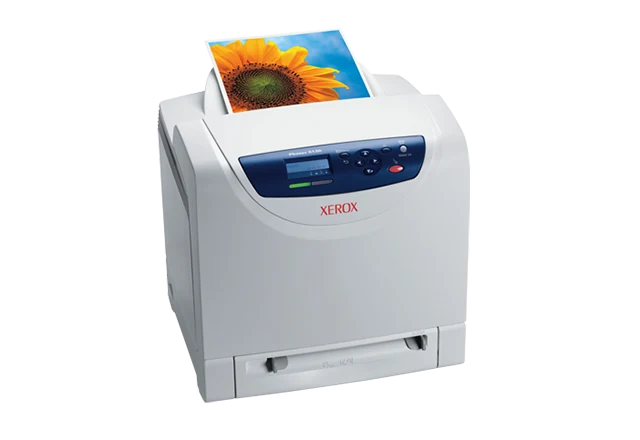
The Xerox Phaser 6130/N is an earlier US print-only color laser with PCL and Adobe PostScript support, compatible USB or wired-network computer printing, and a 250-sheet main tray beside a single-sheet feed slot. It can be useful in an established document environment that has suitable software and keeps scanning on a separate device.
Its distinction from the similar-looking 6125 is the controller and software scope. The 6130 starts with 128 MB memory and supports an expansion slot, while the 6125 has fixed 64 MB host-based printing. Protected stored jobs still require an upgrade; they should not be assumed from the 6130 name or an ordinary network security setting.
Verify the language and connection before the job
The US guide documents PCL and PostScript along with historical Mac and Linux support. The original manual gives Mac USB and LPR or LPD installation routines, establishing computer workflows for that generation. Those old instructions do not guarantee that a current operating system has an appropriate driver.
USB 2.0 Type B is the direct computer connection. Ethernet is 10/100Base-TX and requires the appropriate network addressing and software configuration. CentreWare Internet Services provides the documented browser management route for a network installation.
A multi-protocol card and wireless adapter are optional, rather than standard upgrades hidden inside every unit. The guides also name Bonjour discovery; discovery support is not the same as AirPrint. If direct mobile-device printing is essential, choose a separately documented mobile arrangement.
Match the stock to the main tray or single-sheet slot
Ordinary Letter, Legal and A4 are positively listed for both sources. The nominal 251-sheet capacity combines 250 in the main tray with one in the manual slot. It is not a pair of stack trays, and the declaration does not establish an exact paper-weight basis for the full nominal count.
The manual distinguishes plain paper at 65–120 gsm from card and glossy categories within the broader media range. Stock thickness, type and source still matter. Match the loaded material and format to the panel and driver rather than using an unrelated type to avoid a mismatch message.
Loading orientation differs between paths. The main-tray routine places the printable face up with the top entering first; the manual-slot routine places it down with the top entering first. Use the instructions for the selected source, particularly with letterhead or preprinted forms where a reversed face wastes the stock.
Envelopes have their own main-tray and manual-slot instructions and require suitable laser stock. Two-sided output is described as manual in the original regional brochure; a booklet layout or driver control does not supply an automatic paper-turning mechanism. The maximum width remains 8.5 inches, which excludes full A3 and Tabloid output.
Secure Print requires more than the standard memory
The US table places Secure Print, Proof Print and RAM collation behind a memory requirement. The manual opens its Secure Print instructions with at least 256 MB added, while a later note gives a generic 256 MB installed minimum. The base 128 MB configuration falls short under either wording.
Check the actual upgrade before relying on this optional function. The documented procedure requires RAM-disk availability at the printer and in the compatible PCL or PostScript driver, a numeric job password, and panel release. RAM-held data is erased when the printer is switched off. An administrator password for changing settings serves a different purpose.
Use the right speed and workload figures
The original manual declares up to 16 monochrome or 12 color one-sided sheets per minute for documents entirely in Letter or A4. They are maker figures, affected by media and adjustment conditions, rather than a tested rate or an automatic-duplex measurement.
The US page gives monthly guidance up to 3,000 pages. The separate 40,000-page duty declaration assumes volume distributed across 30 days; it is not the normal workload recommendation. A color-heavy job mix and an older unit's actual condition can also affect the practical routine.
Supplies and placement remain model-specific
US replacement black toner 106R01281 is declared at 2,500 pages; cyan, magenta and yellow 106R01278, 106R01279 and 106R01280 are declared at 1,900 each under the guide's ISO/IEC 19798 statement. Do not substitute the 6125's cartridge identities or mistake those replacement yields for an established US starter package.
The North American parts table identifies 6130/N as a 110 V configuration. Its listed body is 15.75 inches wide, 17.5 deep and 15.3 high at 38 pounds including consumables. Leave additional working clearance for paper, output and access, and check the actual mains label. Xerox explicitly says the model is no longer sold as new.
Key details at a glance
| Color printing | Yes |
|---|---|
| Scanner | No |
| Copying | No |
| Fax | No |
| Flatbed scanner | No |
| Automatic document feeder | No |
| Automatic two-sided printing | No |
| Automatic two-sided scanning | No |
| Single-pass two-sided scanning | No |
| Color scanning | No |
| Instructed envelope handling | Yes |
| Supported PIN-release printing | No |
| Recommended monthly maximum | 3000 pages |
| Maximum monthly duty | 40000 pages |
| Included ordinary-paper capacity | 251 sheets |
| Declared one-sided mono Letter rate | 16 pages/min |
| Declared one-sided color Letter rate | 12 pages/min |
| Unit-body width | 15.75 in |
| Unit-body depth | 17.5 in |
| Unit-body height | 15.3 in |
| Unit weight | 38 lb |
| Imaging engine | laser |
Use the exact model’s instructions for operating limits, supplied equipment and version differences.
Paper, software and setup details
Print-rate conditions
The original manual declares up to 16 monochrome or 12 color one-sided sheets/min for documents entirely in Letter or A4. Media and adjustment conditions can reduce output; no ISO/IEC 24734 speed basis or measured result is asserted. US monthly guidance is up to 3,000 pages without a minimum, distinct from the 40,000-page maximum-duty declaration with volume uniformly distributed over 30 days.
Paper handling
Included input is a 250-sheet main tray plus a one-sheet manual feed slot, nominally 251 on standard paper. A precise gsm basis for the full nominal count is unestablished. Ordinary Letter, Legal and A4 are explicitly listed for both routes. The original user manual gives plain paper at 65–120 gsm and separate card/glossy categories within the broader 65–220 gsm range. The earlier regional brochure explicitly describes manual two-sided printing; it does not provide automatic duplex hardware. The manual slot handles one sheet, not a second stack. Supported envelopes have instructed main-tray and manual-slot routines with different loading orientation; use matching settings and laser-suitable stock without windows or metal clasps. Maximum width is 8.5 in., not A3/Tabloid.
Scanning arrangement
This is a print-only color laser without scanner hardware, an original feeder, copying or fax. Document-feed language in its paper instructions concerns blank print media, not scanned originals.
Computer and mobile connections
6130/N includes USB 2.0 Type B and 10/100Base-TX Ethernet for compatible computer printing. Its PCL and Adobe PostScript support and historical Mac/Linux software scope are different from the 6125 host-based configuration. Original Mac USB and LPR/LPD routines establish computer printing, not modern OS compatibility. Configure the actual network address; CentreWare IS is the documented network management route. The wireless adapter and extra multi-protocol card are optional. Bonjour discovery is not proof of AirPrint or Mopria, whose normal arrangements remain unestablished.
Supplies and declared yields
US 6130 replacement toner is black 106R01281 at 2,500 declared pages and cyan/magenta/yellow 106R01278/279/280 at 1,900 each. The guide states an ISO/IEC 19798 yield basis, with coverage and mode affecting output. These are not the 6125 cartridge identities or established US supplied yields. The regional 220–240V starter statement is kept separate. The manual identifies imaging and transfer components in addition to the fuser; verify actual maintenance needs rather than assuming toner is the only item. No current price, cost per page, stock or service coverage is promised.
Software and support
US 6130/N has 128 MB standard memory, expandable via the documented DDR2 DIMM slot; it does not include the upgrade needed for Secure Print, Proof Print and RAM collation. The original manual opens Secure Print with an added 256 MB condition and also states a generic 256 MB installed minimum; base 128 MB is insufficient under either statement. Confirm the exact upgrade and enable RAM disk at the printer and compatible PCL/PostScript driver. The optional routine assigns a numeric password and releases the held job through the panel. RAM-held jobs are lost when power is removed. A network administrator password is a different function.
Electrical edition and setup
Exact earlier US 6130/N 110V part established by the North American parts table; verify the individual label. US dimensions are 15.75 in. wide, 17.5 deep and 15.3 high at 38 lb including consumables, agreeing with the original manual 400 x 445 x 389 mm. The regional brochure prints a different depth and is not used for US body fit. Allow tray/output/cover access, ventilation and space beside the supply door; the original guide specifies additional working clearances.
Sources for this assessment
- Xerox North American Phaser 6125/6130 Evaluator Guide, March 2009
- Xerox North American Phaser 6125/6130 exact 110V parts list, effective January 1, 2009
- Original Xerox Phaser 6130 Printer User Guide, reproduced original PDF
- Original Xerox regional Phaser 6125/6130 brochure, February 2008, 613BR-01EB
- Xerox US Phaser 6130 historical product page
Find a printer for your routine.
Match color output, scanning, connections and paper handling, then compare the exact models.