
Your needs, this model
Does it fit your priorities?
Can an Ethernet-connected 6280N print Legal color pages with at least 300 included sheets and a 4,000-page monthly requirement?
Yes. The standard main tray and MPT both support ordinary Legal stock and provide 400 nominal sheets together. The US page gives guidance up to 5,000 pages/month. This is a compatible wired printing arrangement with no automatic duplex requirement.
Explore this need in the finder →Does a standard USB-connected N automatically print both sides of Letter paper?
No. The N configuration needs the optional duplex unit; the DN includes it. Manual reinsertion or a driver menu does not supply missing automatic duplex hardware.
Explore this need in the finder →Is PIN-protected release included for an ordinary Ethernet installation?
No. The US configuration guide expressly requires optional memory or a hard drive for Secure Print. Its documented password workflow also requires the applicable RAM-disk and driver setup, so check the upgrade before depending on it.
Explore this need in the finder →A wired color printer whose N suffix matters
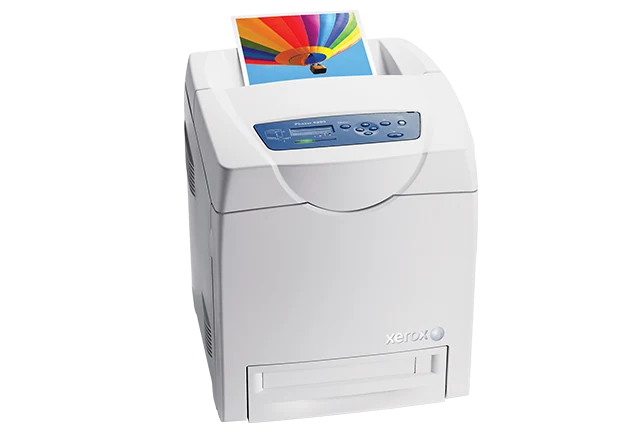
The Xerox Phaser 6280N is an earlier print-only color laser for compatible USB or wired-network document work. Its standard 250-sheet main tray and 150-sheet multipurpose tray provide 400 nominal sheets of input, useful when an office keeps ordinary paper loaded but also needs a separate place for supported special stock.
The main limitation is the configuration itself: N does not include automatic two-sided printing. Xerox lists a duplex upgrade, while the 6280DN includes that function. If routine unattended duplex is important, verify the actual installed unit or choose a configuration that provides it as standard. The family is explicitly no longer sold as new.
Start with the computer connection you can actually support
Standard interfaces are USB 2.0 and 10/100Base-TX Ethernet. USB serves a directly connected computer; Ethernet provides the network route and documented browser management through CentreWare Internet Services. It is a 10/100 interface, not gigabit Ethernet.
Check suitable software for the actual operating system before committing to reuse. Historical driver names and operating-system lists do not guarantee compatibility with a present computer. Xerox's Mobile Express computer driver also does not establish native AirPrint or Mopria operation from a phone.
A wireless network adapter is optional. The DN suffix does not add that radio either. An ordinary base Ethernet installation should therefore be planned around the wired port and the office network rather than an assumed wireless setup screen.
Keep ordinary paper and special stock in their own routines
Both included paper sources accept ordinary Letter, Legal and A4. The nominal 400-sheet total uses standard paper; the read capacity declaration does not establish a precise paper-weight basis. Respect each tray's fill line when changing thickness or media type.
The general media envelope reaches 65–220 gsm, but it is not one unrestricted range for every material. The manual identifies plain paper separately at 65–120 gsm and gives distinct card and glossy categories. Match the physical stock, selected tray, size and type in the printer and software.
The optional 550-sheet feeder raises the advertised maximum to 950. That larger number should not guide expectations for an unmodified N. If frequent replenishment is the problem, first check the actual tray hardware and whether the ordinary 250-sheet main tray meets the normal job pattern.
Supported envelopes use the multipurpose tray only and remain one-sided. Use flat, laser-suitable envelopes without windows or metal clasps and follow the format-specific loading instructions. The 8.5-inch maximum sheet width also means this is not a full A3 or Tabloid printer.
Protected release has an additional hardware condition
Both base variants have 256 MB memory. The US evaluator guide expressly requires optional memory or a hard drive for Secure Print. The manual's opening condition likewise calls for added memory or storage, even though a later note gives a generic 256 MB minimum.
Do not treat that minimum as proof that every stock machine includes protected release. Confirm the installed upgrade and compatible driver. The documented routine uses a numeric password, an enabled RAM disk and printer-panel release; jobs held in volatile RAM disappear when power is removed. A panel administrator password is a different function.
Read speed, workload and toner declarations in context
The US guide declares up to 31 monochrome or 26 color one-sided Letter pages per minute. A4 figures are separately 30 and 25. Those numbers describe different paper sizes and output modes, and no measured result or ISO/IEC 24734 speed basis is asserted here.
The US historical page gives monthly guidance up to 5,000 pages. Its separate 70,000-page duty-cycle declaration is not a recommendation to print that volume routinely. Consider ordinary replenishment, maintenance and the intended mix of color documents alongside the guidance.
US replacement toner is declared at 3,000 black pages or 2,200 per color in standard cartridges; high-capacity replacements are 7,000 black and 5,900 per color under ISO/IEC 19798. The regional brochure's supplied-cartridge statement does not establish a US starter yield. Fuser, transfer and feed-roller maintenance also remain separate.
Check placement and the particular unit
The N body is listed as 15.7 inches wide, 19.3 deep and 18.6 high at 54 pounds. Optional paper hardware adds its own space and weight. Allow access for trays, output and covers rather than treating body dimensions as the entire working footprint.
Finally, check the actual mains label: family documents describe different electrical editions. If scanning or copying belongs in the same routine, use an independently documented multifunction device or a separate scanner; the 6280N provides printed output only.
Key details at a glance
| Color printing | Yes |
|---|---|
| Scanner | No |
| Copying | No |
| Fax | No |
| Flatbed scanner | No |
| Automatic document feeder | No |
| Automatic two-sided printing | No |
| Automatic two-sided scanning | No |
| Single-pass two-sided scanning | No |
| Color scanning | No |
| Instructed envelope handling | Yes |
| Supported PIN-release printing | No |
| Recommended monthly maximum | 5000 pages |
| Maximum monthly duty | 70000 pages |
| Included ordinary-paper capacity | 400 sheets |
| Declared one-sided mono Letter rate | 31 pages/min |
| Declared one-sided color Letter rate | 26 pages/min |
| Unit-body width | 15.7 in |
| Unit-body depth | 19.3 in |
| Unit-body height | 18.6 in |
| Unit weight | 54 lb |
| Imaging engine | laser |
Use the exact model’s instructions for operating limits, supplied equipment and version differences.
Paper, software and setup details
Print-rate conditions
The US guide declares up to 31 monochrome or 26 color one-sided Letter pages/min, separately 30/25 for A4. These are maker ratings without an asserted ISO/IEC 24734 basis and are not duplex measurements. The US page gives monthly guidance up to 5,000 pages without a minimum; the 70,000-page maximum duty declaration is a different quantity.
Paper handling
Included input is a 150-sheet MPT plus a 250-sheet main tray, nominally 400 on standard paper; the read capacity declaration does not establish a precise paper-weight basis. Both standard sources accept ordinary Letter, Legal and A4. General media span 65–220 gsm with type-specific limits; plain paper is 65–120 gsm in the manual. The optional 550-sheet feeder is required for 950 total. Supported envelopes use only the MPT, one-sided, with the matching size and type; use laser-suitable envelopes without windows or metal clasps. The widest supported sheet is 8.5 in., not A3 or Tabloid.
Scanning arrangement
The 6280 is a print-only color laser without scanning, an original feeder, copying or fax. Two-sided output, where installed, does not provide two-sided original capture.
Computer and mobile connections
Included USB 2.0 Type B and 10/100Base-TX Ethernet support compatible computer printing; this is not gigabit Ethernet. USB is a direct computer route, while Ethernet requires the appropriate network addressing and software. CentreWare IS is documented for network administration. A wireless adapter is optional. Native AirPrint and Mopria operation is not established by the read original sources; do not infer a mobile route from Ethernet or from the historical Mobile Express computer driver.
Supplies and declared yields
US replacement toner declarations are standard black 106R01391 at 3,000 pages and CMY 106R01388/389/390 at 2,200 each; high black 106R01395 at 7,000 and CMY 106R01392/393/394 at 5,900 each, under ISO/IEC 19798. Image coverage and mode affect yield. Supplied US cartridge yield is unestablished; the regional 220–240V brochure box declaration is not assigned to the US package. Fuser, transfer unit and feed roller are separate maintenance items. No current price, cost per page, supply stock or service entitlement is promised.
Software and support
Both original base configurations have 256 MB memory. The US guide and the manual opening condition require additional memory or a hard drive for Secure Print. Its numeric-password routine also needs the RAM disk enabled at the printer and made available in a compatible PCL/PostScript driver. RAM-disk jobs disappear when power is removed. The manual also states a generic 256 MB minimum; this does not establish included protected release against the explicit upgrade condition. Check installed hardware and software before using optional confidential printing.
Electrical edition and setup
Earlier US Phaser 6280N reference, explicitly no longer sold as new. N does not include automatic print duplex; upgrade 097S03746 is optional. Its stated unit body is 15.7 in. wide, 19.3 deep and 18.6 high at 54 lb, without the optional feeder. Leave working space for paper loading, output, covers and ventilation. Family specifications list both 110–127V and 220–240V versions; check the actual mains label. A regional package weight is not the unit body weight.
Sources for this assessment
Find a printer for your routine.
Match color output, scanning, connections and paper handling, then compare the exact models.