
Your needs, this model
Does it fit your priorities?
Can USB support automatic two-sided Legal color printing with at least 600 included ordinary sheets?
Yes. DN includes automatic print duplex, Legal fits both standard sources, and the nominal included input is 700. Use suitable ordinary stock, consult the device Paper Tips page for the exact duplex types/weights and select the correct binding edge in compatible software.
Explore this need in the finder →Does a standard Ethernet-connected DN include protected PIN release?
No. DN includes print duplex but not the hard drive required for Secure Print. Verify the separate Productivity Kit and its applicable software before relying on that optional routine.
Explore this need in the finder →Can the long-sheet MPT capability print full Tabloid pages over USB?
No. The documented MPT width is at most 8.5 inches, even though custom sheets can be much longer. A long narrow sheet is not an 11 by 17 inch Tabloid page; choose a documented wide-format model.
Explore this need in the finder →Included duplex for an established wired document routine
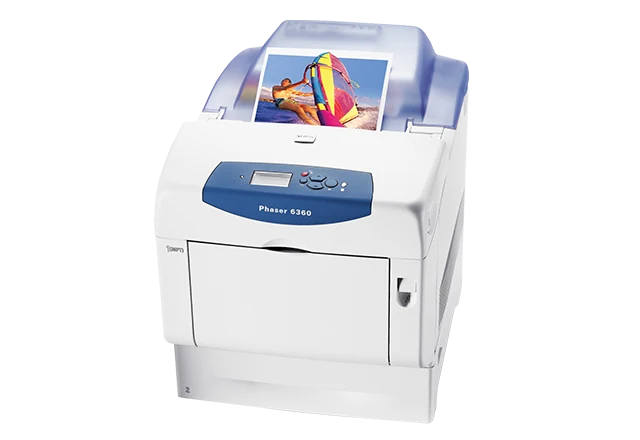
The Xerox Phaser 6360DN is an earlier print-only color laser with automatic print duplex and 700 nominal sheet positions in its two standard sources. It can suit a compatible office that already has a separate scanner and needs ordinary two-sided color documents through USB or a wired network.
The DN configuration includes duplex but keeps the base 256 MB memory and no standard hard drive. Protected stored printing therefore has a different option requirement. Xerox identifies the family as no longer sold as new, so the actual unit, installed accessories and available software should determine any reuse decision.
Make the two faces turn the way the document needs
Letter, A4 and Legal fit the documented standard sources and suitable automatic duplex routine. Choose the intended binding edge together with page orientation. A long-edge selection on one layout does not necessarily create the same reading direction when the document changes between portrait and landscape.
The guide gives compatible Windows and historical Mac selections for two-sided output. Verify the controls available in the actual driver or application and check the first finished sheet before running a complete document. Driver settings must agree with the loaded paper type and format.
Do not apply the widest media range to every duplex job. The guide directs users to the printer's Paper Tips page for the exact supported types and weights. Transparencies, envelopes, labels, die-cut specialty media and thick cardstock are excluded from automatic two-sided printing.
Use the 550-sheet main tray and 150-sheet MPT deliberately
The included total is 700 nominal sheets; the preserved capacity count does not state a paper-weight basis. Main-tray media span 65–163 gsm, while the multipurpose tray has a wider 65–216 gsm range with distinct media restrictions. Capacity and fill lines change with stock thickness.
The guide shows different preprinted-stock orientations for the sources. In the MPT, the first side for duplex faces up with the bottom entering first. In the main tray, the first side faces down with the top toward the tray's back. Use the source-specific instructions rather than transferring an orientation from another Xerox generation.
Optional feeders can expand input to 2,350 sheets, but the standard DN does not include them. The ordinary 550-sheet main tray is already useful for keeping a normal ream loaded beside the MPT; confirm added hardware before counting extra stacks.
Separate envelope and long-sheet work from ordinary duplex
Supported envelopes use Tray 1 only, one-sided, with no more than ten loaded. The required orientation varies by format: #10 Commercial, C5 and B5 use flaps up with the tops toward the printer's right; Monarch, A7, DL and C6 use flaps up with their bottoms entering first.
Set the matching size and type in the panel and driver. Custom MPT sheets may be long, but their documented width remains at most 8.5 inches. That capability does not provide full A3 or Tabloid output.
Check the interface and the actual options
The standard connections are USB 2.0 and 10/100Base-TX Ethernet, rather than gigabit Ethernet. Configure suitable computer software and the network address where applicable. CentreWare Internet Services provides the documented browser administration route over the network.
A wireless adapter is optional. Check an independently documented arrangement if mobile printing is essential. For confidential jobs, Secure Print requires the optional hard drive/Productivity Kit. Duplex hardware or an administrator password does not supply that protected-job function; print the Configuration page to confirm installed options.
Workload, supplies and physical fit
The US declaration is up to 42 one-sided Letter pages per minute in color or monochrome. It is not a measured duplex rate. The US historical page gives monthly guidance up to 14,000 pages; the separate 100,000-page duty declaration is not the ordinary workload recommendation.
The old US guide declares standard toner at 9,000 black pages and 5,000 per color using a 5% Letter/A4 coverage basis. The current US page describes its listed supplies under ISO/IEC 19798, so keep each declaration with its stated measurement method. Starter capacity is unestablished; imaging, transfer and fuser parts are separate.
The body is listed as 22.8 inches deep and 20.2 high at 77.4 pounds. The printed inch and millimeter width figures disagree. Check the actual width, mains label and working clearance, including tray loading and cover access, before placing it in a tight space.
Key details at a glance
| Color printing | Yes |
|---|---|
| Scanner | No |
| Copying | No |
| Fax | No |
| Flatbed scanner | No |
| Automatic document feeder | No |
| Automatic two-sided printing | Yes |
| Automatic two-sided scanning | No |
| Single-pass two-sided scanning | No |
| Color scanning | No |
| Instructed envelope handling | Yes |
| Supported PIN-release printing | No |
| Recommended monthly maximum | 14000 pages |
| Maximum monthly duty | 100000 pages |
| Included ordinary-paper capacity | 700 sheets |
| Declared one-sided mono Letter rate | 42 pages/min |
| Declared one-sided color Letter rate | 42 pages/min |
| Unit-body depth | 22.8 in |
| Unit-body height | 20.2 in |
| Unit weight | 77.4 lb |
| Imaging engine | laser |
Use the exact model’s instructions for operating limits, supplied equipment and version differences.
Paper, software and setup details
Print-rate conditions
The US Letter-size declaration is up to 42 one-sided pages/min in color or monochrome. This is not a measured or duplex-speed result, and no ISO/IEC 24734 basis is asserted. The US historical page gives monthly guidance up to 14,000 pages, without a minimum; the separate guide duty-cycle declaration is 100,000 pages/month and is not used as the ordinary workload recommendation.
Paper handling
DN includes automatic print duplex for suitable ordinary Letter, Legal and A4 stock through the standard sources. Included input is a 150-sheet MPT plus a 550-sheet main tray, nominally 700; the count has no established paper-weight basis in the read sources. MPT media range is 65–216 gsm, main tray 65–163 gsm, with media-specific restrictions. Print the device Paper Tips page for exact duplex stock types/weights; do not borrow the widest simplex range. Transparencies, envelopes, labels, die-cut media and thick cardstock are excluded from automatic duplex. Extra feeders are optional and 2,350 maximum is not included. Supported envelopes use only the MPT one-sided, no more than ten, with format-specific orientation. Maximum sheet width is 8.5 in.; long custom MPT stock does not establish A3/Tabloid.
Scanning arrangement
This is a print-only color laser without a scanner, original feeder, copying or fax. DN automatic duplex handles printed output, not original capture.
Computer and mobile connections
Standard USB 2.0 Type B and Ethernet 10/100Base-TX serve compatible computer printing. The network interface is not gigabit. Configure the actual network address and suitable software; CentreWare Internet Services is the documented network administration route. The listed wireless adapter is optional. Native AirPrint and Mopria arrangements are not established by the read sources, so no mobile workflow is presumed from Ethernet alone. Verify current OS, protocol and firmware support.
Supplies and declared yields
The February 2010 US guide declares standard black 106R01217 at 9,000 pages and CMY 106R01214/215/216 at 5,000 each; high black 106R01221 at 18,000 and high CMY 106R01218/219/220 at 12,000 each. Its stated basis is 5% area coverage on Letter/A4, not ISO/IEC 19798. The current US page separately uses ISO/IEC 19798 for its listed standard K/CMY and high-CMY supplies. Starter yield is unestablished. Imaging unit, transfer roller and voltage-specific fuser are separate; maintenance declarations vary by job length and media. No current cost, stock or service coverage is promised.
Software and support
DN has 256 MB standard memory and no included hard drive. Secure Print and other protected/stored-job features require an optional hard drive/Productivity Kit; automatic duplex does not supply that upgrade. Print the Configuration page to verify installed options. Compatible Windows software selects the Paper/Output two-sided option; the documented historical Mac routine selects both sides and the desired binding icon. Current applications and drivers may present different controls, so verify the intended page layout.
Electrical edition and setup
Earlier US 6360DN reference, explicitly no longer sold as new. The N/DN body is listed as 22.8 in. deep, 20.2 high and 77.4 lb. Width is printed as 17.2 in. and 429 mm, which disagree; verify actual width before a tight installation. Allow extra tray, top-cover, side-door and ventilation access. Larger DT/DX tray modules are not included. Family power specifications describe both 110–127V and 220–240V editions; check the actual mains label.
Sources for this assessment
Find a printer for your routine.
Match color output, scanning, connections and paper handling, then compare the exact models.