
Your needs, this model
Does it fit your priorities?
Can an Ethernet computer use Legal glass and automatic two-sided Legal feeder scanning, alongside Legal print duplex and PIN-held jobs?
Yes, with compatible drivers or the configured network scan destination. The glass and reversing feeder both accept Legal, the ordinary duplex path supports Legal, and Secure Print uses a passcode plus panel release. Fax still needs a separate analog line.
Explore this need in the finder →Does this reversing feeder satisfy single-pass scanning?
No. The exact brochure and configuration identify a reversing RADF. Some manual text says single-pass, but that conflicts with the specific hardware descriptions and is not adopted for this requirement.
Explore this need in the finder →Does the base DN configuration include the Wi-Fi kit?
No. Wireless networking and Wi-Fi Direct require the separately optional adapter. Basic mobile printing can instead use the printer’s Ethernet connection on a suitable shared network.
Explore this need in the finder →Legal document work with two useful capture routes
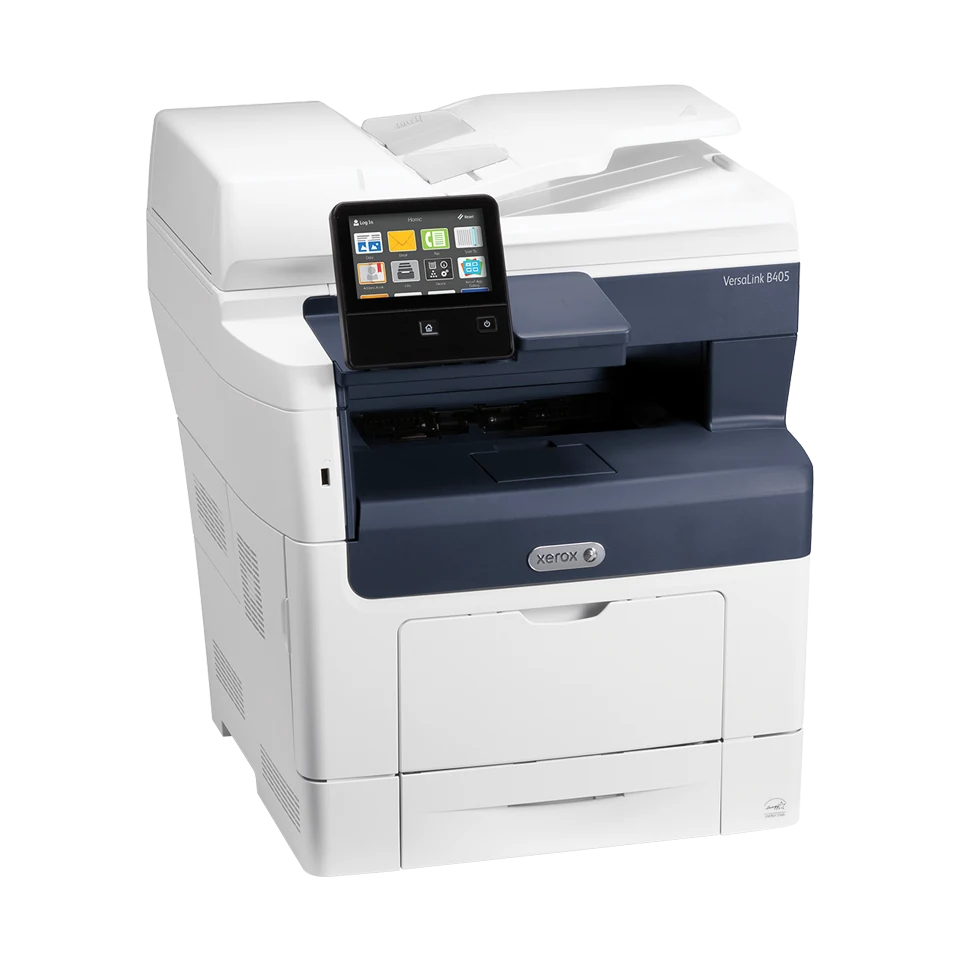
The Xerox VersaLink B405/DN is an earlier monochrome laser MFP for an office routine that needs printing, color scanning, copying and analog fax. Its useful combination is Legal-sized glass, a 60-sheet reversing document feeder, automatic ordinary print duplex and passcode-held computer jobs. USB and Ethernet are standard; wireless networking requires an optional kit.
Xerox's US page says the model is no longer sold as new. This reference therefore helps assess a documented configuration or an existing unit, with current software, the electrical label and maintenance condition checked before reuse.
Keep reversing capture distinct from single-pass scanning
The exact family brochure expressly calls the B405 feeder a reversing RADF and says it scans two-sided originals for copy, scan and fax jobs. The assigned model configuration table also identifies RADF. Some user-guide passages instead say single-pass; that conflicting wording is not adopted as a single-pass capability.
The independently documented glass accepts originals up to Legal. Letter, A4 and Legal also fit the feeder's stated dimensions. Use the glass for books, damaged sheets or other originals unsuitable for feeding. Load suitable loose feeder originals face up, adjust the guides and keep within the fill line.
Color scanning is separate from monochrome printing and the color touchscreen. The application table assigns output-color and saturation controls to scanning services, while the model's printed output remains black and white. A color screen does not make this a color printer.
Choose a complete computer-scanning arrangement
For USB scanning, the guide requires an A-to-B cable, suitable application and scan drivers: TWAIN/WIA on the documented Windows route or ICA on the Mac route. Choose the flatbed or feeder source inside the application. Check present-day operating-system compatibility rather than relying solely on the original examples.
Ethernet provides another complete arrangement. A WSD desktop scan needs the computer and printer on an active network, WSD enabled and the printer installed appropriately. A shared-folder destination instead needs the folder, permissions and address-book entry configured. A front USB flash-drive socket is a different destination from the rear computer port.
AirPrint and Mopria offer basic mobile printing on a suitable shared network. The base printer can remain wired to that network while a mobile device uses its Wi-Fi. This does not install the optional printer radio or establish every desktop paper, duplex and passcode setting inside a mobile app.
Use the included paper sources before counting expansion
The standard configuration combines a 550-sheet tray with a 150-sheet bypass for 700 ordinary sheets. Letter, Legal and A4 fit both included sources and the automatic duplex path. The guide's ordinary plain-paper range is 60–90 gsm; duplex has its own supported types and weight ceiling. Follow the actual stock settings rather than applying the ordinary capacity headline to every material.
Legal requires the tray to extend and protrude from the printer. Leave room for that operating position. Three additional 550-sheet trays can raise capacity to 2,350 sheets, but they are optional. Envelopes use the bypass only, with their instructed type and fuser settings; that is a separate one-sided media routine.
The declared one-sided print rate is up to 47 Letter pages per minute or 45 on A4. The guide gives differing separate duplex figures, so neither becomes a promised 47-page duplex rate. The recommended monthly maximum is 15,000 pages, distinct from the US brochure's 150,000-page maximum duty ceiling.
Protect the right job and configure the telephone line
Secure Print requires the compatible computer driver's job type and a passcode. At the printer, open Personal & Secure Jobs, choose the folder and enter that passcode to release the job. It is deleted after printing. Personal Print and ordinary Saved Jobs have different protection and should not be treated as equivalent.
Analog fax needs the LINE port connected to a suitable operating telephone line, with fax enabled and configured. Ethernet does not replace that phone connection. Optional cloud or workflow services have their own setup conditions.
Replacement toner declarations range from 5,900 to 24,600 ISO/IEC 19752 average standard pages, while the drum has a separate approximate service figure. Verify regional cartridge compatibility and voltage-specific maintenance parts. The standard body is 19.5 inches wide and deep, 21.69 high and 48.5 pounds; allow more operating room. Choose another documented model when included Wi-Fi or confirmed single-pass capture is essential.
Key details at a glance
| Color printing | No |
|---|---|
| Scanner | Yes |
| Copying | Yes |
| Fax | Yes |
| Flatbed scanner | Yes |
| Automatic document feeder | Yes |
| Automatic two-sided printing | Yes |
| Automatic two-sided scanning | Yes |
| Single-pass two-sided scanning | No |
| Color scanning | Yes |
| Instructed envelope handling | Yes |
| Apple AirPrint | Yes |
| Mopria printing | Yes |
| Supported PIN-release printing | Yes |
| Recommended monthly maximum | 15000 pages |
| Maximum monthly duty | 150000 pages |
| Included ordinary-paper capacity | 700 sheets |
| Document-feeder capacity | 60 sheets |
| Declared one-sided mono Letter rate | 47 pages/min |
| Unit-body width | 19.5 in |
| Unit-body depth | 19.5 in |
| Unit-body height | 21.69 in |
| Unit weight | 48.5 lb |
| Imaging engine | laser |
Use the exact model’s instructions for operating limits, supplied equipment and version differences.
Paper, software and setup details
Print-rate conditions
Maker-declared one-sided rates are up to 47 Letter or 45 A4 pages/min, with ISO/IEC 24734 identified in the US brochure. The guide gives conflicting separate duplex figures of 29 and 28 images/min; neither is substituted for the one-sided rate. Recommended monthly volume is up to 15,000 pages. The US brochure separately declares 150,000 maximum-duty pages; the assigned regional table labels that duty quantity images.
Paper handling
Standard input is the 550-sheet tray plus a 150-sheet bypass, totaling 700 ordinary sheets under the maker’s stated configuration rating; a specific weight basis for that capacity is unestablished here. Letter, Legal and A4 are confirmed for both included sources and automatic duplex. Ordinary plain paper is 60–90 gsm; automatic duplex supports its listed types through 163 gsm. Three additional 550-sheet trays and the 2,350-sheet maximum are optional. Envelopes use the bypass only. Output holds 250 sheets.
Scanning arrangement
The exact brochure and model configuration identify a 60-sheet reversing RADF supporting automatic two-sided capture. The guide’s occasional single-pass label conflicts with those model-specific descriptions and is not adopted. Letter, Legal and A4 fit both the feeder and the independently documented Legal glass. Color output and saturation controls are positive for Scan To, while printed output remains monochrome. USB computer scanning uses compatible TWAIN/WIA or ICA software; shared-network WSD or configured computer folders have their own setup.
Computer and mobile connections
Standard USB Type B computer and gigabit Ethernet connections are documented. Wi-Fi and Wi-Fi Direct require the optional wireless kit and are excluded from the base plans. Front USB Type A sockets serve flash-drive/accessory roles rather than substituting for the computer connection. A suitable shared network can support basic AirPrint/Mopria while the printer uses Ethernet.
Supplies and declared yields
The US brochure declares replacement toner yields of 5,900 standard, 13,900 high and 24,600 extra-high average standard pages to ISO/IEC 19752. Listed numbers are 106R03580, 106R03582 and 106R03584; verify actual regional supply compatibility. Drum 101R00554 has a separate approximate 65,000-page figure with job/media conditions. The US page separately lists voltage-specific fuser maintenance and a media-roller kit. Starter yield is unestablished; no current page-cost claim is made.
Software and support
Compatible computer drivers support the documented paper, duplex and Secure Print routines. Secure Print takes a passcode and holds the job until entry at Jobs > Personal & Secure Jobs, then deletes it after printing. Personal Print and ordinary Saved Jobs have different protection. No exact passcode length is asserted. The optional 16 GB productivity SSD is not presented as included or required for the documented basic Secure Print routine. Mobile app settings remain separate.
Electrical edition and setup
Earlier US VersaLink B405/DN reference; the maker says the model is no longer sold as new. Standard body is 19.5 in wide, 19.5 in deep and 21.69 in high at 48.5 lb in the guide; additional trays change it. Legal tray extension protrudes, so allow working access. Fax needs LINE to an operating suitable analog line and enabled/configured fax settings. Separate electrical classes are listed; the actual unit’s voltage edition remains unestablished.
Sources for this assessment
Find a printer for your routine.
Match color output, scanning, connections and paper handling, then compare the exact models.