
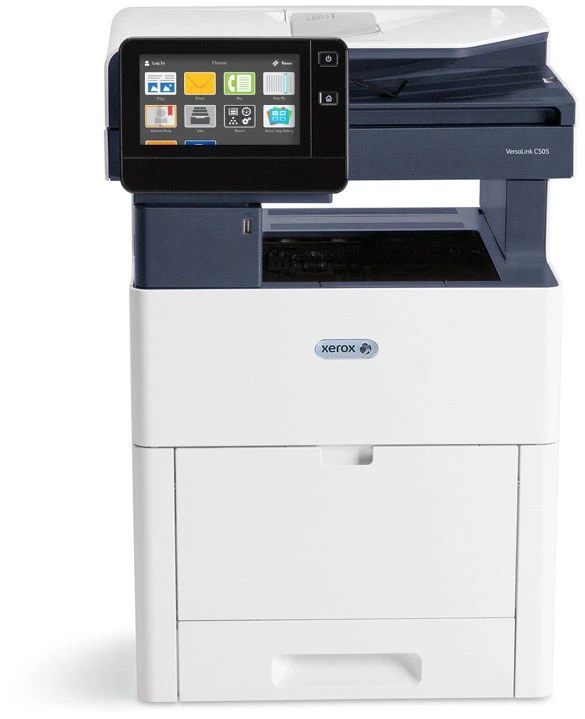
Your needs, this model
Does it fit your priorities?
Can a USB-connected C505/X scan both sides of Legal originals in one pass, copy them and send conventional faxes?
Yes with compatible USB scan software and drivers, and a separately configured dedicated analog telephone line. The 100-sheet single-pass feeder and the glass each accept Legal originals. Fax is included in the exact X variant; neither the USB cable nor an office Ethernet connection replaces its telephone connection.
Explore this need in the finder →Can a wired office use color Legal duplex printing, 700 included sheets and passcode release for an 8,000-page month?
Yes in the documented compatible desktop driver arrangement. Both included input paths accept Legal, and the guide separately confirms Legal automatic duplex. Secure Print uses a passcode at the panel. Xerox recommends up to 10,000 monthly pages; the 120,000 duty maximum is a different limit.
Explore this need in the finder →Does the basic C505/X provide a Wi-Fi Direct setup without purchasing or confirming another adapter?
No. Wi-Fi and Wi-Fi Direct require the optional wireless network adapter. The included Ethernet interface can support suitable shared-network mobile printing, but NFC pairing and a color touchscreen do not supply the missing radio.
Explore this need in the finder →Keep the fax requirement attached to the X suffix
The Xerox VersaLink C505/X fits an office combining color computer printing with substantial original-document work. Its Legal-size glass and 100-sheet single-pass duplex feeder support two different capture routines, and this exact X configuration includes conventional fax.
The deciding condition is how those jobs reach their destinations. USB or Ethernet can connect the computer, but analog fax needs its own compatible telephone line and configuration. Wi-Fi requires an optional adapter. A general C505 family feature list should not substitute for checking the actual suffix and installed equipment.
Xerox's US shop marks the C505 discontinued. This is an earlier-model reference based on the documented US configuration, with an LED toner imaging engine rather than a claimed laser beam or a hands-on performance test.
Give loose pages and difficult originals their own route
The feeder scans both sides of a suitable original in one pass. That is useful for double-sided agreements or forms where repeatedly turning each page on the glass would interrupt the job. Letter, Legal and A4 fit its documented range.
The glass independently accepts Legal originals. It therefore remains useful for a long individual sheet that should not go through the feeder. Books, damaged pages and other unsuitable originals also belong on the glass, with attention to their placement and the supported scan area.
USB computer scanning is explicitly described in the guide. It needs an A/B cable, a compatible application and the appropriate scan driver; the front flash-drive socket is a different destination. On Ethernet, a configured SMB folder can receive scans, with the destination and its access credentials saved correctly.
For fax, the X configuration adds the documented analog function. Connect and configure the telephone path before treating fax as part of a daily routine. Server fax, LAN fax and optional cloud applications have separate requirements and should not be assumed to work merely because their names appear in a menu.
Use the base paper capacity before considering a tower
The included 550-sheet drawer and 150-sheet bypass total 700 ordinary sheets at Xerox's 75 gsm basis. Both paths accommodate Letter, Legal and A4, and automatic duplex is independently confirmed for those sizes.
That combination can keep a main stock in the drawer while the bypass serves a different supported ordinary paper or an occasional envelope job. Envelope construction, orientation and driver settings still matter; the ordinary-paper capacity is not an envelope count.
The optional 2,000-sheet feeder accepts Letter and A4. It does not add Legal storage. Several brochure photographs show larger arrangements with cabinets or extra drawers, so compare the included machine against the actual refill pattern before using a maximum-capacity figure.
Separate confidential desktop printing from basic mobile access
Secure Print holds a supported computer job until its passcode is entered at the panel. That provides a deliberate release step for documents that should not wait openly in a shared output tray. Personal Print does not use the same passcode protection.
The exact X table includes the Productivity Kit, but source versions differ over the stated drive capacity. Check the installed storage before relying on disk-dependent overwrite or advanced copy functions. A generic family brochure describing optional storage does not fully describe the exact X package.
Native AirPrint and Mopria provide a separate shared-network printing route. The printer can use Ethernet while a suitable mobile client reaches it through the office network. Discovery must be enabled and correctly routed; advanced desktop passcode and media controls should be checked in the application actually used.
Plan around the recommended workload and actual supplies
The detailed US table declares up to 45 one-sided Letter pages per minute in color or monochrome. Legal and A4 have separate figures, as does duplex output. These declarations do not predict the elapsed time of a mixed scan, processing and print job.
Xerox recommends average monthly output up to 10,000 pages, separately from the 120,000-page duty maximum. Supply planning also involves four toner colors, separate drums and a waste cartridge. Regional high-capacity ordering codes differ, so match replacements to the actual US unit and treat yields as conditional manufacturer declarations.
If fax is unnecessary, compare the separately documented C505/S. If original capture is unnecessary, a print-only model may be a more suitable comparison. The X configuration makes sense when its scanner routes and established telephone workflow will both be used.
Key details at a glance
| Color printing | Yes |
|---|---|
| Scanner | Yes |
| Copying | Yes |
| Fax | Yes |
| Flatbed scanner | Yes |
| Automatic document feeder | Yes |
| Automatic two-sided printing | Yes |
| Automatic two-sided scanning | Yes |
| Single-pass two-sided scanning | Yes |
| Color scanning | Yes |
| Instructed envelope handling | Yes |
| Apple AirPrint | Yes |
| Mopria printing | Yes |
| Supported PIN-release printing | Yes |
| Recommended monthly maximum | 10000 pages |
| Maximum monthly duty | 120000 pages |
| Included ordinary-paper capacity | 700 sheets |
| Document-feeder capacity | 100 sheets |
| Declared one-sided mono Letter rate | 45 pages/min |
| Declared one-sided color Letter rate | 45 pages/min |
| Unit-body width | 18.5 in |
| Unit-body depth | 19.9 in |
| Unit-body height | 25.3 in |
| Unit weight | 77.2 lb |
| Imaging engine | led |
Use the exact model’s instructions for operating limits, supplied equipment and version differences.
Paper, software and setup details
Print-rate conditions
The May 2022 US detailed table declares up to 45 one-sided Letter pages/min in color or monochrome, 43 A4 and 37 Legal under ISO/IEC 24734. Automatic-duplex figures are separately 44 Letter, 42 A4 and 22 Legal. The November 2022 guide gives 43/41 Letter/A4 duplex; this assessment uses the detailed-table basis. The recommended average monthly maximum is 10,000, distinct from the 120,000 duty maximum. Scanner image rates are separate from printing, and none is a measured timing or quality result.
Paper handling
The included 550-sheet main tray and 150-sheet bypass total 700 ordinary sheets at 20 lb, 75 gsm. Both support Letter, Legal and A4, and the guide separately confirms those exact automatic-duplex sizes. The optional 2,000-sheet feeder accepts Letter/A4 and adds no Legal storage. Extra drawers, cabinet and caster base are separate equipment. Media types and weights have their own restrictions; the ordinary-paper rating does not describe envelopes. The guide permits envelopes from Tray 1 or bypass. For Number 10 in the bypass use short-edge feed, flaps down and to the right, select Envelope and the exact size in the compatible driver, and keep the stack below 16.5 mm. The approximate 10–20-envelope count depends on construction. Do not use padded, windowed, clasped, heat-activated or press-and-seal envelopes, and do not assign them automatic duplex.
Scanning arrangement
The C505 has a Legal-size document glass and a standard 100-sheet single-pass duplex document feeder. Letter, Legal and A4 fit the positively documented glass and feeder ranges. The feeder accepts loose undamaged originals 140–216 mm wide and 140–356 mm long. The guide gives 60–125 gsm while the detailed table gives 60–128 gsm; follow the actual instructions and stock. Books, wrinkled or delicate originals use the glass. US detailed specifications give 600 x 600 dpi optical scanning; the shared guide gives 600 x 400, so neither is treated as an interpolated or tested quality claim. USB computer scanning explicitly requires an A/B cable, compatible application and TWAIN/WIA for Windows or ICA for Macintosh. Ethernet scanning can deliver to an SMB shared folder with appropriate access and destination credentials; network WSD is another described routine. Front USB flash-drive scanning is separate from the rear computer connection. C505/X includes walk-up analog fax, with a dedicated compatible telephone line connected to the rear RJ11 Line socket and fax enabled/configured. LAN fax and server-fax services have their own setup. A network cable alone does not provide telephone transmission or establish VoIP compatibility.
Computer and mobile connections
USB 3 Type B computer printing and Gigabit Ethernet are included. Wi-Fi and Wi-Fi Direct require the optional 497K16750 adapter; NFC pairing does not supply a radio. The compatible desktop print/scan driver arrangements below retain paper and scan functions together. Native AirPrint and Mopria use a suitable shared network and are recorded separately from desktop driver controls. AirPrint requires IPP and Bonjour/mDNS, with the client on the same subnet or suitable discovery routing. A phone can use the office network while the printer uses Ethernet. Historical app/cloud-service names do not establish current service availability, licenses or optional accessories.
Supplies and declared yields
The US table lists supplied cartridges at 5,000 black and 2,400 each cyan, magenta and yellow pages under ISO/IEC 19798; an earlier unit may no longer contain fresh supplied toner. US standard replacement black is 106R03862, and cyan/magenta/yellow are 106R03859/60/61. US high-capacity black 106R03869 declares 12,100 pages and colors 106R03863/64/65 declare 5,200 each; extra-high colors 106R03866/67/68 declare 9,000 each. The regional inherited table instead uses 03870–76 ordering codes. Match the actual market and machine. Separate drums 108R01481/82/83/84 each have an approximate 40,000-page declaration, and waste cartridge 108R01416 approximately 30,000; these are not toner yields. Coverage, mode, job length and media conditions matter. No cost-per-page or remaining-life claim.
Software and support
Included Secure Print holds a compatible computer print job until its passcode is entered at the panel. In the driver choose Job Type, Secure Print, type and confirm the code, then submit. At Home choose Jobs, Personal & Secure Jobs, your folder and passcode, then release the desired job. Printed secure jobs are automatically deleted. Personal Print and Saved Jobs have different access behavior; Personal Print does not use a passcode. Immediate disk overwrite and certain advanced copy features require the HDD/Productivity Kit. Check current compatible drivers and the installed storage configuration rather than assuming every family app or historical operating-system listing applies. The exact C505/X includes the Productivity Kit in the variant table. The evaluator calls it a 320 GB drive while the user guide calls it 250 GB; generic brochure storage wording also differs. Confirm the installed equipment and capacity rather than using that difference to invent another package.
Electrical edition and setup
This reference describes the US electrical edition, listed as 110–127 VAC separately from Europe/other 220–240 VAC. Confirm the rating label and exact suffix on the actual unit. The US maker shop marks C505 discontinued. The detailed-table unpackaged body is 18.5 x 19.9 x 25.3 inches and 77.2 lb; the 94.8 lb carton and added feeder/cabinet arrangements are different. Allow room above for the glass/feeder and around open trays, cables, output and service access.
Sources for this assessment
Find a printer for your routine.
Match color output, scanning, connections and paper handling, then compare the exact models.