
Your needs, this model
Does it fit your priorities?
Can Ethernet print color Tabloid documents on both sides, hold jobs for passcode release and include 620 sheets for 8,000-page months?
Yes with a compatible computer driver and supported ordinary media. The exact DN includes duplex, and the guide explicitly lists Ledger/Tabloid in the two-sided table. Both included paper sources support that ordinary size. Basic Secure Print is included; the optional storage kit enhances stored jobs and adds other features.
Explore this need in the finder →Can a suitable shared Ethernet network support native Apple AirPrint and Mopria mobile printing?
Yes with the corresponding services and mobile software enabled and network discovery permitted. AirPrint requires IPP/Bonjour and appropriate subnet access; Mopria needs its supported Print Service. The printer Wi-Fi kit is optional and is not counted as included.
Explore this need in the finder →Does a direct USB-only computer cable provide the reviewed native AirPrint route?
That arrangement is not established. USB Type B provides compatible computer printing, while the native mobile protocols use the configured network. A Type A flash-drive port and the color touchscreen do not supply that network route.
Explore this need in the finder →Wide-format color output with duplex included on DN
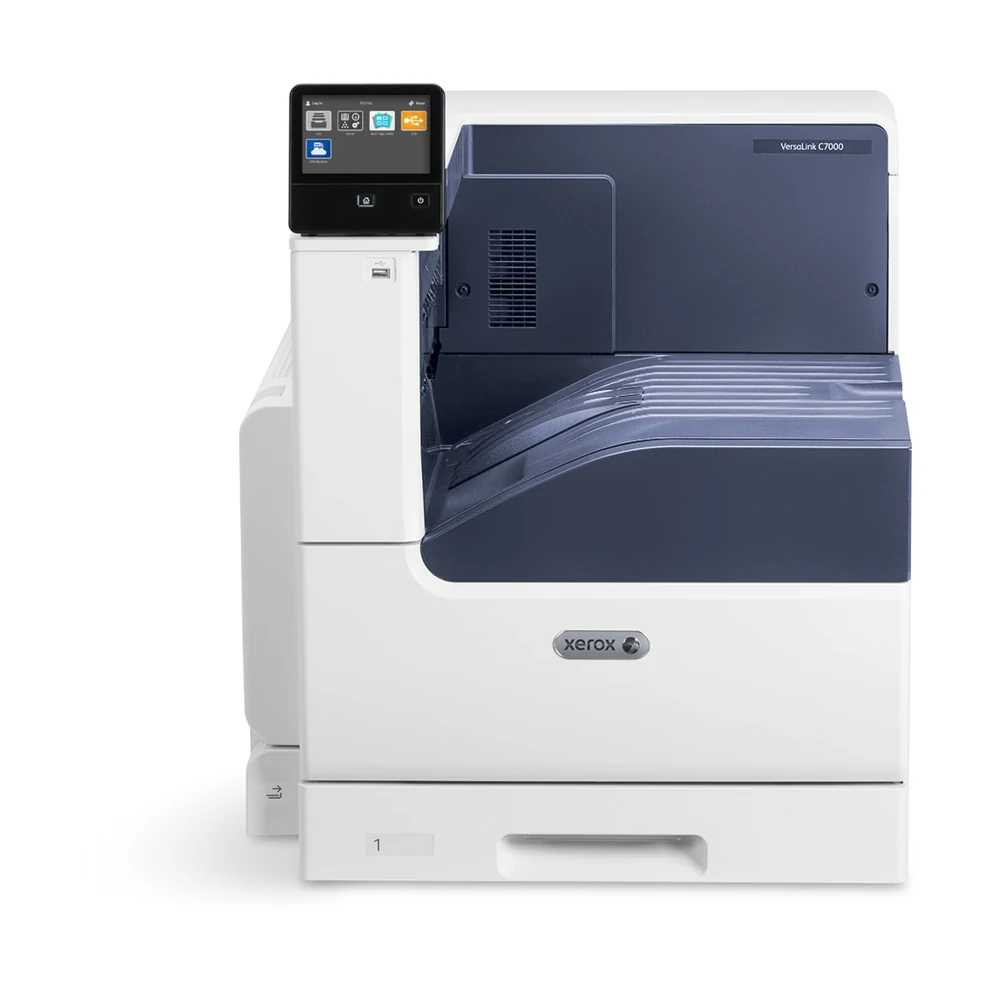
The Xerox VersaLink C7000DN is a print-only color LED toner printer for workgroups producing ordinary office pages and larger A3 or Tabloid documents. DN includes automatic two-sided printing, a 520-sheet main drawer and 100-sheet bypass. The deciding distinction is straightforward: this model prints large documents, while a separate scanner is needed for originals.
USB and Gigabit Ethernet are included. Native AirPrint and Mopria support a suitable network arrangement; printer Wi-Fi and Wi-Fi Direct require an optional kit. Additional paper modules, storage and finishing should be checked as separate equipment.
All five ordinary sizes have a documented duplex path
The guide explicitly lists Letter, Legal, A4, A3 and Ledger/Tabloid for automatic two-sided printing. Both included paper sources also support those ordinary sizes. The declared standard total is therefore 620 sheets without adding a drawer.
The detailed US capacity basis is 20 lb, 75 gsm stock, while the guide uses 80 gsm for the same counts. Plain duplex media spans 60–105 gsm, with supported lightweight cardstock through 169 gsm. The broader one-sided main-drawer range does not make heavier stock suitable for automatic duplex.
Confirm the paper size, type and source after loading, then select the required long-edge or short-edge binding in a compatible driver. Keep each tray's contents consistent. The optional envelope drawer replaces the main drawer, so its capacity cannot be added alongside the original 520 ordinary sheets.
Secure Print is part of the basic computer routine
In a compatible Windows or Mac driver, select Secure Print as the job type, enter and confirm the passcode, then submit the document. At the panel, open Home, Jobs and Personal & Secure Jobs, choose the folder and enter the matching code. Touch the individual job or Print All.
The guide says a printed secure job is deleted automatically. Passcode length and retention after a power interruption remain unestablished here. Personal Print is a separate job type and should not be treated as the same protection.
The optional 320 GB storage kit enables functions such as disk overwrite and permanent font storage. Xerox's kit sheet describes secure, personal and saved jobs as enhanced by the kit, rather than newly enabled. Its larger stored-job capacity should therefore not be confused with a requirement for basic passcode release.
Keep mobile printing on its actual network
The USB Type B connection is for a compatible computer. Walk-up Type A USB memory printing is another route. Neither proves direct phone printing over a USB cable.
For native AirPrint, enable IPP and Bonjour/multicast DNS and use the appropriate shared subnet or configured discovery routing. A compatible mobile application is required. Mopria likewise needs its supported Print Service and access to the printer's network. These protocols can serve the reviewed shared Ethernet setup without counting an optional printer radio as standard equipment.
Mobile application controls are distinct from the full computer driver. Confirm the actual paper selection, duplex and confidential-job controls in that application before depending on a combined mobile workflow.
Use the bypass for occasional envelopes
The standard bypass supports suitable paper envelopes. The guide loads Number 10, C5, DL or Monarch long edge first with flaps up, then matches the format and type in Device, Paper Trays and the driver. Open flaps may require an orientation adjustment.
Use flat paper construction without windows, metal clasps or unsuitable adhesive closures. The optional dedicated envelope drawer has a different loading routine and replaces Tray 1. Neither routine makes envelopes eligible for automatic duplex or the ordinary 620-sheet count.
Match the rate and consumable to the job
The original detailed table declares up to 35 one-sided Letter/A4 pages per minute in long-edge feed for color and monochrome. Legal is separately 22 and A3/Tabloid 19. Two-sided figures form another set. These manufacturer declarations do not describe measured throughput for a particular document.
Recommended ordinary volume is up to 10,000 pages monthly. The 153,000 duty figure is expressly a nonsustained one-month maximum. Starter toner declarations are 3,300 pages per color and 5,300 black; high-capacity US retail replacements have different identities and yields.
Use the US retail ordering group rather than a regional or metered cartridge with a similar headline. Approximate drum and waste-container life also differs from toner ISO testing. The North American power requirement is 110–127 V, and its fuser differs from the 220 V part.
Allow space for a substantial base unit
The unpackaged body is declared at 23.23 by 26.41 by 25.08 inches and 119.71 pounds. Added trays, a stand or finisher change that arrangement. Allow working access around loading, output and covers. If the real requirement includes scanning or copying large originals, compare an explicitly equipped multifunction model rather than assuming the C7000's touchscreen or software list supplies those functions.
Key details at a glance
| Color printing | Yes |
|---|---|
| Scanner | No |
| Copying | No |
| Fax | No |
| Flatbed scanner | No |
| Automatic document feeder | No |
| Automatic two-sided printing | Yes |
| Automatic two-sided scanning | No |
| Single-pass two-sided scanning | No |
| Color scanning | No |
| Instructed envelope handling | Yes |
| Apple AirPrint | Yes |
| Mopria printing | Yes |
| Supported PIN-release printing | Yes |
| Recommended monthly maximum | 10000 pages |
| Maximum monthly duty | 153000 pages |
| Included ordinary-paper capacity | 620 sheets |
| Declared one-sided mono Letter rate | 35 pages/min |
| Declared one-sided color Letter rate | 35 pages/min |
| Unit-body width | 23.23 in |
| Unit-body depth | 26.41 in |
| Unit-body height | 25.08 in |
| Unit weight | 119.71 lb |
| Imaging engine | led |
Use the exact model’s instructions for operating limits, supplied equipment and version differences.
Paper, software and setup details
Print-rate conditions
Original detailed table explicitly declares one-sided Letter/A4 at up to 35 pages/min long-edge feed for color and monochrome, separately Legal 22 and A3/Tabloid 19. Automatic two-sided rates are separately 35 Letter/A4, 14 Legal and 13 A3/Tabloid; these are maker declarations, not measured throughput. Declared speed follows ISO/IEC 24734. Recommended ordinary monthly maximum is 10,000; maximum duty 153,000 is explicitly a nonsustained one-month maximum.
Paper handling
Included Tray 1 has 520 ordinary sheets and bypass 100, totaling 620 at the detailed US 20 lb 75 gsm basis. The guide uses 80 gsm for the same counts. Both positively support ordinary Letter, Legal, A4, A3 and Tabloid; all five are explicitly in the automatic-duplex table. Plain duplex is 60–105 gsm; supported lightweight cardstock is 106–169 gsm. Wider one-sided main 60–256 or bypass 60–216 ranges do not extend duplex. Additional drawers, stand and finisher are optional. The optional envelope drawer replaces Tray 1, rather than adding envelope capacity beside its 520 ordinary sheets. Standard bypass supports suitable paper envelopes, loaded long edge first with flaps up, with actual size/type and driver orientation settings. No unestablished bypass envelope count or envelope-duplex promise.
Scanning arrangement
An LED toner-based color printer with print-only standard functions. It has no original scanner, copier, fax, glass or document feeder. A regional brochure accidentally mentions scan to USB and generic compatible software includes Mopria Scan/cloud fax; these do not add physical scanning or included analog fax. The five-inch color screen is a control interface.
Computer and mobile connections
Included Gigabit Ethernet and USB 3.0 Type B support direct compatible computer printing. Type A USB memory printing is separate. Standard native AirPrint and Mopria use a suitably configured shared network and supported applications/Print Service; wireless mobile devices need network access to the printer. AirPrint requires IPP, Bonjour/mDNS and the appropriate subnet/discovery configuration. A printer Wi-Fi/Wi-Fi Direct kit is optional; no standard radio or direct USB phone route is inferred. The mobile plan does not inherit unverified full-driver paper-specific, PIN or duplex controls.
Supplies and declared yields
Original US box contents declare CMY starter toner at 3,300 pages each and black at 5,300. US retail standard replacement parts are CMY 106R03764/763/762 and black 106R03761; high CMY 106R03760/759/758 are 10,100 each and black 106R03757 is 10,700. The detailed US sheet uses ISO/IEC 19798, varying with image, coverage and mode. The inherited regional brochure lists different retail codes, and worldwide metered parts form another distinct group; do not interchange them by yield. Drum 113R00782 is approximately 82,200 pages with job-length, media and speed conditions, separately from toner ISO testing; the current box page also labels supplied drums approximate. Waste bottle 115R00129 is 21,200 approximate pages. US 120 V fuser 115R00137 differs from 220 V 115R00138. No price or cost-per-page claim.
Software and support
Standard Secure Print holds a compatible computer job for passcode release. Select the job type in the Windows/Mac driver, enter and confirm the code, then at the panel choose Home, Jobs, Personal & Secure Jobs, the folder and matching passcode. Touch the job or Print All; printed secure jobs are automatically deleted. Optional 320 GB storage enables disk overwrite and permanent fonts and expands stored-job capacity; the original kit sheet treats Secure/Personal/Saved jobs as enhanced rather than newly enabled. Fixed code length and power-loss retention remain unestablished. Do not treat Personal Print as passcode protection. Native 600 x 600 standard resolution and 1200 x 2400 enhanced mode differ. Actual drivers, accounts and administrator policy require checking.
Electrical edition and setup
The detailed specification explicitly identifies North American 110–127 V electrical requirements, separate from other geography 220–240 V. Current US exact C7000/DN configuration corroborates the model. Unpackaged base body is 23.23 x 26.41 x 25.08 inches and 119.71 lb; precise consumable basis is unestablished. Stand, added trays and finisher change the dimensions and weight. Allow extra loading, bypass, output, open-cover, ventilation and service access. Current reference status is not a claim about any individual seller stock or price.
Sources for this assessment
- Preserved Xerox VersaLink C7000 regional brochure, July2019, VCVBR-012C
- Original Xerox US VersaLink C7000 detailed specifications, April2021, VCVSS-01UG
- Original Xerox VersaLink C7000 User Guide,version1.4.1,July2020,702P05614
- Original Xerox VersaLink single-function Productivity Kit feature sheet,May2018,XOGFS-64UC
- Current Xerox US exact C7000/DN manufacturer reference and configuration row
Find a printer for your routine.
Match color output, scanning, connections and paper handling, then compare the exact models.