
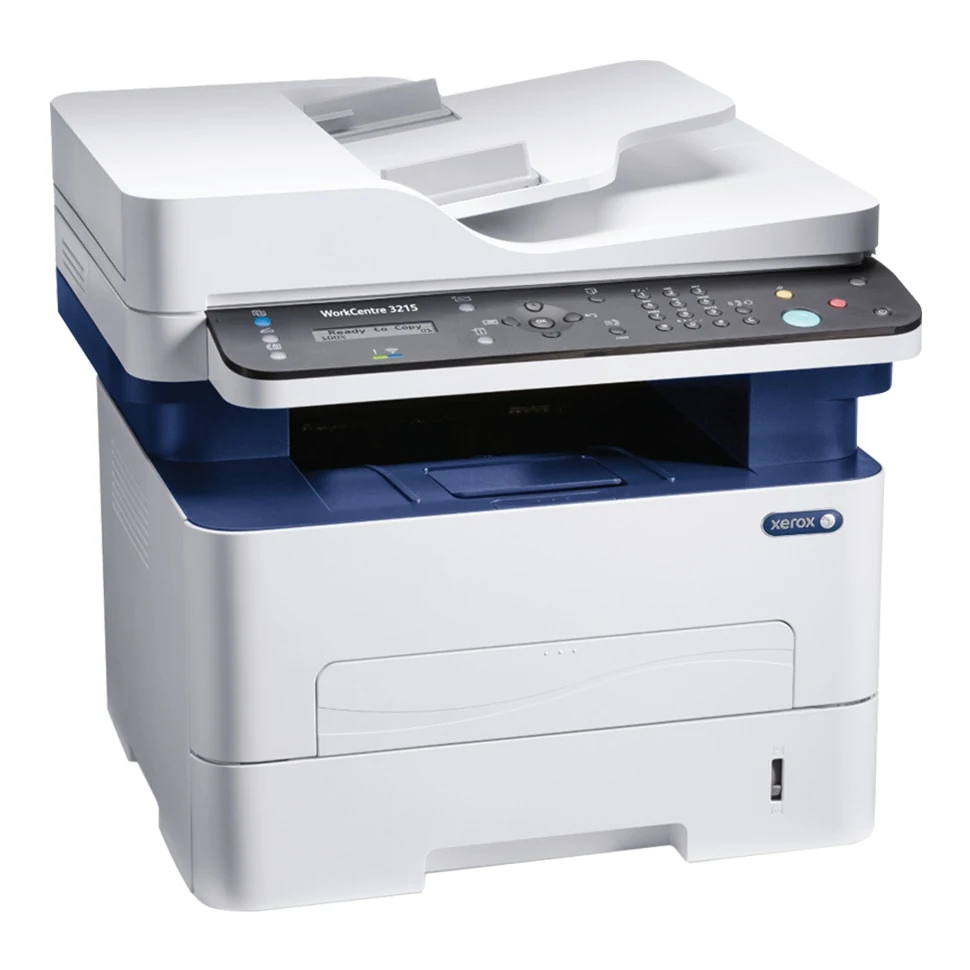
Your needs, this model
Does it fit your priorities?
Can USB support monochrome Letter printing, color flatbed scans, copies and fax for 2,000-page months?
Yes with compatible print and scan drivers, scanner setup and a separately configured analog phone line. Letter is supported on the glass and feeder. The recommended maximum is 2,500 monthly; 30,000 is a different, nonsustained duty figure. Earlier-model inclusion is required.
Explore this need in the finder →Can a compatible Mac scan a one-sided Legal original over the network through the feeder?
Yes in the documented compatible Mac Image Capture and enabled network-scanning arrangement. The ADF accepts Legal and the Mac scan size menu explicitly includes it. This does not establish Legal on the glass, automatic two-sided scanning or Legal in every Windows panel menu.
Explore this need in the finder →Will selecting the 3215/NI provide automatic two-sided Letter printing?
No. The exact 3215NI family-table column says manual duplex, while neighboring 3225 configurations have automatic duplex. Generic shared-guide duplex instructions do not add that hardware to the 3215.
Explore this need in the finder →A small connected document station with manual duplex
The Xerox WorkCentre 3215/NI combines monochrome laser printing and copying with a color scanner and analog fax. USB, Ethernet and Wi-Fi are included, along with a 40-sheet document feeder. Its deciding limitation is manual two-sided printing: the automatic duplex feature shown elsewhere in the family brochure belongs to other configurations.
Xerox now says the 3215 is no longer sold as new. It remains a useful earlier-model reference for an existing unit or an exact used configuration, provided its drivers, consumables and physical condition fit the intended job. Current seller stock and prices are separate questions.
Choose the paper route before submitting the job
The main drawer holds up to 250 ordinary sheets, while the manual feed slot accepts one sheet. That is 251 input positions, with the practical distinction that only 250 form a normal stack. Both paths support Letter, Legal and A4.
The guide's capacity basis is 20 lb, 80 gsm stock. The main drawer's broader media range is 60–163 gsm and the manual path reaches 220 gsm, subject to the particular media instructions. Those ranges do not make every heavy sheet, coating or envelope suitable.
Set the actual paper size and type in the driver and machine. For two-sided work, expect a manual refeed procedure and check the application's instructions on a small job first. Booklet or two-sided options in a shared driver description do not establish an automatic duplex unit on the 3215.
Match the original to the glass or feeder
The feeder accepts up to 40 originals at the stated 80 gsm basis and supports ordinary Letter, A4 and Legal dimensions. Load suitable originals face up and bring the guides against their edges. Books, damaged sheets and individual small items belong on the glass, face down at its rear-left alignment corner.
Letter and A4 are confirmed for the glass. Legal support in a general scan menu does not prove a Legal-sized glass area. The documented Mac Image Capture route explicitly offers Legal and a document-feeder mode; use that compatible setup for the reviewed Legal scanning routine.
The Windows panel scan-size list shown in the guide omits Legal. Confirm the particular application and driver instead of expecting every interface to expose identical controls. Automatic two-sided feeder scanning and a single-pass mechanism remain unestablished here. A 40-sheet feeder alone does not demonstrate either function.
Enable the computer destination before scanning
The guide separates Scan to Local PC over USB from Scan to Network PC. A network cable or Wi-Fi connection that prints successfully is only part of the scanner setup: install the appropriate scan driver and enable the destination.
For the documented Windows setup, use the recommended Easy Printer Manager installation, switch to Advanced Mode, open Scan to PC Settings and enable scanning from the device panel. Choose the destination folder, color, size and file format. At the printer, select Scan, PC and the appropriate Local or Network PC destination.
Mac scanning follows its documented Image Capture and enabled local/network setup. These are historical operating instructions, so verify compatibility with the actual operating system before depending on the workflow. Color scanning creates color files; printed pages remain black and white.
Keep mobile printing and telephone fax distinct
Native AirPrint needs a compatible application and an appropriate shared Wi-Fi network. Enable IPP and Bonjour/multicast DNS. The sending device normally uses the same subnet, with correctly configured discovery routing needed across subnets.
Wi-Fi Direct is separately documented for peer printing without an existing wireless network. It should not be treated as proof of computer scanning over that route, or as a guarantee that every mobile protocol uses it. A direct USB computer cable does not provide the reviewed AirPrint network setup.
Fax uses its own configured analog telephone connection. Enter the number and identity, enable fax and perform the instructed test. Secure Fax Receive can hold incoming faxes behind a release password; it does not establish confidential PIN release for arbitrary computer print jobs.
Feed envelopes individually and plan ordinary volume
Use the manual slot for suitable envelopes, short edge first with the flap down. Select Manual Feed Slot, the actual size and Envelope type in the driver. Feed one at a time. The guide directs rear output when the stated curl or crease problems occur; this remains a one-sided special-media routine.
The exact model's declared one-sided rate is up to 27 Letter pages per minute, or 26 A4. Recommended volume is up to 2,500 monthly, separate from the nonsustained 30,000-page duty maximum. Neither is a measured speed or endurance result.
US replacement toner is 106R02775 or 106R02777, with manufacturer ISO/IEC 19752 declarations of 1,500 or 3,000 pages. The separate drum has its own approximate life conditions. Check the unit's electrical label and regional supplies. If automatic two-sided output is central to the routine, compare an explicitly equipped duplex configuration before accepting manual refeeding.
Key details at a glance
| Color printing | No |
|---|---|
| Scanner | Yes |
| Copying | Yes |
| Fax | Yes |
| Flatbed scanner | Yes |
| Automatic document feeder | Yes |
| Automatic two-sided printing | No |
| Color scanning | Yes |
| Instructed envelope handling | Yes |
| Apple AirPrint | Yes |
| Recommended monthly maximum | 2500 pages |
| Maximum monthly duty | 30000 pages |
| Included ordinary-paper capacity | 251 sheets |
| Document-feeder capacity | 40 sheets |
| Declared one-sided mono Letter rate | 27 pages/min |
| Unit-body width | 15.8 in |
| Unit-body depth | 14.3 in |
| Unit-body height | 14.4 in |
| Unit weight | 24.7 lb |
| Imaging engine | laser |
Use the exact model’s instructions for operating limits, supplied equipment and version differences.
Paper, software and setup details
Print-rate conditions
Exact 3215NI column declares up to 27 one-sided Letter pages/min and 26 A4; neighboring 3225 and 3260 figures of 29/28 do not apply. Print 600 x 600 dpi and 4800 x 600 enhanced image quality differ. Recommended ordinary volume is up to 2,500 monthly on the current US reference; the 30,000 duty figure is a nonsustained one-month maximum. No measured-throughput claim.
Paper handling
Included main drawer 250 ordinary sheets plus a one-sheet manual slot gives 251 total positions, rather than a second stack of paper. The guide uses 20 lb 80 gsm as the capacity basis. Both support ordinary Letter, Legal and A4; the exact US main range is 105 x 149 to 216 x 356 mm and manual range 76 x 127 to 216 x 356 mm. Main media 60–163 gsm, manual 60–220 gsm; these broad ranges do not make every media type suitable. Exact 3215NI duplex is manual; shared manual descriptions of automatic two-sided controls concern other configurations. Envelopes feed one at a time through the manual slot, short edge first with flap down, driver source Manual Feed Slot, correct size and Envelope type. Open rear output if the instructed routine requires it; no envelope duplex or main-drawer envelope claim.
Scanning arrangement
Monochrome printing and copying coexist with color scanning. The 40-sheet ADF capacity is at 20 lb 80 gsm, 60–105 gsm originals and 148 x 148 to 216 x 356 mm range. Simplex Letter, Legal and A4 originals fit the feeder; the reviewed Mac Image Capture path explicitly offers Legal. Glass is confirmed for Letter/A4 only. Windows panel original-size list omits Legal, so confirm a compatible application for Legal feeder scans. Automatic two-sided and single-pass feeder methods remain unestablished rather than inferred from the word ADF or shared copy-output duplex controls.
Computer and mobile connections
Included USB2 computer cable route, 10/100 Ethernet and Wi-Fi b/g/n. Actual guide distinguishes local USB Scan to PC from Network PC scanning with the scanner driver and device enabled in the application. Windows Easy Printer Manager uses Recommended installation, Advanced Mode, Scan to PC Settings and Enable Scan from Device Panel; select destination, color, size and file format. Mac Image Capture supplies its documented local/network route. Wi-Fi Direct has a separately documented peer print setup; computer scanning over that peer route is unestablished. Native AirPrint uses a suitable shared Wi-Fi network with IPP and Bonjour/mDNS enabled, same subnet or correctly routed discovery, and an application that supports AirPrint. No USB-only AirPrint or Mopria assumption.
Supplies and declared yields
US supplied print cartridge is declared at 1,500 pages. US standard replacement 106R02775 is 1,500 and high 106R02777 is 3,000 under ISO/IEC 19752, varying with coverage, image and mode. Separate drum 101R00474 is approximately 10,000; current US conditions use average three-page A4/Letter jobs, while original brochure specifies approximate A4/Letter 75 gsm pages. Drum and toner measurement bases differ. Regional 106R02778/282 codes are not substituted for these US parts. No price or cost-per-page calculation.
Software and support
The original US security list and actual fax setup support Secure Fax Receive, which holds incoming faxes until a release password is entered. That feature does not establish passcode release for arbitrary computer print jobs. PIN print remains unknown. Native AirPrint is kept separate from retired cloud-service names in old brochures. Historical driver lists establish the documented arrangement, not compatibility with every present operating system; verify the exact current driver and scan application before relying on it.
Electrical edition and setup
The original North American 2016 reference lists 110 V 3215/NI; original family specifications separately list 110–127 and 220–240 V editions. Confirm the actual unit rating label and corresponding regional supplies. Fax requires its dedicated analog telephone connection and configured number/ID, enablement and test; Ethernet or Wi-Fi is not the fax telephone line and VoIP compatibility is not promised. Declared body 15.8 x 14.3 x 14.4 inches and 24.7 lb is the 3215, not the 25.1 lb 3225. Precise consumable basis is unestablished; allow additional feeder, paper loading, rear output, cover, cable and ventilation space.
Sources for this assessment
- Xerox WorkCentre 3215 key features, October 2014
- Xerox WorkCentre 3215 Portuguese regional brochure, June 2014
- Xerox US Phaser 3260 and WorkCentre 3215/3225 family brochure, June 2015, 326BR-02UD
- Original Xerox WorkCentre 3215NI / 3225DN / 3225DNI User Guide, July 2014, distributor-hosted reproduction
- Original Xerox North American Office Product Reference Guide, 2016 Volume 1
- Current Xerox US WorkCentre 3215 manufacturer reference
Find a printer for your routine.
Match color output, scanning, connections and paper handling, then compare the exact models.