
Your needs, this model
Does it fit your priorities?
Can USB provide monochrome Letter duplex printing, color two-sided Legal feeder scans and included analog fax with 550 sheets?
Yes with compatible print and scan drivers, suitable ordinary media and the separately configured analog telephone line. The original Local PC instructions explicitly use USB and provide sidedness selection. The 60-sheet Legal feeder is confirmed, while its reversing or single-pass method is unestablished.
Explore this need in the finder →Is a Legal-size glass confirmed for a bound original that cannot use the feeder?
No. The actual glass loading instructions positively confirm Letter/A4; the specification maximum and Legal feeder do not establish the same size on the glass. A selected Legal flatbed requirement therefore remains unsupported.
Explore this need in the finder →Does the standard printer include 1,050 ordinary Letter sheets without buying another drawer?
No. Included capacity is 500 main plus 50 bypass. Another 500-sheet drawer is optional and cannot be counted in the standard 550-sheet arrangement.
Explore this need in the finder →Monochrome documents with two practical computer scan routes
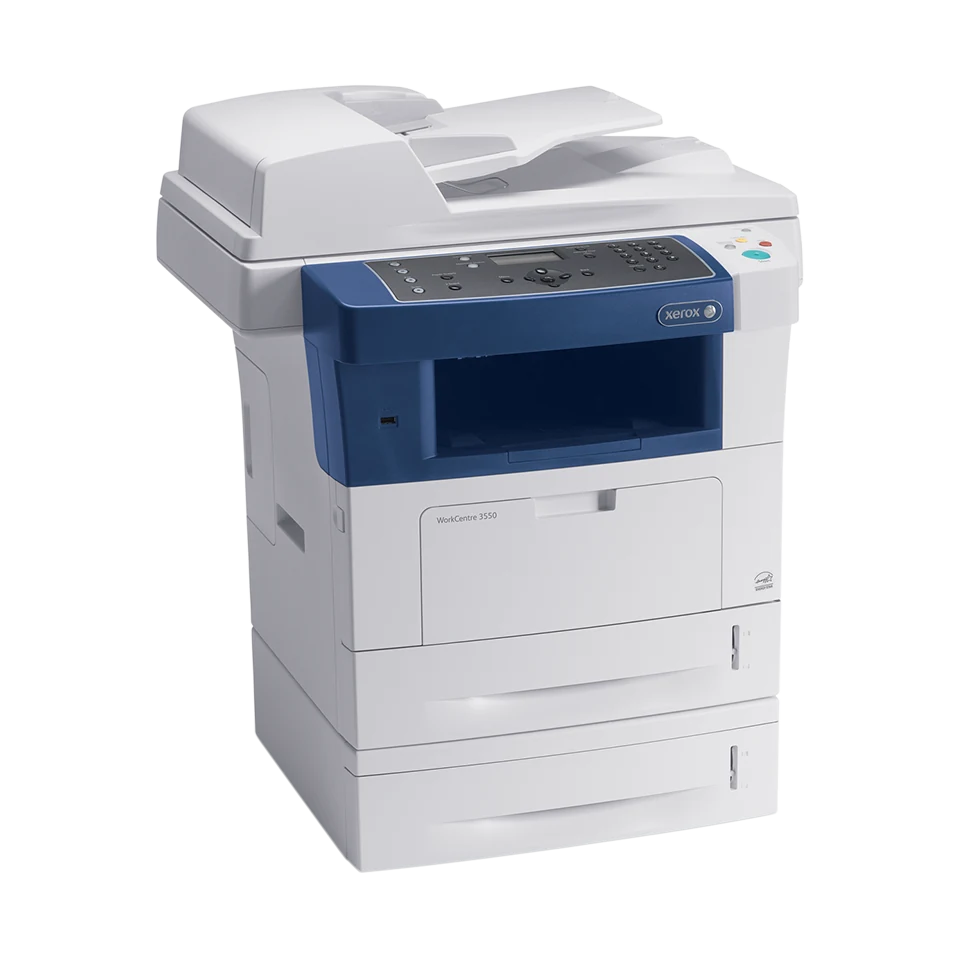
The Xerox WorkCentre 3550 is an earlier monochrome laser multifunction printer with color scanning, automatic two-sided printing, a 60-sheet duplex document feeder and embedded analog fax. The reviewed US configuration is 3550/X, identified by Xerox's original configuration list as a 110 V print, copy, scan and fax machine.
Its useful connection choice is between direct USB Local PC scanning and configured network scanning. The network PC workflow specifically uses the Windows Network Scan Manager and scan driver. Wireless requires an optional adapter, and old software listings need checking against the computer that will actually use the printer.
USB scanning is explicitly supported
For the local route, connect the printer to the computer with USB and install the scan driver. The guide directs the user to Scan, Local PC, sidedness settings and the destination; My Documents is the documented default. A Not Available message calls for checking the connection and setup.
For a network PC, configure the printer and Windows utility first. Select Network PC, the relevant login and destination, then resolution, color and file format. This is more specific than simply seeing Ethernet in an interface list. Scan-to-FTP, SMB and email also depend on their own configured destinations and access policies.
The front USB memory function is separate from the computer cable. Saving a scan on a flash drive does not establish how a computer driver or network destination behaves.
Legal feeder support and glass support are different
The automatic feeder accepts originals from 69.9 by 145 to 216 by 356 mm at 50–120 gsm. It supports ordinary Letter, Legal and A4 originals, with automatic two-sided scanning. The sources do not establish whether that process uses reversing or a single-pass sensor arrangement.
The actual glass loading instructions confirm Letter and A4. A general 8.5-by-14-inch maximum scan area does not establish a Legal glass, so a bound Legal document needs a more specifically documented flatbed alternative. On this machine, use the glass for suitable single originals and the feeder for supported loose stacks.
Color scanning does not change the print engine's monochrome output. The declared scan rates are separate from print speed and vary between black and color acquisition.
Count 550 ordinary sheets and keep duplex separate
The standard package includes a 500-sheet main tray and 50-sheet bypass. Both accept ordinary Letter, Legal and A4, totaling 550 at the US specification's 20 lb, 75 gsm basis. A further 500-sheet drawer is optional, so 1,050 sheets describes an expanded arrangement.
Automatic Letter/A4 duplex is positively documented, including separate speed figures and the driver's long-edge or short-edge choices. The exact Legal automatic-duplex size path remains unestablished here. Match the actual media, source and driver settings rather than assigning every supported one-sided size to the duplex path.
The older guide uses 80 gsm for the same capacity counts and gives a narrower ordinary main-tray weight range. Respect the actual loading line and choose compatible stock instead of filling solely to a nominal headline.
Confidential jobs and fax need their own setup
Secure Print appears among the standard printing features. The Windows guide describes holding a job until its passcode is entered at the control panel. That routine has no stated requirement for the optional extra memory. Proof printing is a different function that holds remaining copies after producing a sample.
Embedded fax requires an appropriate analog telephone line and fax settings. It can coexist with either computer connection, but the telephone path is separate from USB or Ethernet. Native AirPrint and Mopria remain unestablished; a Mobile Express Driver name does not establish phone-native printing.
Envelopes use a five-item bypass routine
The original envelope instructions allow at most five, loaded short edge first with flaps up. Open the rear output and release the specified green fuser levers as directed by the guide, then select the actual envelope size, type and bypass source.
The driver settings override the panel for computer jobs. This specialty routine does not inherit the 550-sheet ordinary capacity or automatic duplex.
Use ordinary volume and complete-machine measurements
Xerox declares up to 35 one-sided Letter pages per minute and 33 A4. The later US sheet separately gives 17/16 for automatic duplex, slightly lower than the older guide. Current ordinary monthly guidance is up to 8,000 pages, while the 75,000 duty figure is a separate declaration.
The original supplied cartridge has a declared 5,000-page capacity; replacements are declared around 5,000 or 11,000 standard pages. Original editions differ on ordering codes, so verify the actual unit's region and supply identity.
The body measures 22.9 by 19.2 by 21.8 inches. Its 51.59-pound declaration excludes the cartridge, so it is not a complete working-weight limit. Leave operating and maintenance room, and compare a machine with an explicitly Legal-size glass if that document route is essential.
Key details at a glance
| Color printing | No |
|---|---|
| Scanner | Yes |
| Copying | Yes |
| Fax | Yes |
| Flatbed scanner | Yes |
| Automatic document feeder | Yes |
| Automatic two-sided printing | Yes |
| Automatic two-sided scanning | Yes |
| Color scanning | Yes |
| Instructed envelope handling | Yes |
| Supported PIN-release printing | Yes |
| Recommended monthly maximum | 8000 pages |
| Maximum monthly duty | 75000 pages |
| Included ordinary-paper capacity | 550 sheets |
| Document-feeder capacity | 60 sheets |
| Declared one-sided mono Letter rate | 35 pages/min |
| Unit-body width | 22.9 in |
| Unit-body depth | 19.2 in |
| Unit-body height | 21.8 in |
| Imaging engine | laser |
Use the exact model’s instructions for operating limits, supplied equipment and version differences.
Paper, software and setup details
Print-rate conditions
The original US table explicitly declares up to 35 one-sided Letter pages/min and 33 A4, separately automatic two-sided 17 Letter/16 A4. Older guide figures are 18/17 for duplex; later 2012 US table is used without claiming measured throughput. The 26 monochrome/8 color scan images/min at 300 dpi are scanner rates. Current US reference gives up to 8,000 ordinary pages/month; 75,000 duty is separate and its original footnote assumes volume uniformly distributed over 30 days.
Paper handling
Included ordinary input is 500-sheet main plus 50-sheet bypass, totaling 550 at the US specification 20 lb 75 gsm basis. Both support Letter, Legal and A4, including the 148 x 210 to 216 x 356 mm main range. The additional 500-sheet drawer, stand and wireless adapter are optional. The guide lists 80 gsm for the same sheet counts and a narrower main ordinary range of 60–90 gsm; use suitable ordinary stock and its marked loading line. Automatic Letter/A4 duplex is explicitly positive in the US speed table and compatible driver routine; exact Legal duplex-size support is unestablished. Envelopes use the bypass, at most five, short edge first with flaps up. Open the rear output and release the specified green fuser levers according to the original guide; choose actual size/type/source in the driver, whose settings override the panel. Envelope capacity and duplex are separate from ordinary-sheet capacity.
Scanning arrangement
Color, grayscale and monochrome scanning are positive despite monochrome printing. The 60-sheet automatic duplex feeder accepts 69.9 x 145 to 216 x 356 mm originals at 50–120 gsm and supports Letter, Legal and A4. Automatic two-sided scanning is established, but the physical reversing versus single-pass method is unknown. Glass Letter/A4 is confirmed by the original loading routine; generic maximum scan area does not establish a Legal glass. USB Local PC scanning requires the installed scan driver. Select Scan, Local PC, the sidedness and destination; default destination is My Documents. Network PC requires a configured Windows Network Scan Manager and driver, then login/destination/color/format settings. USB flash scanning is a separate route.
Computer and mobile connections
Included direct USB 2.0 and 10/100 Ethernet provide compatible computer printing and the separately documented local/network scanning arrangements. The network computer-scanning plan is specifically a compatible Windows setup with Network Scan Manager; other OS paths are not silently combined. Standalone copying and embedded analog fax coexist with the print connection, with a separately configured appropriate analog phone line, not fax through the computer data port. No VoIP compatibility promise. Native AirPrint, Mopria and Wi-Fi Direct are unestablished. A wireless adapter is optional, and Mobile Express Driver is not evidence of phone-native printing.
Supplies and declared yields
The preserved US specification lists a supplied 5,000-capacity print cartridge. Its replacement declarations are approximately 5,000 and 11,000 standard pages under ISO/IEC 19752, varying with image, coverage and media. That edition lists 106R01528/106R01530, while another original US brochure indexed by the maker lists 106R01529/106R01531. The applicable local ordering distinction remains unresolved; verify against the actual serial/region and supplier rather than treating the numbers as interchangeable. No present price or cost-per-page calculation is made.
Software and support
US specifications list Secure Print among ordinary printing features with 256 MB standard memory. The actual Windows guide says Secure job type holds the job until its passcode is entered at the panel; no optional extra memory or disk condition is stated for that routine. Fixed driver passcode length and retention across power loss remain unestablished. The separate CentreWare print-ready-file submission uses a documented 4–10 digit secure ID; that limit is not assigned to every driver. Proof printing is a separate held-copy function. Actual compatible current drivers, local policies and network credentials require checking.
Electrical edition and setup
Exact original US configuration list identifies 3550/X as 110 V, print/copy/scan/fax with automatic duplex and one 500-sheet drawer. This is the reviewed US arrangement of the assigned generic 3550 row, separate from regional 3550V/X or XD. The family specification covers both 110–127 and 220–240 V, so inspect the actual label. Unit body dimensions are 22.9 x 19.2 x 21.8 inches. Its declared 51.59 lb explicitly excludes the print cartridge, so complete working weight is unknown and is not used to pass a weight limit. Allow additional feeder, output, covers, loading, ventilation and service space. Maker now says no longer sold as new.
Sources for this assessment
- Preserved Xerox US WorkCentre 3550 detailed specifications, February 2012, W3BSS-01UG
- Original Xerox US Mississippi EPL list, effective October1,2012
- Original Xerox WorkCentre3550 User Guide version1.0, coverApril2010/internalMarch2010, reproduced English body
- Current Xerox US WorkCentre3550 manufacturer reference page
Find a printer for your routine.
Match color output, scanning, connections and paper handling, then compare the exact models.