
Your needs, this model
Does it fit your priorities?
Can the Ethernet arrangement scan both sides of color Legal documents, use Legal glass, hold print jobs by PIN and serve 15,000 monthly pages?
Yes with the configured network scan destination or mailbox retrieval, compatible Secure Print driver and separate analog fax line. Legal glass and automatic duplex feeder routes are explicit, included paper is 700 sheets and the recommended monthly ceiling is 15,000. This does not establish single-pass capture.
Explore this need in the finder →Can a compatible USB computer capture ordinary color Legal originals from the glass or feeder and print two-sided Legal?
Yes for the guide’s USB application/WIA capture and compatible computer printing. Both original paths accept Legal and the print-duplex table includes it. The USB plan records ordinary feeder capture; the separately confirmed network two-sided scan setting is not automatically assigned to its USB software.
Explore this need in the finder →Does its 150,000-page maximum duty qualify a requirement to print 20,000 pages every month?
No. Xerox separately recommends an average monthly print volume up to 15,000 pages. The much higher duty figure is a maximum expected in a single month and is explicitly not meant to be sustained regularly. A 20,000-page routine requirement needs another documented workload recommendation.
Explore this need in the finder →The X configuration supplies the analog fax hardware
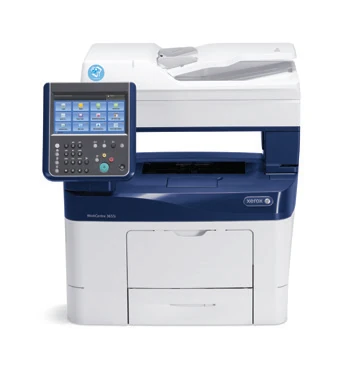
The Xerox WorkCentre 3655i/X is an earlier monochrome laser multifunction printer for a configured office document workflow. Its useful combination is automatic two-sided printing, color capture, Legal-size glass, a duplex document feeder and included X-specific analog fax.
The suffix matters. Xerox's exact table gives S Internet Fax and server-fax enablement, while X adds the walk-up analog fax arrangement. A general list of software fax services should not be used to erase that hardware difference. X also includes an offline convenience stapler, which is separate from automatic print finishing.
Make the scan destination part of the installation
The glass accepts originals through Legal, and the standard 60-sheet feeder supports ordinary and automatically two-sided originals within its size and weight limits. Use the glass for books, delicate documents and other originals unsuitable for feeding.
Network Workflow Scanning can create color files and capture both document sides automatically. The original sources reviewed here do not establish the physical method as single-pass. That is a different requirement from simply scanning both sides without manual turning.
A network destination still needs configuration. An SMB folder requires the correct destination and credentials, while a workflow template identifies where files go. The device can also save a scan in an internal mailbox, after which CentreWare Internet Services downloads it to the computer. A file left only in the device mailbox is not yet a computer archive.
The guide warns that the public mailbox is accessible to all users. Select a suitable private workflow for sensitive documents instead of assuming that any scan destination is private. A compatible USB computer also has documented application or WIA capture from the glass or feeder, although its reviewed instructions do not explicitly establish the network workflow's two-sided scan setting.
Start with the included 700 sheets
The main drawer holds 550 ordinary sheets and the bypass another 150, totaling 700 on the specification's 75 gsm basis. Letter, Legal and A4 fit both normal paper paths. The 2,350-sheet maximum requires three optional drawers and should not describe the base package.
Those three ordinary sizes also support automatic print duplex with the guide's specified stock. Set the actual size, type and two-sided option in the compatible driver. The 60 originals in the feeder and the output-tray capacity are different quantities.
Envelopes use the bypass and one-sided printing. Follow this model's diagram and driver settings: long-edge flaps load down and to the left. That direction is different from some other Xerox models. Special-media support is an instructed routine, rather than permission to feed any envelope construction.
The X model's convenience stapler handles a limited set offline. A user brings the sheets to it; its presence does not mean every driver job emerges as an automatically stapled set.
Separate wired functions from optional wireless
Ethernet and USB computer printing are standard. The Type A memory-device port has another purpose, and wireless operation requires the optional adapter. A supported shared network can still provide native AirPrint or Mopria through the printer's Ethernet connection without a radio inside the printer.
Compatible computer jobs can use Secure Print, which holds them until the assigned passcode is entered at the panel. This included feature is distinct from optional card readers or print-management services. Analog fax needs its own functioning telephone line and configuration.
Use the recommended volume for routine planning
Xerox declares up to 47 one-sided Letter pages per minute, 45 A4 and 36 Legal. The guide separately gives lower two-sided rates. These figures describe different jobs and are not measured performance results.
The recommended average monthly volume is up to 15,000 pages. The 150,000-page maximum duty is explicitly not intended as a sustained routine. Use the former when choosing a printer for recurring work.
Separate toner and drum yields also have different measurement bases. Check the condition, supplies and software compatibility of an actual earlier unit. For configured wired capture and included analog fax, X has a clear documented role; essential single-pass scanning or built-in wireless requires another confirmed configuration.
Key details at a glance
| Color printing | No |
|---|---|
| Scanner | Yes |
| Copying | Yes |
| Fax | Yes |
| Flatbed scanner | Yes |
| Automatic document feeder | Yes |
| Automatic two-sided printing | Yes |
| Automatic two-sided scanning | Yes |
| Color scanning | Yes |
| Instructed envelope handling | Yes |
| Apple AirPrint | Yes |
| Mopria printing | Yes |
| Supported PIN-release printing | Yes |
| Recommended monthly maximum | 15000 pages |
| Maximum monthly duty | 150000 pages |
| Included ordinary-paper capacity | 700 sheets |
| Document-feeder capacity | 60 sheets |
| Declared one-sided mono Letter rate | 47 pages/min |
| Unit-body width | 22 in |
| Unit-body depth | 21.3 in |
| Unit-body height | 22.7 in |
| Unit weight | 58 lb |
| Imaging engine | laser |
Use the exact model’s instructions for operating limits, supplied equipment and version differences.
Paper, software and setup details
Print-rate conditions
The original specifications declare up to 47 one-sided Letter pages/min, 45 A4 and 36 Legal. The guide separately lists up to 29 Letter and 28 A4 pages/min for two-sided printing. The recommended average monthly print volume is up to 15,000 pages; the 150,000-page maximum duty is a different limit, explicitly unsuitable as a sustained monthly target. Color scan image rates are not color printing or measured output speed.
Paper handling
Included normal input is 550 sheets in Tray 1 plus 150 in the bypass, totaling 700 at the specification’s 20 lb/75 gsm basis. Both ordinary paths support Letter, Legal and A4. Automatic print duplex supports those three sizes with the guide’s supported 60–163 gsm stock. The 2,350-sheet maximum requires three optional 550-sheet drawers. The 60-sheet document feeder and 250-sheet output are separate counts. Envelopes use the bypass, one-sided, with matching Envelope settings. Follow the exact diagram: long-edge flaps load down and to the left; non-adhesive short-edge flaps use another instructed orientation. The X model’s included convenience stapler is an offline, single-position device for up to 20 sheets on the stated basis; it does not automatically finish every printed set.
Scanning arrangement
The glass and 60-sheet automatic feeder each accept originals through 8.5 x 14 inches, including Letter, Legal and A4. Feeder limits are 50–125 gsm for simplex and 60–125 for duplex originals. The detailed specification bases capacities on 75 gsm, while the guide describes about 60 originals at 80 gsm; observe the fill mark and actual stock. Network Workflow Scanning positively supports color and automatic two-sided files. The reviewed material does not establish its physical method as single-pass, so automatic duplex is recorded with unspecified mechanism. For the directly connected USB computer, the guide confirms color application/WIA capture from glass or feeder, but does not explicitly establish its two-sided driver routine; that plan records the confirmed ordinary capture routes.
Computer and mobile connections
Gigabit Ethernet and Type B USB computer printing are standard; the Type A walk-up port serves compatible memory devices. Wi-Fi and Wi-Fi Direct require the optional adapter. Ethernet computer capture can use a configured SMB destination, a workflow repository or a device mailbox downloaded through CentreWare Internet Services. A mailbox file remaining only on the device is not yet saved on the computer. Direct USB scanning requires compatible scan software and the documented application or WIA route. Native AirPrint and Mopria are standard network printing protocols, usable through an Ethernet-connected printer on a suitable shared network without adding its optional radio. Their basic mobile plan does not borrow desktop-driver or scan features.
Supplies and declared yields
The US detailed sheet lists supplied toner at 6,100 pages and replacements 106R02736 at 6,100, 106R02738 at 14,400 and 106R02740 at 25,900 under ISO/IEC 19752. The separate 113R00773 drum is approximately 68,000 pages on an average three-page A4/Letter job basis. Its 108R00823 staple cartridge is listed at 3,000 staples. These declared yields are affected by use and do not establish present supply prices, remaining life or cost per page.
Software and support
Secure Print uses a 4–10 digit passcode in the compatible driver and holds the job until release at the panel. Its included hardware and native feature differ from optional print-management or smart-card systems. For scanning, choose a suitable private mailbox or correctly configured destination, permissions and credentials. The guide warns that all users can retrieve scans from the public mailbox. Current driver, network-security and app compatibility must be checked for the actual installation; old software version lists and cloud-service names are not present-service promises.
Electrical edition and setup
The exact X body is 22.0 x 21.3 x 22.7 inches and 58 lb unpackaged, distinct from the S model’s 56 lb and the X carton’s 70.8 lb. Leave additional access and ventilation space, including tray extension and the feeder/cover. The reviewed North American sheet specifies 110–127 VAC separately from Europe’s 220–240 version; the shared guide also distinguishes electrical editions. Inspect the actual label. X includes embedded analog fax and its fax cord; configure the dedicated compatible telephone line. Internet/server fax listings do not turn S into the same base analog-fax configuration. Xerox explicitly marks 3655i discontinued.
Sources for this assessment
Find a printer for your routine.
Match color output, scanning, connections and paper handling, then compare the exact models.