
Your needs, this model
Does it fit your priorities?
Can Ethernet support monochrome Legal duplex printing, color Legal scans from the glass or automatic duplex feeder, fax and PIN release for 20,000-page months?
Yes with compatible drivers, a configured network scan template/repository and the enabled analog telephone line for fax. Legal is established for the glass, feeder and print-duplex path. Included ordinary-paper capacity is 600 at 75 gsm, and the recommended monthly maximum is 30,000. The feeder is automatic duplex, with its physical single-pass method unestablished.
Explore this need in the finder →Can a USB-connected computer print two-sided Letter documents using the base 600-sheet input configuration?
Yes with the compatible computer driver and actual ordinary-paper settings. The exact US X table provides one 500-sheet tray plus the 100-sheet bypass. The larger XF input and finishing package is separate. This USB printing answer does not establish USB computer scanning.
Explore this need in the finder →Does the documented automatic duplex feeder establish both sides scanned in one pass?
No qualifying single-pass claim is established. The original sources positively document automatic two-sided capture and its supported sizes, but the reviewed material does not establish the physical reversing or single-pass method. A buyer for whom one-pass capture is essential needs a separately confirmed scanner mechanism.
Explore this need in the finder →A wired Legal-document station with separate print and scan strengths
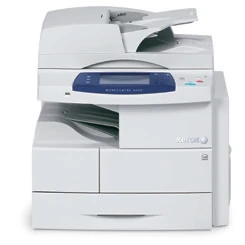
The Xerox WorkCentre 4260X fits a document team producing monochrome paperwork while scanning originals in color. Its full Legal-size glass is useful for longer pages that should remain stationary, while a 100-sheet feeder handles suitable loose stacks and automatic two-sided originals. The X configuration also includes embedded telephone fax.
The deciding setup requirement is network filing. The documented Ethernet scanner needs its destination and template configured; connecting a print queue does not complete that work. USB computer printing and scanning to a portable USB drive are different routines.
The current US Xerox shop identifies WorkCentre 4260 as discontinued. Verify the exact 110 V X edition, condition, installed options and compatible software before treating an individual machine as an office solution.
Use the Legal glass when a feeder is unsuitable
The original evaluator explicitly identifies an 8.5 by 14 inch platen glass for copying and scanning Legal originals. Letter and A4 also fit. This is more useful than a Legal feeder alone when a longer page is bound, fragile or otherwise unsuitable for transport.
For suitable stacks, the detailed specification lists a 100-sheet duplex automatic document feeder. Its original-size range accommodates Letter, Legal and A4. Automatic capture of both original sides is confirmed, but the reviewed sources do not establish a single-pass mechanism. Choose a separately confirmed scanner if one-pass capture is essential.
Color scanning is supported even though the printer makes monochrome pages. The scan-resolution table gives color a 300 by 300 dpi maximum, separately from the higher setting available in other scan modes. Color capture and color printing should therefore be treated as different needs.
Make the network destination part of the routine
A scan template collects the destination and image settings for a filing job. A repository means the configured network folder or server location receiving the scan. The destination must be set up and accessible before the panel workflow can deliver files.
At Services Home, choose Network Scanning and the appropriate template. Confirm output color, original sides and filing choices. The original guide distinguishes temporary panel changes from persistent template settings and does not let an ordinary panel selection freely replace the configured destination.
For loose pages, remove clips and staples, load face up with the first page on top and headings toward the machine's left, then adjust the guides. Place a stationary original face down at the glass's top-left registration arrow. Check a completed file at its intended destination before relying on a longer batch.
The US X base has 600 input sheets
The exact US configuration table gives the X one 500-sheet main tray and a 100-sheet bypass, totaling 600 ordinary sheets at 20 lb, 75 gsm. Their stated size ranges include Letter, Legal and A4. The automatic-duplex table independently confirms those three output sizes.
The XF package adds an extra drawer, high-capacity feeder and finisher. Those additions change capacity and working space. Combined-family documentation describes other tray counts, so compare an actual unit with the exact US configuration rather than counting every pictured drawer as standard X equipment.
For envelopes, use the instructed bypass routine with short-edge feeding and flaps facing up. Adjust the guide and confirm size and type. Envelope loading is a separate one-sided job, with its own limit, rather than the bypass's ordinary-paper sheet rating.
Choose passcode release for sensitive computer jobs
Secure Print holds a supported computer job until its PIN is entered at the printer. In the compatible Windows driver's Paper/Output controls, selecting Secure Print opens the passcode dialog. Send the prepared job, then use its code at the control panel to release it.
A Confidential watermark only adds a label to a page. Sample Set holds remaining copies after a sample, while Delay Print schedules output and Saved Job stores work for reuse. These serve different purposes from confidential release. The included hard drive supports the documented arrangement; optional card and accounting systems require separate checks.
Embedded fax requires the X's configured analog telephone line. Server fax has its own optional enablement and network setup. Neither a working Ethernet printer nor a USB cable supplies that telephone service.
Plan workload, supplies and access around the actual machine
The manufacturer declares up to 55 one-sided Letter pages per minute, 53 A4 and 40 Legal. Automatic-duplex rates are separate. Recommended regular output reaches 30,000 monthly pages; the 250,000 duty figure describes a different maximum. These are source declarations, not measured performance.
Supplied toner is declared at 12,000 pages and replacement toner at 25,000 under ISO/IEC 19752. The imaging drum and maintenance kit have separate identities and approximate life conditions. A toner replacement does not refresh every wear component.
The exact X body is 24.5 by 19 by 25.5 inches and 98 lb. Allow additional space for the open glass, feeder, side bypass, service covers and ventilation, plus any separately installed drawer or finishing equipment.
Key details at a glance
| Color printing | No |
|---|---|
| Scanner | Yes |
| Copying | Yes |
| Fax | Yes |
| Flatbed scanner | Yes |
| Automatic document feeder | Yes |
| Automatic two-sided printing | Yes |
| Automatic two-sided scanning | Yes |
| Color scanning | Yes |
| Instructed envelope handling | Yes |
| Supported PIN-release printing | Yes |
| Recommended monthly maximum | 30000 pages |
| Maximum monthly duty | 250000 pages |
| Included ordinary-paper capacity | 600 sheets |
| Document-feeder capacity | 100 sheets |
| Declared one-sided mono Letter rate | 55 pages/min |
| Unit-body width | 24.5 in |
| Unit-body depth | 19 in |
| Unit-body height | 25.5 in |
| Unit weight | 98 lb |
| Imaging engine | laser |
Use the exact model’s instructions for operating limits, supplied equipment and version differences.
Paper, software and setup details
Print-rate conditions
The exact US table declares one-sided monochrome output up to 55 Letter, 53 A4 and 40 Legal pages/min. Automatic-duplex output is separately 36 Letter, 35 A4 and 35 Legal. Scanner input of 55 monochrome or 25 color Letter images/min is different from print speed. Recommended regular monthly output is up to 30,000; the 250,000 duty declaration is a separate maximum. Enhanced image-quality figures are not physical optical resolution. No measured-speed or reliability claim.
Paper handling
The exact US X configuration includes one 500-sheet tray and a 100-sheet bypass, totaling 600 ordinary sheets at 20 lb, 75 gsm. Both size ranges include Letter, Legal and A4; the exact duplex output table independently establishes those three sizes for automatic duplex. The optional second 500-sheet tray, 2,000-sheet feeder and finisher belong to added equipment or the XF package. The combined guide describes a different two-tray X and 520/2,100-sheet capacities at 80 gsm; these do not replace the exact US base table. Use actual panel size/type settings and supported ordinary stock; one-sided bypass media up to 200 gsm is not an automatic-duplex weight promise. For the documented one-sided envelope routine, unfold the right bypass and load short edge first, flaps facing up, below MAX. Adjust the guide and confirm size/type/color. Use well-constructed envelopes without clasps, windows, coated linings or prohibited self-adhesive seals. The combined guide gives 10 bypass envelopes as a separate limit; do not read 100 ordinary sheets as 100 envelopes.
Scanning arrangement
A full 8.5 x 14 inch glass is explicitly documented for copying and scanning Legal pages, and also accommodates Letter and A4. The 100-sheet duplex automatic document feeder supports those three sizes within its 70–216 mm by 152–356 mm original range. Automatic two-sided original capture is positive; reversing versus single-pass method remains unestablished. Use the unspecified automatic-duplex route and do not qualify single-pass. Remove clips/staples; load loose originals face up, first page on top, headings toward the left, and set guides gently to their edges. For the glass, place the original face down at the top-left registration arrow. The US capacity basis is 75 gsm; the combined guide separately uses 80 gsm. Color capture maximum in the detailed specification is 300 x 300 dpi, distinct from 600 x 600 in other scan modes.
Computer and mobile connections
Included USB2 computer printing and Gigabit Ethernet. The documented computer scanning arrangement is configured network scanning, including templates/repositories and network TWAIN/WIA applications. At Services Home select Network Scanning, choose the administrator-created template, then set output color, original sides, type, resolution and filing options as needed. A repository is the preconfigured network filing destination; the panel does not freely replace its destination. Authentication and destination access must work. Scanning to a portable USB storage device does not establish direct scanning to a USB-connected computer; the latter remains unknown. No included Wi-Fi, native AirPrint or Mopria arrangement is established by these sources.
Supplies and declared yields
The original US box has starter toner declared at 12,000 pages. Replacement toner 106R01409 is declared at 25,000 under ISO/IEC 19752, with image, coverage and media conditions. Drum 113R00755 is approximately 80,000 and maintenance kit 115R00063 is 200,000 under separate job-length, media-size and orientation conditions. Toner and imaging drum are different consumables. Staple refills 008R12941 are for an equipped finisher, not evidence that the base X includes one. No current price, cost-per-page or remaining-life promise.
Software and support
Included Secure Print holds a supported computer job in memory until its PIN is entered at the panel. In the compatible Windows driver, Paper/Output job type Secure Print opens the passcode dialog; send the job and use the printer control panel to release it with that code. Sample Set, Delay Print, Saved Job and a Confidential watermark have different purposes. The standard 80 GB hard drive is not an optional-storage assumption. Additional card readers, network-accounting or server-fax solutions have their own configuration and licensing. Historical operating-system and software lists do not guarantee current compatibility.
Electrical edition and setup
The exact original US configuration sheet positively labels 4260/X as a 110 V part; the evaluator separately documents 110–127 V and 220–240 V electrical arrangements. Check the actual rating label and installed package. X adds embedded analog telephone fax to S; the normal fax arrangement requires its configured analog phone line, while optional server fax is separate. The current US Xerox shop marks WorkCentre 4260 discontinued. Exact X body is 24.5 x 19 x 25.5 inches and 98 lb, different from S at 97 lb, XF at 205 lb and the X carton at 114.4 lb. Combined-guide generic body dimensions are inconsistent and are not used. Allow glass/feeder opening, side bypass, service covers, cables and ventilation.
Sources for this assessment
- Original Xerox WorkCentre 4260 evaluator guide, January 2014
- Original Xerox WorkCentre 4260 detailed specifications, January 2014
- Original Xerox WorkCentre 4250/4260 User Guide, version 5.0, 2013, reproduced body
- Original Xerox WorkCentre 4260 US exact configuration and consumables sheet
- Current United States Shop Xerox WorkCentre 4260 legacy reference
Find a printer for your routine.
Match color output, scanning, connections and paper handling, then compare the exact models.