
Your needs, this model
Does it fit your priorities?
Can an Ethernet computer retrieve color Tabloid scans from the glass or automatic duplex feeder while printing monochrome Tabloid duplex pages with 1,000 included sheets?
Yes with the compatible print driver and the administrator-enabled printer folder. Scan into that folder, then retrieve the file through CentreWare Internet Services on the network computer. The glass and automatic duplex feeder accept Tabloid; the guide explicitly documents Tabloid duplex booklet output. Included capacity is 1,090 ordinary sheets at 75 gsm. Single-pass feeder operation is not established.
Explore this need in the finder →Can a compatible USB computer send a passcode-held two-sided Letter job using the basic 5325/P paper drawers?
Yes. The supported driver provides automatic duplex and Secure Print, with release at the printer using the chosen passcode. The P package contains two 520-sheet drawers and the 50-sheet bypass. This USB printing arrangement does not establish USB computer scanning.
Explore this need in the finder →Does the unmodified 5325/P package include a normal telephone fax function?
No. Fax is an optional kit in this family, and the exact P bundle does not include it. The separate PHXF package explicitly includes one-line fax and a finisher. A telephone line or Ethernet cable alone cannot supply the missing fax option.
Explore this need in the finder →Keep the wide page, even when the printed copy is monochrome
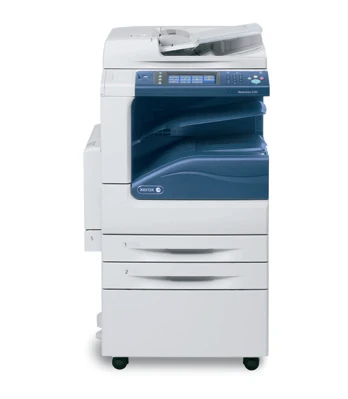
The Xerox WorkCentre 5325/P suits an office that needs to preserve larger originals in color and produce monochrome paperwork from the same station. Its glass accommodates A3 and Tabloid pages, and the 110-sheet feeder handles suitable loose originals, including automatic capture of both sides.
The deciding distinction is the package. The original US 5325/P combines printing, copying and color scanning with two paper drawers and a stand. It does not include the fax kit, a finishing tower or the high-capacity tandem cabinet. Those additions belong to other configurations or separately installed options.
This is an earlier configuration reference. Check an individual machine's 110 V rating, installed hardware, condition and compatible software before planning an office around it. An accessible manual does not establish a current offer.
A useful base capacity for mixed document sizes
The P package includes two 520-sheet drawers and a 50-sheet bypass: 1,090 ordinary sheets on the detailed specification's 75 gsm basis. Letter, Legal, A4, A3 and Tabloid fit the documented included paper paths. Keeping two sizes ready can reduce drawer changes, although each drawer still holds only the stock actually loaded into it.
The high-capacity tandem arrangement is different. Its additional storage favors smaller office sizes; it should not be counted as extra Tabloid capacity. Photographs showing side feeders, staplers or booklet equipment likewise describe installed options rather than the basic P package.
Automatic two-sided printing is standard. The guide describes supported duplex media at 60–169 gsm and specifically documents Letter, A4, Tabloid and A3 booklet output. Its broad Legal paper support does not independently establish a Legal automatic-duplex routine in the reviewed material.
For envelopes, the bypass is the included route. Follow its separate loading instructions and size settings. The optional higher-capacity envelope tray replaces the first drawer; it does not add envelope storage while leaving that drawer available for ordinary sheets.
Separate large originals from the feeder's mechanism
The glass accepts originals up to 297 by 432 mm, allowing a larger page to remain stationary. That matters for a bound document or an original unsuitable for transport. The feeder's documented duplex size range also accommodates Letter, Legal, A4, A3 and Tabloid, but suitable paper condition and weight remain necessary.
Automatic two-sided capture is confirmed. A single-pass mechanism is not established, so choose a separately confirmed scanner if capturing both sides in one pass is essential. The feeder's 110-sheet capacity is also a different quantity from the printer's input capacity.
Color scanning preserves colored markings even though printed output is monochrome. That distinction makes the 5325/P relevant to an office filing annotated plans or mixed documents without requiring color copies on paper.
Use the enabled printer folder as a filing step
The exact US P configuration includes scanning to a mailbox and email. For a documented computer retrieval arrangement, an administrator enables a folder on the printer. The scan goes into that folder first; a computer on the network then retrieves it through CentreWare Internet Services in a browser.
This differs from a small USB desktop scanner that immediately sends every scan into an open application. Agree on the destination, access credentials and file handling before relying on longer batches. Protect folders where appropriate and decide whether files should remain after retrieval.
Additional network repositories, desktop workflow software, searchable files and previews have their own option and setup conditions. The presence of those features somewhere in a family brochure does not make all of them part of the base P arrangement.
Match the computer driver and release routine
Ethernet and USB computer printing are documented. The standard PCL arrangement supports a compatible Windows workflow, while the family specification requires the optional PostScript Kit for Mac printing. Old operating-system lists do not promise compatibility with a present computer.
Secure Print holds an appropriate computer job for passcode release at the machine. It is useful when paperwork should not sit unattended in the output tray. Sample Set, delayed output and saved jobs serve different purposes and should not be substituted for that release behavior.
Fax requires its separate option and service setup. A working network print queue does not provide the missing hardware. If telephone fax is essential, compare the installed package directly rather than treating P and PHXF as interchangeable names.
Read the speed and supply figures on their own terms
Xerox declares up to 25 one-sided Letter or A4 pages per minute with long-edge feeding, 16 Legal and 14 Tabloid or A3. These are manufacturer figures, not measured results. The 100,000-page monthly duty figure is a maximum, not a recommended regular workload.
Replacement black toner 006R01159 is declared at approximately 30,000 pages under the stated ISO and coverage conditions. The imaging drum is a separate item, and the supplied starter toner's yield is not established here. For a mainly Letter office, a smaller monochrome multifunction printer may be easier to place and maintain; the 5325/P's clearer reason for consideration is its larger document area and included two-drawer arrangement.
Key details at a glance
| Color printing | No |
|---|---|
| Scanner | Yes |
| Copying | Yes |
| Fax | No |
| Flatbed scanner | Yes |
| Automatic document feeder | Yes |
| Automatic two-sided printing | Yes |
| Automatic two-sided scanning | Yes |
| Color scanning | Yes |
| Instructed envelope handling | Yes |
| Supported PIN-release printing | Yes |
| Maximum monthly duty | 100000 pages |
| Included ordinary-paper capacity | 1090 sheets |
| Document-feeder capacity | 110 sheets |
| Declared one-sided mono Letter rate | 25 pages/min |
| Unit-body width | 23.5 in |
| Unit-body depth | 25.1 in |
| Unit-body height | 43.9 in |
| Unit weight | 220 lb |
| Imaging engine | laser |
Use the exact model’s instructions for operating limits, supplied equipment and version differences.
Paper, software and setup details
Print-rate conditions
Declared one-sided monochrome speed is up to 25 Letter or A4 pages/min with long-edge feeding, 16 Legal and 14 Tabloid or A3. The 55 images/min scanner figure is separate. No measured result or assumed duplex speed. The 100,000-page monthly duty cycle is a maximum, explicitly not regular sustained volume; a recommended monthly maximum remains unestablished.
Paper handling
Exact US 5325/P includes the stand with two 520-sheet drawers and a 50-sheet bypass: 1,090 ordinary sheets at the detailed specification's 75 gsm basis. Each included path supports Letter, Legal, A4, A3 and Tabloid within its stated range; the guide independently lists these standard sizes. Its tray-loading description uses 80 gsm, a separate capacity basis. The PH tandem cabinet and additional high-capacity feeder are different packages; their smaller-paper capacity cannot become A3 capacity. Automatic duplex is standard; the guide gives supported media at 60–169 gsm and specifically describes duplex booklets on Letter, A4, Tabloid and A3. The reviewed material does not independently establish Legal automatic duplex. Envelopes are one-sided. Use the bypass with supported 75–90 gsm C5, DL, Monarch or Commercial #10 envelopes, long edge first, flaps up and leading into the printer; set panel size and driver Envelope type. Do not exceed MAX or use windows, metal clasps or padded envelopes. The optional 60-envelope tray replaces Tray 1 and is not included.
Scanning arrangement
The glass accepts originals up to 297 x 432 mm, accommodating Letter, Legal, A4, A3 and Tabloid. The 110-sheet automatic duplex feeder supports these same five sizes within its documented simplex and duplex ranges; duplex originals use 50–128 gsm, versus 38–128 gsm simplex. Automatic capture of both sides is confirmed, but single-pass versus reversing mechanism is unestablished. Use the unspecified automatic-duplex route. Load feeder originals face up, first page on top, and adjust guides. Place a glass original face down against the back-left registration, and do not force the cover onto a thick book. Color scanning is supported; printed output remains monochrome.
Computer and mobile connections
Included Gigabit Ethernet and USB2 computer printing with a compatible driver. The exact P configuration includes color Scan to Mailbox and Email. For the documented computer-scanning plan, an administrator enables a protected folder on the printer; select Store to Folder at Services Home, choose color and original sides, then scan. On the network computer, enter the printer IP address in a browser, open CentreWare Internet Services, choose Scan then Folder, authenticate if needed, select the file and retrieval format, click Retrieve, then save the linked file. This is a network retrieval route. Optional repository, WSD, desktop workflow and searchable-PDF kits have separate requirements. A USB flash drive is different from direct scanning to a USB computer, which remains unestablished. No native AirPrint or Mopria route is established by generic mobile-driver marketing.
Supplies and declared yields
The exact US P bundle includes starter toner, with its yield unestablished in the reviewed sources. Sold replacement black toner is 006R01159, declared at approximately 30,000 pages under ISO/IEC 19752 with the maker's coverage and print-mode conditions. Metered toner 006R01158 is a different ordering item. Imaging drum 013R00591 is separate and listed at approximately 96,000 pages, not a toner yield or guaranteed remaining life. Optional finisher staple cartridges do not establish an included finisher. No current prices or cost-per-page calculation.
Software and support
Secure Print is standard on the Copier/Printer/Scanner package. In a compatible Windows driver choose Paper/Output, Job Type, Secure Print and enter/confirm a 1–12 digit passcode. At the panel choose Job Status, Secure Print Jobs & More, Secure Print, your identification and Job List; enter the passcode, select the document and Print. Sample Set, Delay Print and stored jobs are different routines. The family specification requires the optional PostScript Kit for Mac printing; base PCL Windows printing does not require that kit. Historical driver lists do not establish present operating-system compatibility.
Electrical edition and setup
The original exact 5325/P US configuration explicitly says 110 V; the detailed specification separately lists 110–127 V and 220–240 V editions. Check the actual unit rating and installed hardware. This is an earlier historical 2016 configuration reference, without a current-stock or manufacturer-discontinuation claim. Fax is optional and not included in P; PHXF explicitly includes its one-line fax kit and finisher. A generic software listing does not activate a fax service. The detailed specification's base unit with bypass closed is 23.5 x 25.1 x 43.9 inches and 220 lb. The older generic guide gives a conflicting 253.5 lb base weight; do not combine it with added-finisher or feeder dimensions. Allow open glass, side bypass, doors and service access.
Sources for this assessment
- Original Xerox US WorkCentre 5325/5330/5335 configurations, revised October 15, 2016
- Original Xerox WorkCentre 5325/5330/5335 data sheet, April 2015
- Original Xerox WorkCentre 5325/5330/5335 detailed specifications, June 2012
- Original Xerox WorkCentre 5300 Series User Guide, version 1.0, September 2011, reproduced body
- Manufacturer WorkCentre 5325/5330/5335 replacement toner and drum reference
Find a printer for your routine.
Match color output, scanning, connections and paper handling, then compare the exact models.