
Your needs, this model
Does it fit your priorities?
Can Ethernet support Legal color print duplex, Legal color feeder capture and fax with 250 included duplex sheets?
Yes, using the main tray, compatible computer software and configured capture destination. The DN includes the print duplex unit and Legal fits the ADF. Fax separately needs an operating configured analog telephone line. The manual slot is not counted in the 250-sheet automatic-duplex arrangement.
Explore this need in the finder →Does DN mean USB scanning reads both faces of Legal originals in a single pass?
This reference does not qualify. DN establishes the included print duplex unit; the read source does not establish a single-pass duplex scanner. The documented Legal feeder capture is retained without inventing that mechanism.
Explore this need in the finder →Does the standard Ethernet DN configuration include password-release Secure Print?
No. Secure Print needs the separate additional-memory/Productivity Kit arrangement with RAM Disk enabled. The DN suffix supplies print duplex, not the optional memory needed for protected stored jobs.
Explore this need in the finder →Choose DN for the included print duplex unit
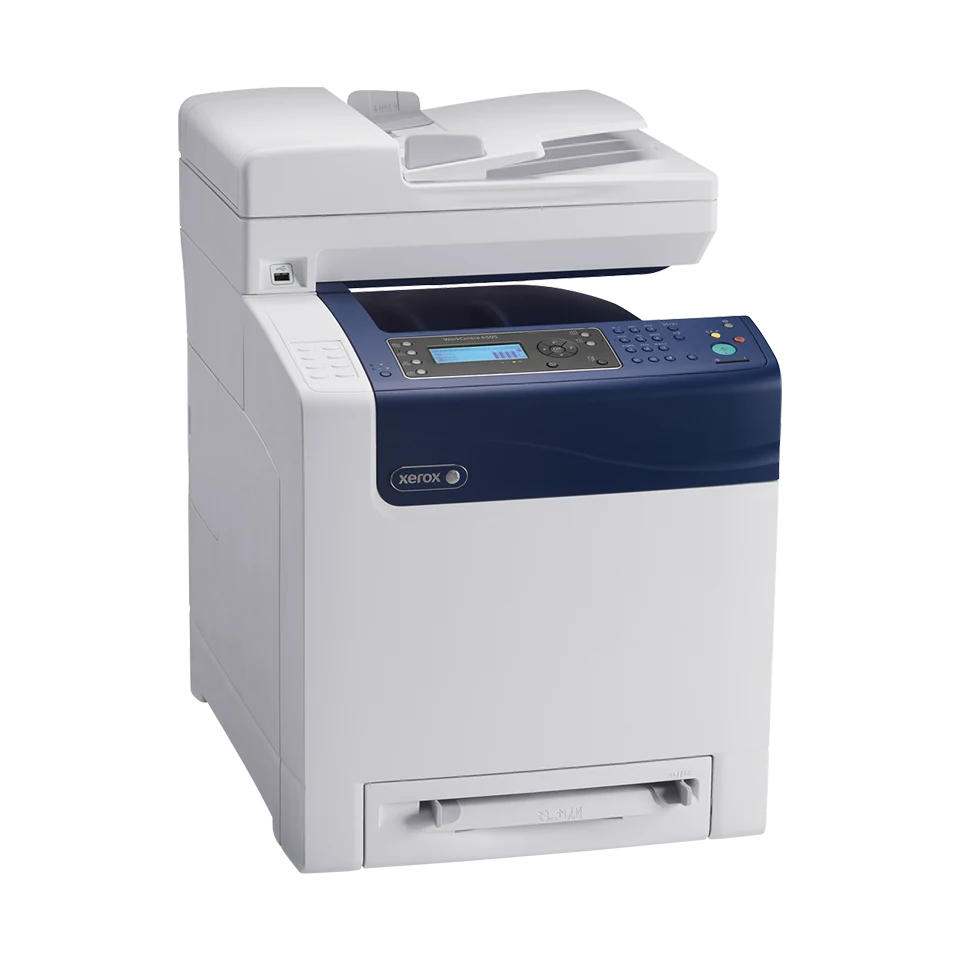
The Xerox WorkCentre 6505DN is an earlier color laser multifunction printer with an included automatic print duplex unit. It brings together computer printing, copying, scanning and analog fax for a compatible wired office. Its useful distinction from 6505N is unattended two-sided output on suitable paper.
That suffix does not settle every document task. The 35-sheet feeder is documented for capturing suitable loose originals, but automatic capture of both faces is not established by the read material. Wireless hardware, mobile printing and the memory needed for Secure Print are separate options. Xerox identifies the family as no longer sold as new.
Use the main tray for automatic two-sided output
The included main tray holds 250 ordinary sheets at 75 gsm/20 lb. Letter, A4 and Legal fit the documented automatic print duplex path. Select the correct format, stock type and binding edge in suitable computer software, and verify that the installed duplex unit is enabled in its configuration.
The detailed main-tray plain-paper range is 65–120 gsm, while the duplex path is limited to 60–105 gsm. Ordinary stock in the common 65–105 gsm range keeps both restrictions in view. Cardstock, labels and envelopes are excluded from automatic duplex; a high general media-weight limit is not permission to duplex every stock.
The single-sheet manual source takes an occasional alternative page. It increases nominal ordinary simplex input to 251, but the documented automatic-duplex routine uses the main tray, or the optional second tray when installed. Count 250 included sheet positions for the main-tray duplex arrangement. The extra 250-sheet drawer is optional.
Keep the original and the output sheet separate
The ADF accepts suitable loose Letter, A4 and Legal originals at 50–125 gsm. Its nominal 35-sheet capacity has no established paper-weight basis in this reading, so check the actual stack and fill line. A heavy original stack is not automatically a 35-sheet load.
Color capture and a glass route are documented. The glass is useful for an appropriate original that should not enter the feeder, but its exact maximum size is not established here. The general Legal scan-size menu should not substitute for confirmation that a full Legal original fits that particular route.
A one-sided-original to two-sided-copy feature describes how copies are printed. It does not prove that the feeder turns originals over or reads both faces at once. If automatic duplex capture is essential, choose a device whose original-handling mechanism is explicitly documented.
Configure capture for the connection you use
USB 2.0 and gigabit Ethernet are standard. The guide describes USB computer capture and configured network delivery separately. Check compatible scan software and a destination for the USB routine, or the reachable shared folder and address-book setup for the network route. Older installation instructions need verification against the computer and network in use.
USB-only operation does not provide network-folder or email delivery. A front USB memory destination is another capture routine, distinct from the rear computer connection. Optional wireless hardware and the later Wireless Print Solutions Adapter have their own requirements; AirPrint or Mopria is not included simply because the printer has Ethernet.
Telephone fax and confidential printing need their own setup
The DN includes native fax. It still needs a working dedicated analog telephone line and configured fax settings. An Ethernet connection does not replace that telephone service, and an unfamiliar digital telephone arrangement requires its own compatibility check.
Standard memory is 256 MB. Xerox lists Secure Print and related stored-job functions as requiring the optional additional-memory/Productivity Kit arrangement and RAM Disk. The duplex unit does not provide that upgrade. Confirm actual installed memory before relying on password release for confidential computer jobs.
Assess workload and the actual installation
Declared printing is up to 24 one-sided Letter or 23 A4 pages per minute in color or monochrome. Recommended monthly output is up to 4,000 pages; the 40,000-page maximum duty ceiling is separate. Neither figure establishes the condition or remaining life of an individual used machine.
US replacement declarations under ISO/IEC 19798 are 3,000 black pages, 2,500 per high-capacity color and 1,000 per standard color. Confirm exact cartridge identity, actual coverage and separate service items; starter yield is unestablished here.
The US DN body is approximately 16.9 inches wide, 21.4 deep and 23 high at 65.1 pounds. Allow additional operating access and verify the mains label, installed options and software. A documented duplex scanner or native mobile model is a better fit when either task determines the purchase.
Key details at a glance
| Color printing | Yes |
|---|---|
| Scanner | Yes |
| Copying | Yes |
| Fax | Yes |
| Flatbed scanner | Yes |
| Automatic document feeder | Yes |
| Automatic two-sided printing | Yes |
| Color scanning | Yes |
| Instructed envelope handling | Yes |
| Apple AirPrint | No |
| Mopria printing | No |
| Supported PIN-release printing | No |
| Recommended monthly maximum | 4000 pages |
| Maximum monthly duty | 40000 pages |
| Included ordinary-paper capacity | 251 sheets |
| Document-feeder capacity | 35 sheets |
| Declared one-sided mono Letter rate | 24 pages/min |
| Declared one-sided color Letter rate | 24 pages/min |
| Unit-body width | 16.9 in |
| Unit-body depth | 21.4 in |
| Unit-body height | 23 in |
| Unit weight | 65.1 lb |
| Imaging engine | laser |
Use the exact model’s instructions for operating limits, supplied equipment and version differences.
Paper, software and setup details
Print-rate conditions
Xerox declares up to 24 one-sided Letter or 23 A4 pages/min in color or monochrome. These are not duplex or scanner rates, and no ISO/IEC 24734 print basis is claimed. The US monthly recommendation is up to 4,000 without a stated minimum; maximum duty is 40,000 pages and is not expected to be sustained regularly.
Paper handling
The DN configuration includes automatic print duplex. Letter, Legal and A4 are supported through the main-tray duplex path on suitable ordinary stock. The main tray holds 250 sheets at 75 gsm / 20 lb; its duplex arrangement uses 250 included sheet positions. The additional one-sheet manual source makes total ordinary simplex input 251 but is not an automatic-duplex source. Detailed main/manual plain stock is 65–120 gsm; the duplex range is 60–105 gsm, giving 65–105 gsm as the common ordinary main-tray range. Optional Tray 2 adds 250. Envelopes use the main or manual source one-sided and never the automatic duplex routine.
Scanning arrangement
The 35-sheet ADF supports suitable loose Letter, Legal and A4 originals at 50–125 gsm. Its nominal count has no established paper-weight basis in the preserved reading. The glass is a documented alternative, but its exact maximum size remains unestablished here; the shared Legal scan menu is not route-specific proof. Color capture is supported. Automatic scanning of both original faces and a single-pass mechanism are unestablished, even though two-sided printed output is supported.
Computer and mobile connections
Standard USB 2.0 Type B and gigabit Ethernet support compatible computer printing and capture. USB scanning uses installed drivers and Express Scan Manager with a destination or the documented supported application route. Ethernet scanning uses a configured shared-folder/address-book destination or compatible scanner setup. USB-only scanning does not send to email or a network location. Front flash-drive capture is separate. Wireless hardware and AirPrint/Mopria through the later Wireless Print Solutions Adapter are optional, outside these base wired plans.
Supplies and declared yields
US replacement black 106R01597 is rated at 3,000 average standard pages; high-capacity CMY 106R01594/595/596 at 2,500 each, and standard CMY 106R01591/592/593 at 1,000 each. The basis is ISO/IEC 19798 with actual yield varying by image, coverage and mode. Starter yield is not established. Imaging and other service items are separate; check exact regional supply identity and actual terms rather than treating historical promotions as current coverage.
Software and support
Check actual OS compatibility and network destination requirements. The base has 256 MB memory; Secure Print and other stored-job functions need optional additional memory/Productivity Kit with RAM Disk enabled. DN duplex does not include that memory option. Native fax uses a separately connected operating dedicated analog telephone line and configured identity, country, date/time and receiving settings; the computer connection is not the phone service.
Electrical edition and setup
Earlier US WorkCentre 6505DN reference, explicitly no longer sold as new. Exact US brochure body is 16.9 x 21.4 x 23 in. at 65.1 lb without the optional drawer. A generic guide gives a different weight, so confirm the actual configuration and support surface. Additional glass, feeder, cover, tray and ventilation access is required. Verify the physical mains label and available software before reuse.
Sources for this assessment
Find a printer for your routine.
Match color output, scanning, connections and paper handling, then compare the exact models.