
Your needs, this model
Does it fit your priorities?
Can USB support Legal color feeder capture, copying and analog fax with 250-sheet ordinary input?
Yes, with compatible computer scanning software and a configured destination. Legal fits the 35-sheet ADF. Fax separately requires an operating configured analog line, while the main paper tray holds 250 ordinary sheets. The N model does not include automatic print duplex.
Explore this need in the finder →Does the base Ethernet 6505N print Legal sheets on both sides automatically?
No. The US configuration table identifies the duplex unit as optional for 6505N. A manual reload or two-sided copy-output menu is not proof that this unit has the option installed.
Explore this need in the finder →Can I require automatic two-sided feeder capture when scanning over Ethernet?
This reference does not qualify. The read original sections establish feeder capture and its sizes, but do not establish automatic capture of both faces. The documented one-sided-to-two-sided copying feature concerns printed output.
Explore this need in the finder →Color office work with a useful configuration boundary
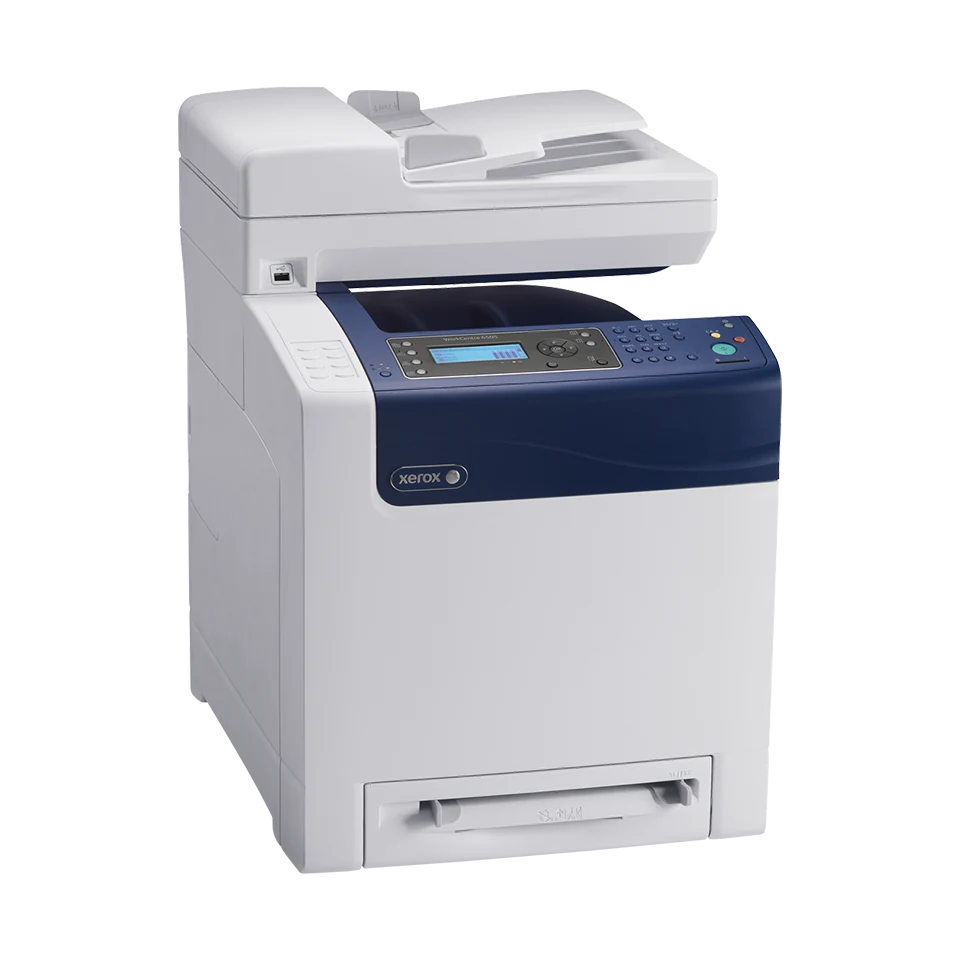
The Xerox WorkCentre 6505N combines color laser printing, copying, computer scanning and native analog fax. A 35-sheet automatic document feeder helps with suitable loose originals, while a glass surface serves items that should not travel through the feeder. It is a practical historical reference for a compatible wired document routine.
The N suffix matters: automatic print duplex requires an optional unit. Wireless hardware and protected stored printing have separate option requirements as well. Xerox identifies WorkCentre 6505 as no longer sold as new, so assess the actual machine, its installed hardware and available software before relying on an inherited feature list.
Connect the computer and choose a capture destination
USB 2.0 and gigabit Ethernet are standard connections. The USB socket for a computer is separate from the front USB memory facility. Installing only a print driver does not finish the computer-scanning setup.
The guide distinguishes USB capture through compatible scan software from network delivery to a configured shared folder. The former requires the relevant driver and destination utility or supported application routine; the latter requires a reachable destination and its address-book setup. Check that those older software and destination requirements still fit the intended computer and network.
USB alone does not provide scan-to-email or a network folder. A front flash drive offers another capture destination, but does not establish wireless computer scanning. A wireless network adapter is optional, and AirPrint/Mopria in the later brochure require the separate Wireless Print Solutions Adapter.
Handle originals according to their physical route
The ADF is rated for 35 suitable loose sheets and accepts Letter, A4 and Legal originals. Its stated original-weight range is 50–125 gsm. The preserved nominal feeder count does not specify the paper weight used for that capacity; inspect the fill line and avoid treating every thickness as a 35-sheet stack.
Color capture is supported even when the resulting file will be used for a monochrome document. Choose the file format and resolution for the destination and check that the resulting image contains the whole original before discarding paper records.
The read material does not establish automatic capture of both original faces. The brochure's one-sided-to-two-sided copying description concerns output sheets. Likewise, a general Legal scan-size menu is not enough to establish that Legal fits the glass. Confirm the actual glass area for a fragile or bound original whose size is decisive.
Understand the paper stack before selecting duplex
The main tray is rated for 250 sheets at 75 gsm/20 lb, with a single-sheet manual slot bringing ordinary nominal input to 251. Letter, A4 and Legal fit both standard sources. A one-sheet slot helps with an occasional different page, rather than providing a second normal paper stack.
The detailed guide gives a 65–120 gsm ordinary plain-paper range. Heavier stock has separate handling limits. Match the loaded format and type to the printer and driver settings, adjust the guides and keep the stack below its fill line.
Supported envelopes use the main tray or manual source one-sided. Choose the documented format and follow the source-specific orientation. The extra 250-sheet drawer is optional. So is the N model's automatic duplex unit: manually turning a sheet over does not provide unattended two-sided printing.
Fax and protected jobs have different requirements
Native fax is included, but needs an operating dedicated analog telephone line and configured fax settings. USB or Ethernet supplies the computer connection, not the telephone service. Confirm the actual line arrangement before promising fax operation.
Secure Print and related stored-job functions require extra memory through the optional Productivity Kit, beyond the standard 256 MB. A panel lock or protected fax reception is not the same as releasing a confidential computer print job with a password. Verify installed memory and the applicable driver routine when that requirement matters.
Plan workload, supplies and space
The declared print speed is up to 24 one-sided Letter or 23 A4 pages per minute in color or monochrome. Recommended monthly printing is up to 4,000 pages; the 40,000-page maximum duty figure is a separate ceiling, not a sustained target.
US replacement yields under ISO/IEC 19798 are 3,000 black pages, 2,500 per high-capacity color or 1,000 per standard color. Starter yield is not established here. Check cartridge identity, separate service parts and actual coverage before estimating operating expense.
The US 6505N body is approximately 16.9 inches wide, 21.4 deep and 23 high at 62.5 pounds. Allow additional feeder, glass, cover and tray access and verify the mains label. Choose an included-duplex configuration or a documented duplex-scanning model when those routines are essential.
Key details at a glance
| Color printing | Yes |
|---|---|
| Scanner | Yes |
| Copying | Yes |
| Fax | Yes |
| Flatbed scanner | Yes |
| Automatic document feeder | Yes |
| Automatic two-sided printing | No |
| Color scanning | Yes |
| Instructed envelope handling | Yes |
| Apple AirPrint | No |
| Mopria printing | No |
| Supported PIN-release printing | No |
| Recommended monthly maximum | 4000 pages |
| Maximum monthly duty | 40000 pages |
| Included ordinary-paper capacity | 251 sheets |
| Document-feeder capacity | 35 sheets |
| Declared one-sided mono Letter rate | 24 pages/min |
| Declared one-sided color Letter rate | 24 pages/min |
| Unit-body width | 16.9 in |
| Unit-body depth | 21.4 in |
| Unit-body height | 23 in |
| Unit weight | 62.5 lb |
| Imaging engine | laser |
Use the exact model’s instructions for operating limits, supplied equipment and version differences.
Paper, software and setup details
Print-rate conditions
Declared print rates are up to 24 one-sided Letter or 23 A4 pages/min in color or monochrome; no ISO/IEC 24734 print basis is claimed. The US monthly recommendation is up to 4,000 pages, with no minimum stated. Maximum duty is 40,000 pages and is not a sustained target. Copy and scan figures are separate.
Paper handling
Standard input is a 250-sheet main tray at 75 gsm / 20 lb plus a single-sheet manual slot, totaling 251 ordinary sheets. Both accept Letter, Legal and A4. Detailed ordinary plain stock is 65–120 gsm, with separate heavier-media limits. The N model needs an optional unit for automatic print duplex; the second 250-sheet drawer is optional too. Suitable envelopes use the main tray or manual source one-sided with exact format, type and guide orientation.
Scanning arrangement
The 35-sheet ADF accepts suitable loose Letter, Legal and A4 originals at 50–125 gsm; the preserved nominal count does not establish a paper-weight basis. The glass is a positive alternative for suitable originals that should not enter the feeder, but its exact maximum size is not established by the read sections. A shared Legal scan menu does not prove Legal glass capture. Color capture is supported; automatic feeder duplex and single-pass capture remain unestablished. Two-sided copy output describes printed sheets, not automatic capture of both original faces.
Computer and mobile connections
USB 2.0 Type B and gigabit Ethernet are standard. USB computer capture needs compatible scan drivers and Express Scan Manager with an output destination, or the documented TWAIN/WIA routine. Ethernet capture needs its configured shared folder/address-book entry or supported scanner setup. USB-only scanning does not send to network folders or email. Front USB memory capture is separate. Wireless hardware and the AirPrint/Mopria Wireless Print Solutions Adapter are optional; no base Wi-Fi or mobile plan is asserted.
Supplies and declared yields
US replacement black 106R01597 is rated at 3,000 average standard pages; high CMY 106R01594/595/596 at 2,500 each, and standard CMY 106R01591/592/593 at 1,000 each, under ISO/IEC 19798. Coverage, image and print mode alter actual yield. Starter yield is unestablished. Confirm regional cartridge identity and separate imaging/service parts. Historical warranty and service promotions are not current coverage promises.
Software and support
Install and check software for the actual operating system; the historical guide does not promise current compatibility. Secure Print and related stored jobs require additional memory/Productivity Kit and RAM Disk, beyond the base 256 MB. Panel locks and protected fax reception are different. Included analog fax needs an operating dedicated telephone line at the rear fax port and configured fax identity, country, date/time and receiving settings; Ethernet or USB does not supply that line.
Electrical edition and setup
Earlier US 6505N reference, explicitly no longer sold as new. The exact US brochure gives 16.9 x 21.4 x 23 in. and 62.5 lb without the optional drawer. A generic manual weight differs, so verify the actual configured unit and furniture strength. Allow extra access for the feeder, glass, covers and trays; the closed-body dimensions are not operating clearance. Verify the actual electrical label and current software.
Sources for this assessment
Find a printer for your routine.
Match color output, scanning, connections and paper handling, then compare the exact models.