
Your needs, this model
Does it fit your priorities?
Can I print from a supported Wi-Fi setup without needing a scanner?
Yes. Dual-band Wi-Fi, AirPrint and monochrome printing are documented. Use a compatible configured network; this is a print-only device.
Explore this need in the finder →Will it automatically print both sides of my reports?
No. The exact model has no automatic duplex mechanism. HL-L2460DW is a different print-only configuration with that function.
Explore this need in the finder →Can I connect it directly to a wired Ethernet network?
No. This model includes wireless and a USB computer interface, not Ethernet.
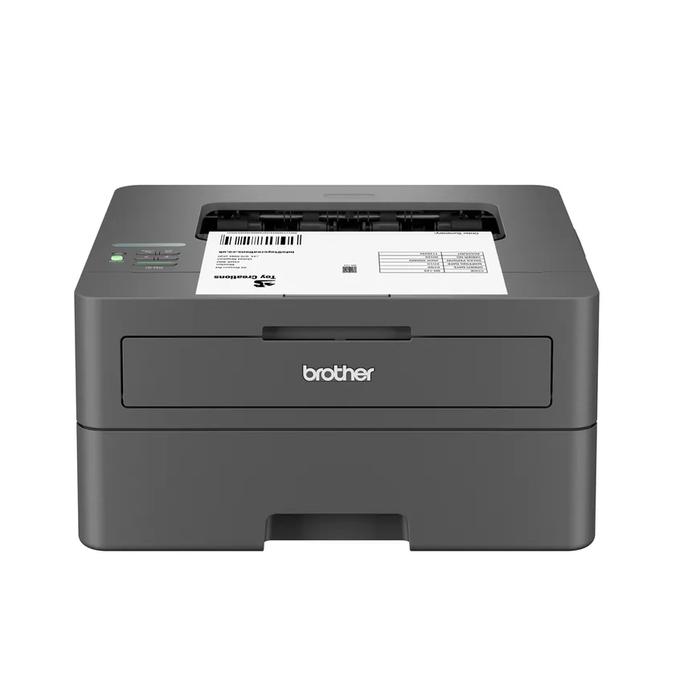
Explore this need in the finder →The Brother HL-L2405W is a compact monochrome laser printer for a home desk that mostly produces single-sided documents. Its useful combination is a 250-sheet tray, dual-band Wi-Fi and a small print-only body. The decisive omission is automatic two-sided printing. Choose it when that simpler routine matches your work; choose a different model if an Ethernet connection, scanner or automatic duplex is essential.
A straightforward fit for single-sided home documents
Think about what leaves the printer rather than starting with the model number. Forms, return instructions, draft text and ordinary correspondence can be reasonable work for a black-and-white print-only device. This printer does not make color pages, scan a receipt or copy a document placed on glass. If those are recurring jobs, its modest body is not a substitute for the missing functions.
Brother declares up to 30 pages per minute for one-sided output. That is a manufacturer rating, not a measured result from our testing, and it does not describe automatic duplex performance: this model has no automatic duplex mechanism. The distinction matters if your usual job is a long report that should come out printed on both sides without further handling. The HL-L2460DW is the more relevant print-only comparison for that requirement.
Wi-Fi is included; wired Ethernet is not
The US reference provides dual-band wireless at 2.4 GHz and 5 GHz, Wi-Fi Direct and a USB 2.0 computer connection. That gives you a choice between an appropriate wireless arrangement and a supported local computer. It does not provide a wired Ethernet socket. If your office deliberately keeps its printer off Wi-Fi and connects it to the router by cable, this exact model does not meet that setup.
AirPrint, Mopria and Brother Mobile Connect are documented mobile-printing routes, subject to their device and network requirements. They should not be confused with a promise that every operating system has a native USB driver. Brother specifically states that macOS printing uses AirPrint and that Mac printer drivers are not supplied. Check the current support information for the exact computer before choosing a connection routine.
The tray helps with ordinary paper, while special media need attention
The 250-sheet tray reduces the need to insert ordinary sheets individually. Its capacity is stated for the specified 20 lb paper basis. Letter, Legal and A4 are listed among its ordinary tray sizes. Supporting those sizes does not add automatic two-sided output. The separate manual slot handles one suitable sheet or envelope at a time, with the size and weight restrictions in the instructions.
A single manual slot can be useful when an envelope is an occasional interruption. It is a different routine from loading a stack of envelopes and expecting an unattended batch. Keep the normal paper source and special-media path separate in your buying decision, especially if the printer will sit where you cannot easily reach its front and rear access areas.
Plan toner and drum replacement as separate jobs
The ordinary US package lists a starter black toner cartridge rated at approximately 700 pages under the stated ISO test conditions, together with a DR830 drum. Replacement TN830, TN830XL and TN830V cartridges have different declared yields. Do not assume the starter has the yield of the larger replacement cartridge pictured in a separate bundle.
The drum is a separate consumable. Its approximately 15,000-page reference uses a specific one-page-per-job, Letter/A4 single-sided condition; actual jobs and media can change the result. These declarations help identify supplies and plan maintenance. Without current supply prices and your actual usage, they do not establish a reliable cost per page or a guaranteed replacement date.
Measure the working location and choose the right workload
The closed unit measures 14.0 inches wide, 14.2 inches deep and 7.2 inches high, with a listed weight of 15.1 lb. Allow additional space for cables, ventilation and opening the paper and service areas. The US product record specifies 110–120 V AC, 50/60 Hz; an overseas listing with a similar name needs its own electrical check.
Brother recommends up to 2,500 printed pages per month, distinct from the much higher 35,000-page maximum-duty figure. Use the recommended volume to judge an ordinary recurring workload. Shortlist the HL-L2405W for its compact single-sided wireless routine. If copying or scanning is part of the same desk, compare the HL-L2480DW and its flatbed arrangement rather than assuming every HL model is print-only.
Sources: Brother US HL-L2405W product record and the original US brochure. This assessment interprets documented features and does not claim hands-on speed, print-quality or reliability testing.
Key details at a glance
| Color printing | No |
|---|---|
| Scanner | No |
| Copying | No |
| Fax | No |
| Flatbed scanner | No |
| Automatic document feeder | No |
| Automatic two-sided printing | No |
| Automatic two-sided scanning | No |
| Single-pass two-sided scanning | No |
| Color scanning | No |
| Instructed envelope handling | Yes |
| Apple AirPrint | Yes |
| Mopria printing | Yes |
| Recommended monthly maximum | 2500 pages |
| Maximum monthly duty | 35000 pages |
| Included ordinary-paper capacity | 250 sheets |
| Declared one-sided mono Letter rate | 30 pages/min |
| Unit-body width | 14 in |
| Unit-body depth | 14.2 in |
| Unit-body height | 7.2 in |
| Unit weight | 15.1 lb |
| Imaging engine | laser |
Use the exact model’s instructions for operating limits, supplied equipment and version differences.
Paper, software and setup details
Print-rate conditions
Manufacturer-declared up to 30 one-sided Letter pages per minute, not a measured or duplex rate.
Paper handling
Up to 250 sheets in the ordinary tray on the stated 20 lb basis; separate single-sheet manual media path. Letter, Legal and A4 ordinary printing. No automatic print duplex.
Computer and mobile connections
No Ethernet; dual-band 2.4/5 GHz wireless and USB 2.0. Network AirPrint/Mopria have their stated conditions. Mac uses AirPrint rather than a supplied native Mac printer driver.
Supplies and declared yields
Ordinary US package lists approximately 700 pages of supplied black toner under ISO/IEC 19752; separate DR830 drum has a conditional approximately 15,000-page reference. Additional-supply bundles are different offers.
Electrical edition and setup
US 110–120 V AC, 50/60 Hz; body dimensions exclude operating and ventilation clearance. Check the exact US rating and supplied configuration.
Sources for this assessment
Find a printer for your routine.
Match color output, scanning, connections and paper handling, then compare the exact models.