
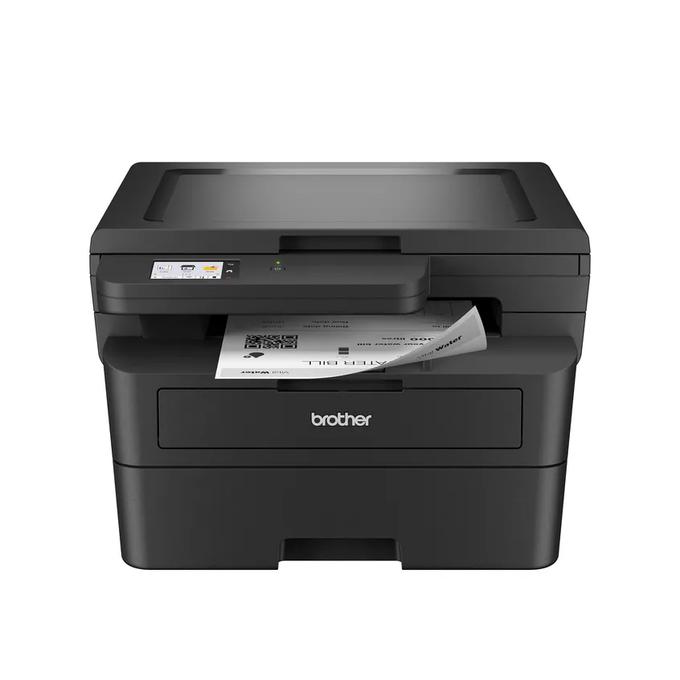
Your needs, this model
Does it fit your priorities?
Can I use Ethernet for color flatbed scanning and monochrome duplex printing?
Yes. The documented desktop network arrangement includes these functions; the scanner’s color capability does not make paper output color.
Explore this need in the finder →Can I load several originals into an automatic document feeder?
No. This exact configuration uses a flatbed without an automatic feeder.
Explore this need in the finder →Can its low body fit within an 11-inch closed-height limit?
The listed body is 10.7 inches high. Leave additional space to raise the lid, operate the trays and follow ventilation requirements.
Explore this need in the finder →The Brother HL-L2480DW fits a desk that needs monochrome duplex printing and occasional flatbed scanning or copying, without a document feeder. Its touchscreen, Ethernet and dual-band Wi-Fi make it a useful alternative to a print-only device when you handle individual originals. It is unsuitable for someone who wants to load a stack and have its pages scanned automatically.
The flatbed changes what this HL model can do
Do not classify it as print-only from the HL name. The exact US configuration combines a black-and-white laser engine with a color-capable flatbed scanner and standalone monochrome copying. A receipt, individual form or suitable page placed on the glass can therefore be captured without a separate desktop scanner. The physical paper output remains black-and-white even when the original is scanned in color.
The US online guide specifies a glass area up to 8.5 by 11.8 inches, accommodating Letter or A4 originals. The brochure gives a Letter reference. Neither describes a Legal-sized flatbed, even though Legal paper is accepted for output. The absence of an automatic document feeder is a real workflow boundary: several loose originals require repeated placement on the glass. If batches are common, the DCP-L2640DW is the more relevant comparison.
A touchscreen helps local access, with qualified destinations
The 2.7-inch color touchscreen provides local navigation and documented cloud-related routes. It can suit someone who copies at the printer or uses a configured destination repeatedly. The screen being color does not change the monochrome engine. Nor does the list of services establish that every scan destination works without an account, software or an internet connection.
Brother distinguishes software and service conditions in the brochure. Some scan destinations and included utilities are Windows-only. Web Connect and cloud functions require the stated internet and account arrangements. Identify the destination you will actually use before comparing a long list of possible features. For an occasional glass copy, the ordinary local operation may be more useful than most of those extras.
Wired and wireless connections are separate choices
The included interfaces are Ethernet, dual-band 2.4/5 GHz wireless and USB 2.0. A wired network can suit a permanent desk near a suitable connection, while wireless avoids routing an Ethernet cable to the printer's location. USB is an option for a compatible local computer. The best connection is the one supported by your actual devices and maintained network arrangement.
AirPrint, Mopria, Wi-Fi Direct and Brother Mobile Connect are documented mobile routes. Brother's Mac qualification says printing and scanning use AirPrint and that native Mac printer drivers are not provided. Check the current operating-system support before planning to replace an old USB-connected Mac printer with an otherwise identical cabling routine. Supported Windows Server network printing also does not imply that server scanning is included.
Automatic print duplex does not automate the glass
Brother declares up to 36 pages per minute for one-sided printing and lists automatic duplex for the US Letter, Legal and Folio sizes. A4 is among the ordinary printing sizes but is not established by that US duplex list. Choose a precise paper requirement if it affects the result rather than using the broad paper list to fill in a missing duplex capability.
The 250-sheet input tray and 100-sheet output capacity use the stated paper conditions. A separate single-sheet manual slot handles instructed special media, including an appropriate envelope. That slot does not create an unattended stack of envelopes, and the flatbed still needs you to position each original. The printer can remove two-sided output handling without removing every manual step in the document routine.
Use the lower body height carefully
The body measures 16.1 inches wide, 15.7 inches deep and 10.7 inches high, with a listed weight of 22.2 lb. Its lack of a feeder helps distinguish the physical format from a taller all-in-one, but a shelf still needs clearance to raise the scanner lid and reach the paper and service areas. The US electrical record specifies 110–120 V AC, 50/60 Hz.
The ordinary package includes an approximately 700-page starter toner cartridge and separate DR830 drum. Their declared yields have different test conditions. Brother recommends up to 2,500 pages per month, distinct from the 35,000-page maximum-duty figure. Shortlist the HL-L2480DW when individual-original capture, Ethernet and the touchscreen are useful. Compare the HL-L2465DW for a different flatbed configuration with a two-line display and no Ethernet, rather than treating their nearby names as the same hardware.
Sources: Brother US HL-L2480DW product record and the exact US brochure. This review uses documented functions, not hands-on speed or scanning-quality results.
Key details at a glance
| Color printing | No |
|---|---|
| Scanner | Yes |
| Copying | Yes |
| Fax | No |
| Flatbed scanner | Yes |
| Automatic document feeder | No |
| Automatic two-sided printing | Yes |
| Automatic two-sided scanning | No |
| Single-pass two-sided scanning | No |
| Color scanning | Yes |
| Instructed envelope handling | Yes |
| Apple AirPrint | Yes |
| Mopria printing | Yes |
| Recommended monthly maximum | 2500 pages |
| Maximum monthly duty | 35000 pages |
| Included ordinary-paper capacity | 250 sheets |
| Declared one-sided mono Letter rate | 36 pages/min |
| Unit-body width | 16.1 in |
| Unit-body depth | 15.7 in |
| Unit-body height | 10.7 in |
| Unit weight | 22.2 lb |
| Imaging engine | laser |
Use the exact model’s instructions for operating limits, supplied equipment and version differences.
Paper, software and setup details
Print-rate conditions
Manufacturer-declared up to 36 one-sided Letter pages per minute, not a measured or duplex rate.
Paper handling
Up to 250 sheets in the ordinary tray on the stated 20 lb basis; separate single-sheet manual media path. Letter, Legal and A4 ordinary printing. US automatic duplex covers Letter and Legal; A4 duplex is not assigned from a generic speed-table mention.
Computer and mobile connections
Ethernet, dual-band 2.4/5 GHz wireless and USB 2.0. Network AirPrint/Mopria have their stated conditions. Mac uses AirPrint rather than a supplied native Mac printer driver.
Supplies and declared yields
Ordinary US package lists approximately 700 pages of supplied black toner under ISO/IEC 19752; separate DR830 drum has a conditional approximately 15,000-page reference. Additional-supply bundles are different offers.
Electrical edition and setup
US 110–120 V AC, 50/60 Hz; body dimensions exclude operating and ventilation clearance. Check the exact US rating and supplied configuration.
Sources for this assessment
Find a printer for your routine.
Match color output, scanning, connections and paper handling, then compare the exact models.