
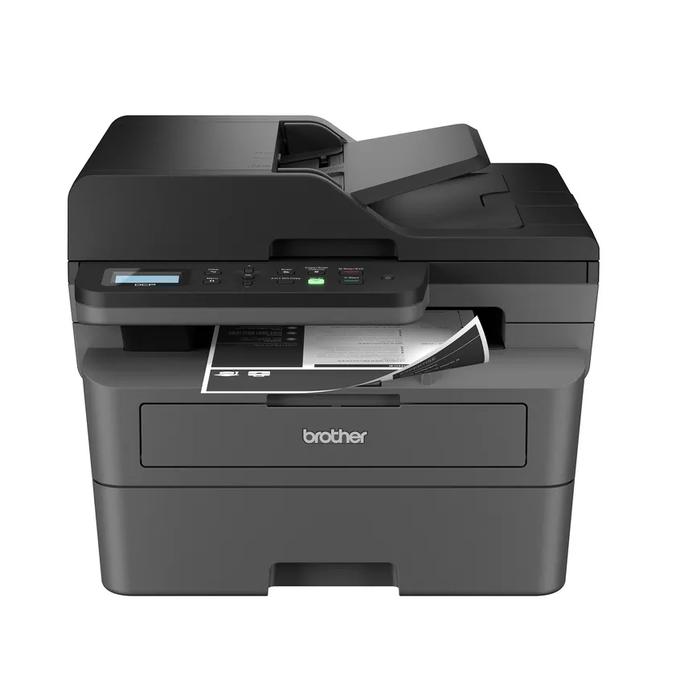
Your needs, this model
Does it fit your priorities?
Can I scan color Letter pages from the feeder and print two-sided documents over Ethernet?
Yes. The supported desktop Ethernet setup combines a color-capable simplex feeder, monochrome output and automatic Letter print duplex.
Explore this need in the finder →Will the feeder automatically scan both faces of my stack?
No. This exact feeder is simplex. Print duplex is a separate function.
Explore this need in the finder →Can it provide telephone fax as well as print, copy and scan?
No. Fax is not part of the DCP-L2640DW configuration.
Explore this need in the finder →The Brother DCP-L2640DW is a practical monochrome all-in-one for someone who prints two-sided documents and regularly scans or copies stacks of one-sided originals. It combines automatic print duplex, a 50-page document feeder, a flatbed and Ethernet or Wi-Fi. Its important boundary is scanning: the feeder does not automatically scan both sides, and there is no fax function.
The feeder solves a different job from print duplex
Start with the papers you receive. A stack of single-sided invoices or forms can use the automatic document feeder instead of repeated placement on the glass. Brother lists a 50-page capacity under the specified paper conditions. That can make a recurring scanning session less hands-on, but the feeder remains a one-sided scanning route. A double-sided original needs a different handling routine.
The printer does automatically produce two-sided output on the documented US Letter, Legal and Folio sizes. That is a separate mechanism from scanning. If your requirement is to scan both faces of a stack without turning the originals yourself, the DCP-L2640DW should not qualify just because the sales description says duplex printing. Compare the MFC-L2900DW for its documented single-pass scanning arrangement.
A black-and-white printer can still capture color
The output engine prints black-and-white pages, while the scanner captures black-and-white or color originals. That distinction can suit an office that distributes scanned color documents electronically but rarely needs color paper output. It does not make a color photocopier: the physical copies are monochrome.
The flatbed provides a separate route for individual originals. The US online guide specifies a glass area up to 8.5 by 11.8 inches, accommodating Letter or A4 originals. The product brochure gives a Letter reference. Neither establishes a Legal-sized flatbed: Legal originals need an appropriate feeder route. Likewise, the feeder's page capacity is not a statement that every thick, damaged, stapled or bound original belongs in it. Follow the original-handling instructions.
Choose the network and software route before installation
The US configuration includes Ethernet, dual-band 2.4/5 GHz wireless and USB 2.0. These are useful choices for a printer that may serve one computer or a supported small network. AirPrint, Mopria, Wi-Fi Direct and Brother Mobile Connect are documented mobile functions, subject to their network and device conditions. Software features such as OCR or particular scan destinations have their own operating-system requirements.
Brother specifically directs Mac users to AirPrint for printing or scanning and says Mac printer drivers are not provided. Several bundled utilities and advanced scan destinations are Windows-only. Decide from the exact computers and destinations you use, not simply from a list containing many software names. A network-printing path on a Windows Server edition also does not automatically establish scanning support on that edition.
The everyday paper path is deliberately modest
The tray holds up to 250 sheets on the stated 20 lb basis, with a separate single-sheet manual slot for instructed special media. Brother declares up to 36 single-sided pages per minute; that is not a measured result or the automatic duplex rate. The output tray's 100-sheet capacity and the 250-sheet input have different purposes, so a sufficiently long unattended job still needs a plan for the finished stack.
Envelopes use the documented single-item manual path. A small occasional mailing may fit that routine, while a sustained envelope workflow deserves closer attention to feed instructions and handling. Choose around the jobs you repeat rather than treating the presence of an envelope media label as an unattended bulk-mailing promise.
Compare the whole package and the alternatives
The standard US package lists a starter toner cartridge rated at approximately 700 pages and a separate DR830 drum. Replacement cartridge yields and the drum's declared life use their own test conditions. The printer's recommended monthly maximum is 2,500 pages; 35,000 is its higher maximum-duty reference. Without current supply prices and your documents, these numbers do not establish a guaranteed running cost.
The body measures 16.1 by 15.7 by 12.5 inches and weighs about 25 lb, before allowing operating clearance. The US electrical record specifies 110–120 V AC, 50/60 Hz. If you need occasional glass scanning but no feeder, compare the lower-profile HL-L2480DW. If a telephone fax connection and touchscreen workflow matter, compare the MFC-L2820DW. The DCP-L2640DW earns its place when its one-sided feeder is the document routine you actually need.
Sources: Brother US DCP-L2640DW product specifications and the original US brochure and qualifications. This is a documented-feature assessment, not a hands-on scanner or printer test.
Key details at a glance
| Color printing | No |
|---|---|
| Scanner | Yes |
| Copying | Yes |
| Fax | No |
| Flatbed scanner | Yes |
| Automatic document feeder | Yes |
| Automatic two-sided printing | Yes |
| Automatic two-sided scanning | No |
| Single-pass two-sided scanning | No |
| Color scanning | Yes |
| Instructed envelope handling | Yes |
| Apple AirPrint | Yes |
| Mopria printing | Yes |
| Recommended monthly maximum | 2500 pages |
| Maximum monthly duty | 35000 pages |
| Included ordinary-paper capacity | 250 sheets |
| Document-feeder capacity | 50 sheets |
| Declared one-sided mono Letter rate | 36 pages/min |
| Unit-body width | 16.1 in |
| Unit-body depth | 15.7 in |
| Unit-body height | 12.5 in |
| Unit weight | 25.1 lb |
| Imaging engine | laser |
Use the exact model’s instructions for operating limits, supplied equipment and version differences.
Paper, software and setup details
Print-rate conditions
Manufacturer-declared up to 36 one-sided Letter pages per minute, not a measured or duplex rate.
Paper handling
Up to 250 sheets in the ordinary tray on the stated 20 lb basis; separate single-sheet manual media path. Letter, Legal and A4 ordinary printing. US automatic duplex covers Letter and Legal; A4 duplex is not assigned from a generic speed-table mention.
Computer and mobile connections
Ethernet, dual-band 2.4/5 GHz wireless and USB 2.0. Network AirPrint/Mopria have their stated conditions. Mac uses AirPrint rather than a supplied native Mac printer driver.
Supplies and declared yields
Ordinary US package lists approximately 700 pages of supplied black toner under ISO/IEC 19752; separate DR830 drum has a conditional approximately 15,000-page reference. Additional-supply bundles are different offers.
Electrical edition and setup
US 110–120 V AC, 50/60 Hz; body dimensions exclude operating and ventilation clearance. Current US online guide gives weight with supplies; brochure and product-table figures can differ.
Sources for this assessment
Find a printer for your routine.
Match color output, scanning, connections and paper handling, then compare the exact models.