
Your needs, this model
Does it fit your priorities?
Can it scan both sides of Letter originals in one pass over Ethernet?
Yes. The exact US brochure establishes a single-pass feeder, and the supported desktop network route includes scanning.
Explore this need in the finder →Does the standard configuration meet a 3,500-page recommended monthly workload?
No. Its recommended monthly maximum is 2,500 pages; maximum duty is a separate figure.
Explore this need in the finder →Does it include 500 sheets of ordinary input without optional equipment?
No. The standard tray is 250 sheets, with a separate single-sheet manual slot.
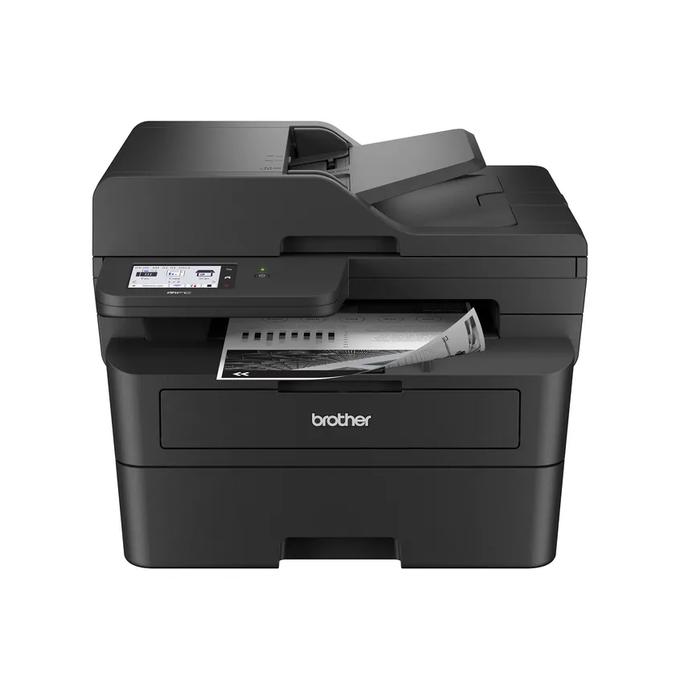
Explore this need in the finder →The Brother MFC-L2900DW is a compact monochrome all-in-one for an office that needs automatic two-sided document capture as well as duplex printing. Its 50-page single-pass feeder, 3.5-inch touchscreen, fax and Ethernet or Wi-Fi distinguish it from simpler one-sided scanning models. Choose it for repeated double-sided paperwork, rather than expecting its print speed or paper capacity to make it a large workgroup machine.
The single-pass feeder is the reason to compare it
With a stack of double-sided originals, the useful question is how the scanner captures their second faces. Brother's exact US brochure describes single-pass copy, scan and fax capability. That supports a genuinely different routine from a feeder that reads only one side. It can remove repeated manual turning during a compatible document job, subject to the original size, paper condition and software settings.
The feeder holds up to 50 suitable pages on the stated basis. A bound document or an unsuitable damaged original still needs another permitted route; having a feeder does not make every original feedable. The US online guide gives the separate flatbed a maximum document area of 8.5 by 11.8 inches, covering Letter or A4. A Legal original needs an appropriate feeder route rather than the glass.
The MFC-L2820DW also prints both sides automatically and has fax, but its feeder does not automatically scan both sides. If most incoming documents are one-sided, its different panel and scanning routine may be acceptable. If two-sided capture is the repeated problem, the MFC-L2900DW addresses the actual job.
Local controls and fax have practical requirements
The 3.5-inch touchscreen provides local navigation and documented shortcuts. It can help with repeated destinations after they have been configured, but a service list does not remove internet, account or mail-server requirements. The particular scan destination and computer environment still matter. Some included utilities and destination functions are Windows-only.
Telephone fax is included, with a telephone line cord in the ordinary US package. The required telephone service and connection follow the operating instructions; simply connecting the printer to a computer by USB does not supply a fax line. PC Fax Receive is specifically unavailable to Mac users in the brochure's qualifications. Choose the fax workflow you need, not just a model whose feature list includes the word.
Choose Ethernet, Wi-Fi or a supported local connection
The US configuration includes Ethernet, dual-band 2.4/5 GHz wireless and USB 2.0. AirPrint, Mopria, Wi-Fi Direct and Brother Mobile Connect are documented mobile routes. A permanent wired location and a wireless home office can therefore use different supported arrangements without treating a front-panel socket or a software name as the computer interface.
Brother directs Mac printing and scanning to AirPrint and does not provide native Mac printer drivers. Several advanced functions retain separate operating-system restrictions. Check the exact supported route before migrating a document process that depended on older installed software. A feature working on one Windows desktop is not evidence that it works identically on a Mac or Windows Server installation.
Paper handling remains that of a compact office printer
The ordinary tray holds up to 250 sheets, with a separate single-sheet manual slot and 100-sheet output capacity under the specified paper conditions. Letter, Legal and A4 are among the ordinary printing sizes. Automatic duplex in the US brochure covers Letter, Legal and Folio; do not transfer A4 simplex support into that duplex list.
Brother declares up to 36 single-sided pages per minute. The document feeder's scanning figures and the printer's duplex rate describe different conditions. A fast scan feature does not enlarge the paper tray, and a long print job can still require clearing the output stack. Suitable envelopes use the instructed manual path rather than an implied high-capacity envelope cassette.
Check whether the recurring workload needs another configuration
The recommended monthly maximum is 2,500 printed pages, while 35,000 is the separate maximum-duty reference. The standard package includes an approximately 700-page starter toner cartridge and a separate DR830 drum, with distinct yield conditions. Replacement toner size and a seller's extra supplies should be compared as package contents, not as changes to the underlying scanning mechanism.
The body measures 16.1 by 16.6 by 12.5 inches and has a current online-guide weight of 27.2 lb with supplies. Allow room for the feeder, lid, paper access, cables and ventilation. The reviewed US electrical reference is 110–120 V AC at 50/60 Hz. For the same general document routine with a higher recommended workload and different included toner and management features, compare the MFC-L2980DW. Shortlist the MFC-L2900DW when its single-pass scanning and fax solve your paperwork without requiring that different office configuration.
Sources: Brother US MFC-L2900DW product record and the exact US brochure. This is an assessment of documented arrangements, not a hands-on speed or reliability test.
Key details at a glance
| Color printing | No |
|---|---|
| Scanner | Yes |
| Copying | Yes |
| Fax | Yes |
| Flatbed scanner | Yes |
| Automatic document feeder | Yes |
| Automatic two-sided printing | Yes |
| Automatic two-sided scanning | Yes |
| Single-pass two-sided scanning | Yes |
| Color scanning | Yes |
| Instructed envelope handling | Yes |
| Apple AirPrint | Yes |
| Mopria printing | Yes |
| Recommended monthly maximum | 2500 pages |
| Maximum monthly duty | 35000 pages |
| Included ordinary-paper capacity | 250 sheets |
| Document-feeder capacity | 50 sheets |
| Declared one-sided mono Letter rate | 36 pages/min |
| Unit-body width | 16.1 in |
| Unit-body depth | 16.6 in |
| Unit-body height | 12.5 in |
| Unit weight | 27.2 lb |
| Imaging engine | laser |
Use the exact model’s instructions for operating limits, supplied equipment and version differences.
Paper, software and setup details
Print-rate conditions
Manufacturer-declared up to 36 one-sided Letter pages per minute, not a measured or duplex rate.
Paper handling
Up to 250 sheets in the ordinary tray on the stated 20 lb basis; separate single-sheet manual media path. Letter, Legal and A4 ordinary printing. US automatic duplex covers Letter and Legal; A4 duplex is not assigned from a generic speed-table mention.
Computer and mobile connections
Ethernet, dual-band 2.4/5 GHz wireless and USB 2.0. Network AirPrint/Mopria have their stated conditions. Mac uses AirPrint rather than a supplied native Mac printer driver.
Supplies and declared yields
Ordinary US package lists approximately 700 pages of supplied black toner under ISO/IEC 19752; separate DR830 drum has a conditional approximately 15,000-page reference. Additional-supply bundles are different offers.
Electrical edition and setup
US 110–120 V AC, 50/60 Hz; body dimensions exclude operating and ventilation clearance. Current US online guide gives weight with supplies; brochure and product-table figures can differ.
Sources for this assessment
Find a printer for your routine.
Match color output, scanning, connections and paper handling, then compare the exact models.