
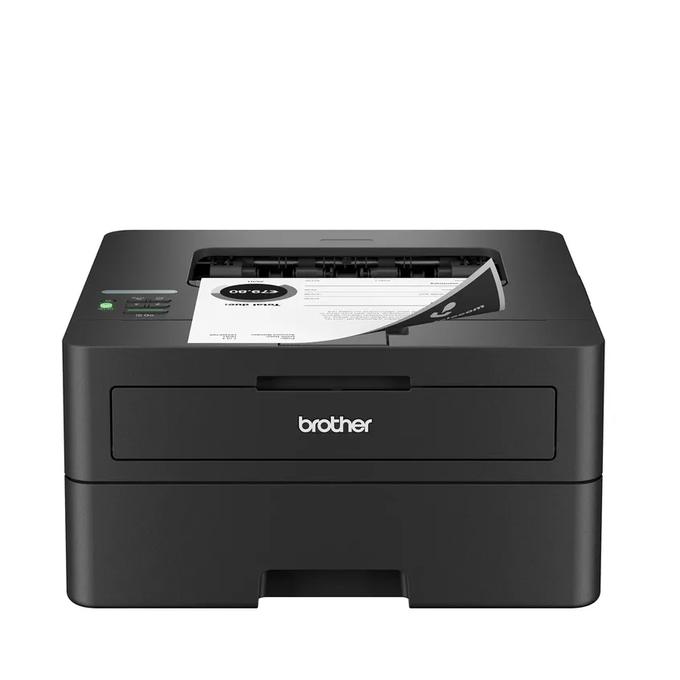
Your needs, this model
Does it fit your priorities?
Can I use Ethernet for automatic two-sided Legal printing?
Yes. The included Ethernet route and US Legal automatic duplex are documented; use the compatible driver and permitted paper.
Explore this need in the finder →Can it also scan and copy paper originals?
No. HL-L2460DW is print-only; a similar model number does not add a scanner.
Explore this need in the finder →Can I require automatic A4 duplex from this US configuration?
That combination is not established. A4 is supported for ordinary printing, but the reviewed US automatic duplex size list is different.
Explore this need in the finder →The Brother HL-L2460DW suits a home office that needs black-and-white printing, automatic two-sided Letter or Legal output, and a choice of Ethernet, Wi-Fi or supported USB connection. It keeps the compact print-only format rather than adding a scanner. Its strongest practical case is a desk that already has another way to digitize documents and wants routine paper output without an all-in-one body.
Choose it for automatic duplex rather than the fastest headline
The useful difference from the HL-L2405W is more than a change from a declared 30 to 36 pages per minute. The HL-L2460DW adds automatic two-sided printing and wired Ethernet. Those change what you can leave the machine to do and how you can connect it. A modest difference in a one-sided speed rating matters less if the less suitable model requires extra paper handling for every report.
The original US brochure names Letter, Legal and Folio for duplex printing. A4 is listed for ordinary tray printing but should not automatically inherit the US duplex-size list. If a particular two-sided paper size is essential, enter that size with the duplex requirement in the printer finder. The 36 ppm declaration describes single-sided output after changing the default duplex setting, not a tested two-sided production rate.
Ethernet can simplify a deliberately wired desk
The included Ethernet interface distinguishes this model from wireless-only alternatives. It can suit a work area where the printer stays near the router or a suitable network connection, while other devices communicate through the supported network. Dual-band 2.4/5 GHz wireless and a USB 2.0 computer interface are also documented. Choose the connection you will actually maintain rather than paying attention only to whether a Wi-Fi badge appears.
AirPrint, Mopria, Brother Mobile Connect and Wi-Fi Direct provide documented mobile options with their stated conditions. A local USB route still requires compatible computer support. Brother's macOS note says printing uses AirPrint and no Mac printer driver is provided. That is especially relevant when replacing an old printer used through a fixed USB cable: verify the new operating-system route before treating the connector as the whole compatibility question.
The paper capacity fits a modest shared routine
The standard tray holds up to 250 sheets on the stated 20 lb paper basis, with a separate single-sheet manual feed slot. The tray accepts ordinary sizes including Letter, Legal and A4. Suitable envelopes and other special media use the instructed manual path and its own limits. The single slot is a convenience for an occasional item, not a second high-capacity paper cassette.
The output tray holds up to 100 sheets. A longer print run can therefore need attention at the output even if the input still contains paper. Plan where the printed stack will land and how easily you can remove it. Body dimensions alone do not describe the clearance for loading paper or performing maintenance.
Print-only is a benefit only if it matches your documents
This is a monochrome printer without a scanner, copy glass or fax function. A small business that regularly receives paper originals may find that omission more significant than the compact height. Conversely, if originals are already captured elsewhere and this desk only prints files, an unused scanner would add little practical value.
For occasional flatbed copying and scanning, compare the separately documented HL-L2480DW. For a stack of one-sided originals, the DCP-L2640DW adds an automatic document feeder. Neither comparison should be decided by assuming that automatic two-sided printing also means automatic two-sided scanning.
Know the supplied consumables and physical edition
The standard US package includes an approximately 700-page starter toner cartridge and a separate DR830 drum. TN830-family replacement cartridges offer other declared yields. Compare the exact package when a seller includes additional toner; a larger consumable bundle does not create a faster engine or add scanning. The declared yields use specified test conditions and should not be presented as guaranteed page counts for every document.
The US unit is 14.0 by 14.2 by 7.2 inches and weighs 15.6 lb. Its product record specifies 110–120 V AC at 50/60 Hz. The recommended monthly maximum is 2,500 pages, while 35,000 is the distinct maximum-duty reference. Choose the HL-L2460DW when its compact wired-or-wireless duplex routine covers your real workload, and leave room to operate it rather than measuring only a closed shelf opening.
Sources: Brother US HL-L2460DW product record and the exact US brochure. Performance figures are manufacturer declarations, not results of hands-on testing.
Key details at a glance
| Color printing | No |
|---|---|
| Scanner | No |
| Copying | No |
| Fax | No |
| Flatbed scanner | No |
| Automatic document feeder | No |
| Automatic two-sided printing | Yes |
| Automatic two-sided scanning | No |
| Single-pass two-sided scanning | No |
| Color scanning | No |
| Instructed envelope handling | Yes |
| Apple AirPrint | Yes |
| Mopria printing | Yes |
| Recommended monthly maximum | 2500 pages |
| Maximum monthly duty | 35000 pages |
| Included ordinary-paper capacity | 250 sheets |
| Declared one-sided mono Letter rate | 36 pages/min |
| Unit-body width | 14 in |
| Unit-body depth | 14.2 in |
| Unit-body height | 7.2 in |
| Unit weight | 15.6 lb |
| Imaging engine | laser |
Use the exact model’s instructions for operating limits, supplied equipment and version differences.
Paper, software and setup details
Print-rate conditions
Manufacturer-declared up to 36 one-sided Letter pages per minute, not a measured or duplex rate.
Paper handling
Up to 250 sheets in the ordinary tray on the stated 20 lb basis; separate single-sheet manual media path. Letter, Legal and A4 ordinary printing. US automatic duplex covers Letter and Legal; A4 duplex is not assigned from a generic speed-table mention.
Computer and mobile connections
Ethernet, dual-band 2.4/5 GHz wireless and USB 2.0. Network AirPrint/Mopria have their stated conditions. Mac uses AirPrint rather than a supplied native Mac printer driver.
Supplies and declared yields
Ordinary US package lists approximately 700 pages of supplied black toner under ISO/IEC 19752; separate DR830 drum has a conditional approximately 15,000-page reference. Additional-supply bundles are different offers.
Electrical edition and setup
US 110–120 V AC, 50/60 Hz; body dimensions exclude operating and ventilation clearance. Check the exact US rating and supplied configuration.
Sources for this assessment
Find a printer for your routine.
Match color output, scanning, connections and paper handling, then compare the exact models.